


Please Consider Donating us
We are helping millions of Beginners and Professionals to learn new programming technologies.
Please consider donating us:



How to Create a Web Scraper in ASP.NET MVC and jQuery
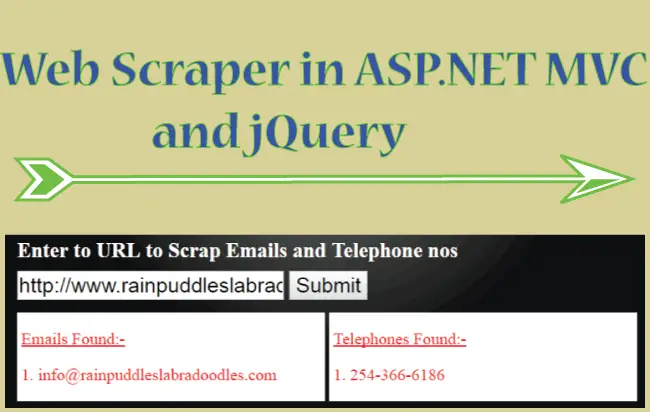
A Web Scraper is a software tool that automatically extracts useful information from websites. It can collect data such as email addresses, telephone numbers, names, physical addresses, and other publicly available information from one or more web pages or URLs. This process is commonly known as web scraping or data harvesting.
In this tutorial, you will learn how to create a Web Scraper using ASP.NET MVC and jQuery. The scraper will accept a specified URL, retrieve its web page content, and extract email addresses and telephone numbers from the page. The extracted information will then be displayed dynamically inside an HTML <div> element using jQuery.
This practical example will help you understand how ASP.NET MVC, jQuery, and web scraping techniques can work together to retrieve and process data from web pages.
Let me tell you it is quite easy to create and you will enjoy the simple codes I have provided.
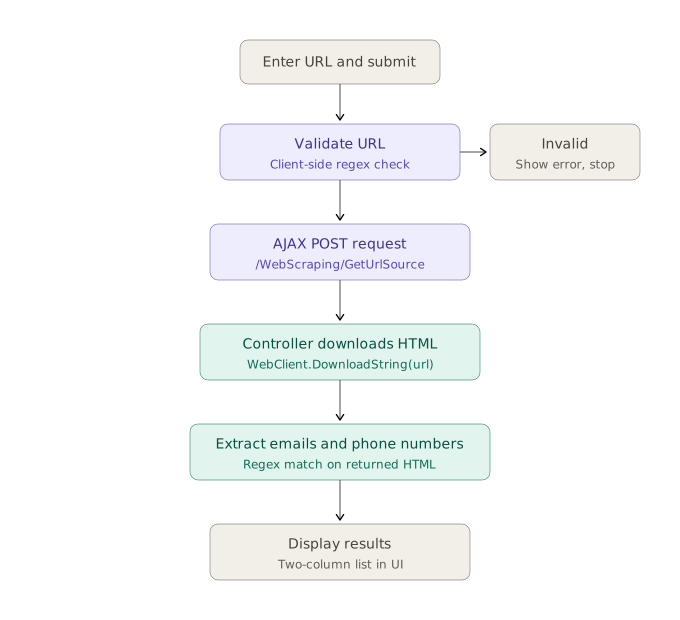
The below image shows the flow of the whole process:
Web Scraper HTML Design
The HTML design of the Web Scraper consists of:
- An input control of type text where the URL of the page (to be crawled) is put.
- A button which when clicked will start the data harvesting procedure.
- A div where the extracted emails and telephone numbers will be shown.

ASP.NET MVC Controller
First create a Controller in your ASP.NET MVC application. Name the controller as WebScrapingController or you can name it anything else.
Now, create a function GetUrlSource in this controller and make it as a [HttpPost] type. This function will be called on the button click event by the jQuery AJAX method.
This Code of GetUrlSource Function is:
[HttpPost]
public string GetUrlSource(string url)
{
    url = url.Substring(0, 4) != "http" ? "http://" + url : url;
    string htmlCode = "";
    using (WebClient client = new WebClient())
    {
        try
        {
            htmlCode = client.DownloadString(url);
        }
        catch (Exception ex)
        {

        }
    }
    return htmlCode;
}
Explanation – The GetUrlSource() function accepts the URL of a web page as a parameter. It uses the WebClient.DownloadString() method to download and read the page’s HTML source code. The function then returns the retrieved HTML content to the caller.
ASP.NET MVC View
Create a view named Index for the WebScrapingController controller and place the below html code in it.
<div id="message"></div>
<input id="urlInput" type="text" placeholder="Enter URL" />
<button id="submit">Submit</button>
<div class="textAlignCenter">
    <img src="~/Content/Image/loading.gif" />
</div>
<div id="twoColumn">
    <div></div>
    <div></div>
</div>
Explanation – The above HTML code contains a twoColumn <div> with two inner div elements. The first div displays the extracted email addresses, while the second div displays the extracted telephone numbers.
1. Server Side Validation in ASP.NET Core
2. Client Side Validation in ASP.NET Core
Now add the below jQuery Code to the view:
<script src="https://ajax.googleapis.com/ajax/libs/jquery/3.1.0/jquery.min.js"></script>
<script>
    $(document).ready(function () {
        $("#reset").click(function (e) {
            $("#urlInput").val("")
            $("#twoColumn > div").html("")
        });

        $("#submit").click(function (e) {
            var validate = Validate();
            $("#message").html(validate);

            if (validate.length == 0) {
                $.ajax({
                    type: "POST",
                    url: "/WebScraping/GetUrlSource",
                    contentType: "application/json; charset=utf-8",
                    data: '{"url":"' + $("#urlInput").val() + '"}',
                    dataType: "html",
                    success: function (result, status, xhr) {
                        GetUrlTelePhone(result);
                    },
                    error: function (xhr, status, error) {
                        $("#message").html("Result: " + status + " " + error + " " + xhr.status + " " + xhr.statusText)
                    }
                });
            }
        });

        function GetUrlTelePhone(html) {
            emails = html.match(/([a-zA-Z0-9._-]+@@[a-zA-Z0-9._-]+\.[a-zA-Z0-9._-]+)/gi);
            emails = emails != null ? $.uniqueSort(emails) : "";
            var email = $("<p><u>Emails Found:-</u></p>");
            for (var i = 0, il = emails.length; i < il; i++)
                email.append("<p>" + (i + 1) + ". " + emails[i] + "</p>");
            $("#twoColumn > div").first().html(email);

            tels = html.match(/\(?([0-9]{3})\)?([ .-]?)([0-9]{3})\2([0-9]{4})/);
            tels = tels != null ? $.uniqueSort(tels) : "";
            tels = $.uniqueSort(tels);
            var tel = $("<p><u>Telephones Found:-</u></p>");
            for (var i = 0, il = tels.length; i < il; i++) {
                if (tels.length > 4)
                    tel.append("<p>" + (i + 1) + ". " + tels[i] + "</p>");
            }
            $("#twoColumn > div:nth-child(2)").html(tel);
        }

        $(document).ajaxStart(function () {
            $("img").show();
        });

        $(document).ajaxStop(function () {
            $("img").hide();
        });


        function Validate() {
            var errorMessage = "";
            if ($("#urlInput").val() == "") {
                errorMessage += "► Enter URL<br/>";
            }
            else if (!(isUrlValid($("#urlInput").val()))) {
                errorMessage += "► Invalid URL<br/>";
            }

            return errorMessage;
        }

        function isUrlValid(url) {
            var urlregex = new RegExp(
          "^(http[s]?:\\/\\/(www\\.)?|ftp:\\/\\/(www\\.)?|www\\.){1}([0-9A-Za-z-\\.@@:%_\+~#=]+)+((\\.[a-zA-Z]{2,3})+)(/(.)*)?(\\?(.)*)?");
            return urlregex.test(url);
        }
    });
</script>
Explanation – When the button click event occurs, the jQuery AJAX method sends a request to the C# GetUrlSource action in the controller. Once the request is completed successfully, the AJAX success callback calls the GetUrlTelePhone() function and passes the retrieved HTML source code to it.
The GetUrlTelePhone function then uses regular expressions to extract the email addresses and telephone numbers from the HTML content. Finally, the extracted data is displayed on the web page.
Kindly check the below link to download the codes:
SHARE THIS ARTICLE


Related Tutorials:



ABOUT THE AUTHOR
I hope you enjoyed reading this tutorial. If it helped you then consider buying a cup of coffee for me. This will help me in writing more such good tutorials for the readers. Thank you.

HELLO EVERYONE
 Welcome to YogiHosting - A Programming Tutorial Website. It is used by millions of people around the world to learn and explore about ASP.NET Core, Blazor, jQuery, JavaScript, Docker, Kubernetes and other topics.
SUBSCRIBE TO NEWSLETTER
Enter your email address to subscribe to this blog and receive notifications of new posts by email.
Join 90K other subscribers