


Dapper
Dapper is an open-source, lightweight object-relational mapper (ORM) for .NET that is fast and easy to learn. It’s considered a micro-ORM because it offers only a subset of the features found in a full ORM like Entity Framework Core. Even so, it is remarkably capable, and you can accomplish just about anything with it, including:
- a. Execute Raw SQL Queries including parameterized queries.
- b. Execute Stored Procedures.
- c. Map the results to class objects.
- d. Seed Database.
- e. Create Transactions.
- f. Use any database with Dapper like SQL Server, Oracle, MySQL, MongoDB, etc.
How do you use a Dapper ORM?
Dapper can be installed to .NET apps from NuGet. Just search for “Dapper” in Tools ➤ NuGet Package Manager ➤ Manage NuGet Packages for Solution window and install it.
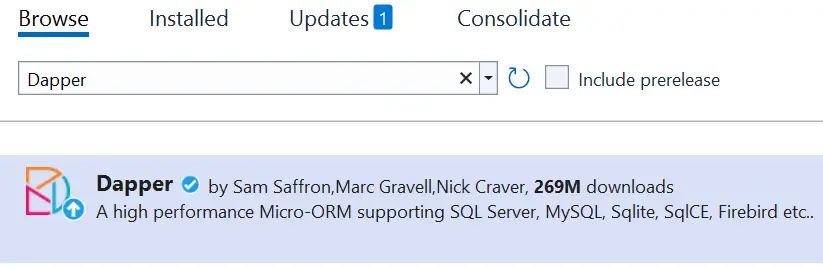
Alternately, you can run the following command in the Tools ➤ NuGet Package Manager ➤ Package Manager Console window to install Dapper.
PM> Install-Package Dapper
or
PM> dotnet add package Dapper
Once Dapper package is installed, we are ready to perform database operations in our .NET app. In the below code we are inserting a record to a database table with Dapper.
string myCS = "Data Source=(localdb)\\MSSQLLocalDB;Initial Catalog=DapperStart;Integrated Security=True;Connect Timeout=30;Encrypt=False;TrustServerCertificate=False;ApplicationIntent=ReadWrite;MultiSubnetFailover=False";
var sql = @"Insert into Inventory(Name, Price, Quantity) values (@Name, @Price, @Quantity)";
using (var connection = new SqlConnection(myCS))
{
var customers = await connection.ExecuteAsync(sql, new { Name = "Shirt", Price = 100, Quantity = 1 });
}
The first part of the code sets up what Dapper needs to talk to the database. myCS is a connection string pointing to a SQL Server LocalDB instance ((localdb)\\MSSQLLocalDB) and a database named DapperStart. Integrated Security=True means it logs in with your Windows account instead of a username and password, and Connect Timeout=30 gives it 30 seconds to connect before failing. The remaining options (Encrypt=False, TrustServerCertificate=False, ApplicationIntent=ReadWrite, MultiSubnetFailover=False) are mostly default settings that Visual Studio adds automatically. Next, the sql variable holds an INSERT statement for an Inventory table. The values are written as parameters (@Name, @Price, @Quantity) instead of being pasted directly into the string, which protects against SQL injection.
The second part runs the query. The using block creates a SqlConnection and guarantees it is closed and disposed of when the block ends. Inside it, Dapper’s ExecuteAsync extension method runs the SQL asynchronously, and the anonymous object new { Name = "Shirt", Price = 100, Quantity = 1 } supplies the parameter values by matching property names to the @ placeholders. ExecuteAsync returns the number of rows affected (here, 1), so the variable would be better named rowsAffected than customers, since it holds a count and not a list of customers. Also note that you don’t need to call connection.Open() yourself, because Dapper opens the connection automatically if it is closed.
Dapper vs Entity Framework Core
Lets understand the differences between Dapper and Entity Framework Core.
| Area | Dapper | Entity Framework Core |
|---|---|---|
| Speed | Dapper is faster because it executes raw sql queries. | Entity Framework Core is slower in speed since it uses multiple steps to interact with the database. Two main components of EF core are – Entity classes & Database Context object. Data is transported to Entity classes from the database using Language Integrated Query (LINQ) while Database context object is used to maintain a session with the database. |
| Complexity | Dapper is very simple to use, you just have to execute the query to the database. | EF Core is a little complex since there is a higher-level, object-oriented approach to database operations. You have to be good at LINQ. |
| Learning Curve | Dapper has a low learning curve. All it needs is that you should be good at writing queries. | EF Core has a steep learning curve since there are lots of things like DB context, Migrations, Fluent API, Conventions and configurations, change tracking, sql generation, caching, lazy loading, etc. |
| For Developers | Developers should be good at writing SQL Queries and Stored Procedures since it is the backbone in Dapper ORM. | Developers should be good at LINQ in order to work with EF Core. This is because data will be communicated in LINQ queries. |
We have written a full series on Entity Framework Core which will be very useful for learning this ORM.It covers all the topics in great details. Do check it.
Is Dapper faster than EF Core?
Yes, Dapper is generally faster than Entity Framework Core in execution speed. Dapper runs raw SQL queries directly, whereas EF Core adds layers such as the DbContext, entities, and LINQ, which provide a high-level, object-oriented approach to database operations. That extra abstraction comes at a performance cost, while raw SQL stays close to the database and runs quickly. Dapper can also speed up development, since it is easy to learn and has none of the extra features that take time to understand in EF Core.
In my understanding, you can learn Dapper in just 1 day only unlike EF core which will take you no less than 10 days.
Now it’s time to check our series of tutorials to make you learn Dapper and use it confidently in your .NET apps.
HELLO EVERYONE
 Welcome to YogiHosting - A Programming Tutorial Website. It is used by millions of people around the world to learn and explore about ASP.NET Core, Blazor, jQuery, JavaScript, Docker, Kubernetes and other topics.
SUBSCRIBE TO NEWSLETTER
Enter your email address to subscribe to this blog and receive notifications of new posts by email.
Join 90K other subscribers