


jQuery Get Complete Guide for Beginners and Experts

What you will learn ?
Want to fetch data from a server without reloading the page? The jQuery .get() method makes AJAX requests simple, fast, and efficient.
What You’ll Learn
In this tutorial, you’ll discover how to:
- Retrieve content from text files using jQuery .get().
- Fetch and display data from a database using PHP.
- Understand how the .get() method works with real-world examples.
- Build dynamic web pages with minimal code.
By the end of this tutorial, you’ll have a solid understanding of the jQuery .get() method and be confident using it in your own web applications.
The complete source code used in this tutorial is available for download through the link provided at the end of the article.
In short: you’ll master the jQuery .get() method and be ready to use it in your next AJAX project.
The jQuery GET Method is a simple and powerful way to perform AJAX requests. It allows you to retrieve data from a server using the HTTP GET method without refreshing the entire web page, making it ideal for creating fast and interactive web applications.
In this tutorial, you’ll learn how the jQuery .get() method works, explore its syntax and parameters, and see practical examples of fetching data from external pages, text files, and databases.
Let us understand all about this method in details.
Syntax of jQuery Get Method
jQuery.get( url [, data ] [, success ] [, dataType ] )
| Name | Value |
|---|---|
| url | The URL to where the AJAX request of HTTP GET type is made. It is the Required parameter. |
| Data | Optional parameter – the key-value pairs that will be send with the AJAX request. Eg {sport: “football”, player: “Cristiano Ronaldo”} |
| success(result,status,xhr) | Optional Parameter – the function to call when the AJAX request is successful. All 3 parameters are optional. The result parameter will get the AJAX response. |
| dataType | The Optional Parameter – the type of data returned from the AJAX response. It can be xml, json, script, text, or html |
jQuery Get Method to Fetch Contents of a Text File
Let’s fetch a text file’s content with the jQuery Get method:
<button id="loadTextFile">Try</button>
<div id="textData"></div>

<script src="https://ajax.googleapis.com/ajax/libs/jquery/3.7.1/jquery.min.js"></script>
<script>
    $(document).ready(function () {
        $.get("file.txt", function (result, status, xhr) {
            $("#textData").html(result);
        });
    });
</script>
The jQuery .get() method makes the AJAX call to the file.txt and shows it’s contents inside a div called textData.
Use .fail() to capture any errors that come during the AJAX request.
See the below code:
<button id="loadNoTextFile">Try</button>
<div id="textNoData"></div>

<script src="https://ajax.googleapis.com/ajax/libs/jquery/3.7.1/jquery.min.js"></script>
<script>
    $(document).ready(function () {
        $("#loadNoTextFile").click(function (e) {
            $.get("no-file.txt", function (result, status, xhr) {
                $("#textNoData").html(result);
            }).fail(function (xhr, status, error) {
            $("#textNoData").html("Result: " + status + " " + error + " " + xhr.status + " " + xhr.statusText)
        });
    });
</script>
In the above code, when trying to access a non-existing file, the .fail() function is called and it shows the message – Result: error Not Found 404 Not Found.
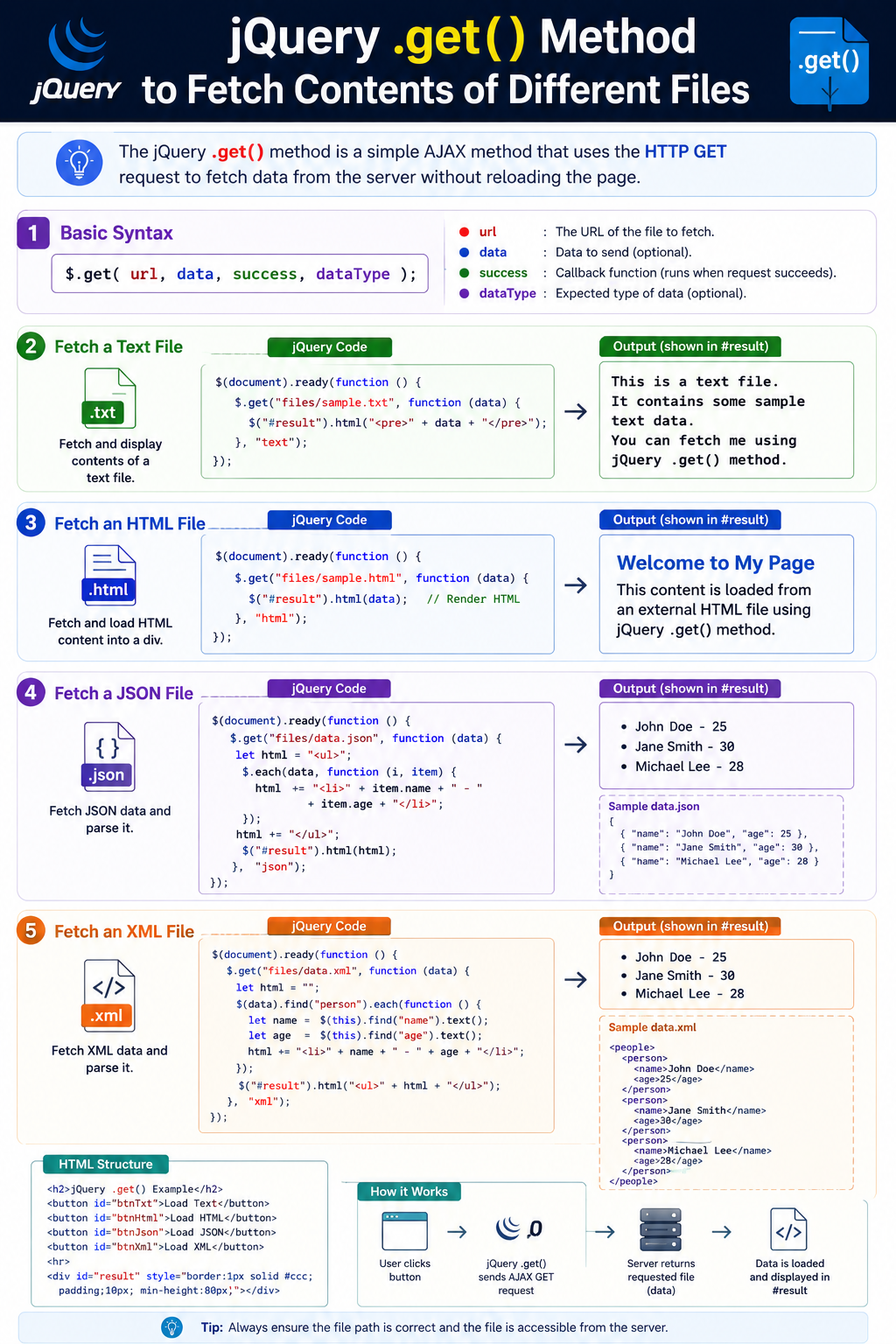
See the below image showing some examples of jQuery GET method:
jQuery Get method to Fetch Data from Database
With the jQuery Get method you can make AJAX calls to a server page also. This server page in turn fetches data from the Database and returns it back as an AJAX response.
Let us create a small demo application in ASP.NET Web Forms to understand this feature.
There are 2 pages – one is HTML and other is .ASPX. The HTML page has 3 controls – 2 selects and a button.
On clicking the button, the 2 ‘select’ control values are passed to the .ASPX page by the jQuery Get method.
The HTML page code:
<div id="message"></div>
<select id="sportSelect">
    <option value="Select">Select Sports</option>
    <option value="Tennis">Tennis</option>
    <option value="Football">Football</option>
    <option value="Cricket">Cricket</option>
</select>
<select id="playerSelect">
    <option value="Select">Select Sports Person</option>
    <option value="Maria Sharapova">Maria Sharapova</option>
    <option value="Cristiano Ronaldo">Cristiano Ronaldo</option>
    <option value="Sachin Tendulkar">Sachin Tendulkar</option>
</select>

<button id="loadDatabase">Try</button>
<div id="dbData"></div>
The jQuery Code:
<script src="https://ajax.googleapis.com/ajax/libs/jquery/3.7.1/jquery.min.js"></script>
<script>
    $("#loadDatabase").click(function (e) {
        $.get("result.aspx",
            {
                sport: $("#sportSelect").val(),
                player: $("#playerSelect").val()
            },
            function (result, status, xhr) {
                $("#dbData").html(result);
            }).fail(function (xhr, status, error) {
                $("#dbData").html("Result: " + status + " " + error + " " + xhr.status + " " + xhr.statusText)
        });
    });
</script>
In the .ASPX page, I get these 2 select control values, using Request.QueryString method.
I then fetch the respective data from the database.
Once I have the data from the DB then I use the Response.Write method to send it to the jQuery Get method as an AJAX response.
The .ASPX page code:
List<MyDataBase> myDataBase;
protected void Page_Load(object sender, EventArgs e)
{
    if (!IsPostBack)
    {
        LoadData();
        SearchDatabase();
    }
}

void SearchDatabase()
{
    string sport = Request.QueryString["sport"];
    string player = Request.QueryString["player"];
    try
    {
        string information = myDataBase.FirstOrDefault(x => x.sport == sport & x.player == player).information;
        Response.Write(information);
        Response.End();
    }
    catch (Exception ex)
    {
        Response.Write("NO DATA");
        Response.End();
    }
}

void LoadData()
{
    myDataBase = new List<MyDataBase>();
    myDataBase.Add(new MyDataBase() { sport = "Tennis", player = "Maria Sharapova", information = "Maria Sharapova is a...});
    myDataBase.Add(new MyDataBase() { sport = "Football", player = "Cristiano Ronaldo", information = "Cristiano Ronaldo is a..." });
    myDataBase.Add(new MyDataBase() { sport = "Cricket", player = "Sachin Tendulkar", information = "Sachin Tendulkar is a..." });
}

class MyDataBase
{
    public string sport { get; set; }
    public string player { get; set; }
    public string information { get; set; }
}
Download the source codes and check the download link:
You are now ready to use the .get() method to make any type of AJAX feature in your website. Also check other similar topics in jQuery AJAX:
SHARE THIS ARTICLE


Related Tutorials:



ABOUT THE AUTHOR
I hope you enjoyed reading this tutorial. If it helped you then consider buying a cup of coffee for me. This will help me in writing more such good tutorials for the readers. Thank you.

HELLO EVERYONE
 Welcome to YogiHosting - A Programming Tutorial Website. It is used by millions of people around the world to learn and explore about ASP.NET Core, Blazor, jQuery, JavaScript, Docker, Kubernetes and other topics.
SUBSCRIBE TO NEWSLETTER
Enter your email address to subscribe to this blog and receive notifications of new posts by email.
Join 90K other subscribers