


Please Consider Donating us
We are helping millions of Beginners and Professionals to learn new programming technologies.
Please consider donating us:



Tutorial – Consuming ASP NET Web API in jQuery from Start [with Code]
![Tutorial – Consuming ASP NET Web API in jQuery from Start [with Code]](https://www.yogihosting.com/wp-content/uploads/2017/08/consuming-asp-net-web-api-in-jquery.jpg "Tutorial – Consuming ASP NET Web API in jQuery from Start [with Code]")
In my previous tutorial, How to Implement ASP NET Web API, I explained how to build a Web API that fetches products from a database and returns them as JSON. In this tutorial, I’ll show you how to consume that Web API using jQuery.
Create a Controller
Create a new controller and name it Controller and name it APICallJs. Since jQuery will be used to consume the Web API, this controller won’t do much on its own — it will simply have two action methods to render the views.
Create two actions named Index and Search. These will correspond to the views that call the Web API’s GetProduct and SearchProduct action methods, respectively.
public class APICallJsController : Controller
{
    public ActionResult Index()
    {
        return View();
    }

    public ActionResult Search()
    {
        return View();
    }
}
Create ‘Index’ View
Create the Index view for the controller. From this view, I’ll call the API’s GetProduct method.
<div id="apiDiv">
    <h4>Enter your API Key & Secret</h4>
    <p>Use (Key = Key1, Secret = Secret1) or (Key = Key2, Secret = Secret2) or (Key = Key3, Secret = Secret3)</p>

    @Html.TextBox("key", "Key1")
    @Html.ValidationMessage("key")
    @Html.TextBox("secret", "Secret1")
    @Html.ValidationMessage("secret")
    <button id="submit">Submit</button>
    <div class="imageDiv">
        <img src="~/Content/Image/loading.gif" />
    </div>
    <div id="message"></div>
    <div id="pagingDiv"></div>
    <input type="hidden" id="totalRecords" />
</div>
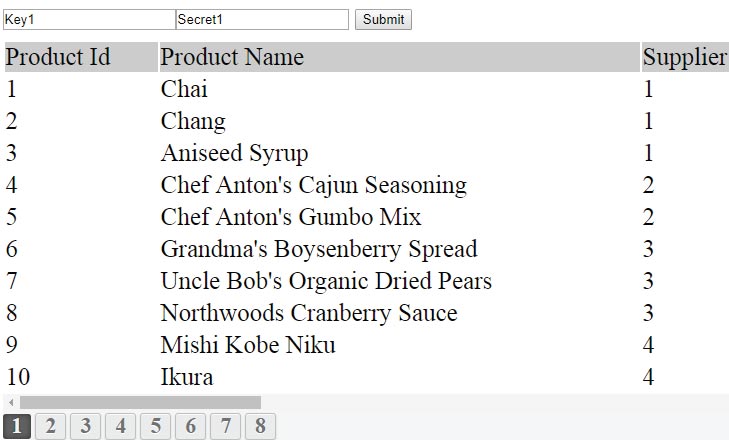
- 2 textboxes are created for entering the Key and Secret required to authenticate with the Web API.
- The API response will be displayed in an HTML table inside the message div, while the pagingDiv will hold the pagination controls.
- A hidden input field will store the total number of records returned by the API in the JSON response.
- An img holds a loading image that will be shown while the jQuery AJAX calls to the API is in progress.
Also add the CSS to the View which is given below:
<style>
    body {
        background-color: #000;
    }

    #apiDiv {
        padding-left: 20px;
        background: #FFF;
        color: #000;
    }

        #apiDiv h4 {
            margin: 10px 0;
            color: #333;
            font-size: 20px;
        }

        #apiDiv .imageDiv {
            text-align: center;
        }

            #apiDiv .imageDiv img {
                display: none;
            }

        #apiDiv p {
            font-size: 18px;
        }

        #apiDiv #message {
            padding-top: 10px;
            overflow: auto;
        }

            #apiDiv #message .resultDiv {
                width: 300%;
            }

            #apiDiv #message table {
                width: 100%;
            }

                #apiDiv #message table tbody > tr:nth-child(1) {
                    background: #CCC;
                }

    #pagingDiv {
        padding-top: 15px;
    }

        #pagingDiv .myDisableClass {
            background-color: #4CAF50;
        }

        #pagingDiv .myClass {
            background-color: #ebbebe;
        }

        #pagingDiv a, #pagingDiv span {
            display: inline-block;
            padding: 0px 9px;
            margin-right: 4px;
            border-radius: 3px;
            border: solid 1px #c0c0c0;
            background: #e9e9e9;
            box-shadow: inset 0px 1px 0px rgba(255,255,255, .8), 0px 1px 3px rgba(0,0,0, .1);
            font-size: .875em;
            font-weight: bold;
            text-decoration: none;
            color: #717171;
            text-shadow: 0px 1px 0px rgba(255,255,255, 1);
        }

            #pagingDiv a:hover {
                cursor: pointer;
                background: #fefefe;
                background: -webkit-gradient(linear, 0% 0%, 0% 100%, from(#FEFEFE), to(#f0f0f0));
                background: -moz-linear-gradient(0% 0% 270deg,#FEFEFE, #f0f0f0);
            }

            #pagingDiv a.active {
                border: none;
                background: #616161;
                box-shadow: inset 0px 0px 8px rgba(0,0,0, .5), 0px 1px 0px rgba(255,255,255, .8);
                color: #f0f0f0;
                text-shadow: 0px 0px 3px rgba(0,0,0, .5);
            }

        #pagingDiv span {
            color: #f0f0f0;
            background: #616161;
        }

    #reset {
        font-size: 15px;
        text-decoration: none;
    }
</style>
The jQuery AJAX code that will call the API method (SearchProduct()) is given below:
var url = "http://localhost:60174/api/API/1"
$.ajax({
    url: url,
    headers: {
        Key: $("#key").val(),
        Secret: $("#secret").val()
    },
    dataType: 'json',
    success: function (result, status, xhr) {
        //show response in ‘message’ div
    },
    error: function (xhr, status, error) {
        alert("Error");
    }
});
Understanding How jQuery will Consume this API
I have added the API Key and Secret to the header of my AJAX request. The key and secret are fetched from the 2 text boxes.
When the API sends its response, it is received inside the success callback function, which then displays it inside the message
The Full jQuery Code which you have to put in your View is:
<script>
    $(document).ready(function () {
        $("#submit").click(function (e) {
            var validate = Validate();
            if (validate.length == 0) {
                DoAjax(1);

                setTimeout(function () {
                    var result = Paging(1, 10, $("#totalRecords").val(), "myClass", "myDisableClass");
                    $("#pagingDiv").html(result)
                }, 5000);
            }
            else
                alert(validate);
        });

        function DoAjax(pageNo) {
            var url = "http://localhost:60174/api/API/" + pageNo
            $.ajax({
                url: url,
                headers: {
                    Key: $("#key").val(),
                    Secret: $("#secret").val()
                },
                dataType: 'json',
                success: function (result, status, xhr) {
                    var table = $("<table>").append("<tr><td>Product Id</td><td>Product Name</td><td>Supplier Id</td><td>Category Id</td><td>Quantity Per Unit</td><td>Unit Price</td><td>Units In Stock</td><td>Units On Order</td><td>Reorder Level</td><td>Discontinued</td></tr>");
                    for (i = 0; i < result["Product"].length; i++) {
                        table.append("<tr><td>" + result["Product"][i]["ProductID"] + "</td><td>" + result["Product"][i]["ProductName"] + "</td><td>" + result["Product"][i]["SupplierID"] + "</td><td>" + result["Product"][i]["CategoryID"] + "</td><td>" + result["Product"][i]["QuantityPerUnit"] + "</td><td>" + result["Product"][i]["UnitPrice"] + "</td><td>" + result["Product"][i]["UnitsInStock"] + "</td><td>" + result["Product"][i]["UnitsOnOrder"] + "</td><td>" + result["Product"][i]["ReorderLevel"] + "</td><td>" + result["Product"][i]["Discontinued"] + "</td></tr>");
                    }
                    $("#message").html($("<div class=\"resultDiv\">").append(table));

                    $("#totalRecords").val(result["Total"]);
                    $("#pagingDiv").css("display", "block");
                },
                error: function (xhr, status, error) {
                    $("#message").html("Result: " + status + " " + error + " " + xhr.status + " " + xhr.statusText)
                    $("#pagingDiv").css("display", "none");
                }
            });
        }

        $("#pagingDiv").on("click", "a", function () {
            DoAjax($(this).attr("pn"));

            var result = Paging($(this).attr("pn"), 10, $("#totalRecords").val(), "myClass", "myDisableClass");
            $("#pagingDiv").html(result)
        });

        function Paging(PageNumber, PageSize, TotalRecords, ClassName, DisableClassName) {
            var ReturnValue = "";

            var TotalPages = Math.ceil(TotalRecords / PageSize);
            if (+PageNumber > 1) {
                if (+PageNumber == 2)
                    ReturnValue = ReturnValue + "<a pn='" + (+PageNumber - 1) + "' class='" + ClassName + "'>Previous</a>   ";
                else {
                    ReturnValue = ReturnValue + "<a pn='";
                    ReturnValue = ReturnValue + (+PageNumber - 1) + "' class='" + ClassName + "'>Previous</a>   ";
                }
            }
            else
                ReturnValue = ReturnValue + "<span class='" + DisableClassName + "'>Previous</span>   ";
            if ((+PageNumber - 3) > 1)
                ReturnValue = ReturnValue + "<a pn='1' class='" + ClassName + "'>1</a> ..... | ";
            for (var i = +PageNumber - 3; i <= +PageNumber; i++)
                if (i >= 1) {
                    if (+PageNumber != i) {
                        ReturnValue = ReturnValue + "<a pn='";
                        ReturnValue = ReturnValue + i + "' class='" + ClassName + "'>" + i + "</a> | ";
                    }
                    else {
                        ReturnValue = ReturnValue + "<span style='font-weight:bold;'>" + i + "</span> | ";
                    }
                }
            for (var i = +PageNumber + 1; i <= +PageNumber + 3; i++)
                if (i <= TotalPages) {
                    if (+PageNumber != i) {
                        ReturnValue = ReturnValue + "<a pn='";
                        ReturnValue = ReturnValue + i + "' class='" + ClassName + "'>" + i + "</a> | ";
                    }
                    else {
                        ReturnValue = ReturnValue + "<span style='font-weight:bold;'>" + i + "</span> | ";
                    }
                }
            if ((+PageNumber + 3) < TotalPages) {
                ReturnValue = ReturnValue + "..... <a pn='";
                ReturnValue = ReturnValue + TotalPages + "' class='" + ClassName + "'>" + TotalPages + "</a>";
            }
            if (+PageNumber < TotalPages) {
                ReturnValue = ReturnValue + "   <a pn='";
                ReturnValue = ReturnValue + (+PageNumber + 1) + "' class='" + ClassName + "'>Next</a>";
            }
            else
                ReturnValue = ReturnValue + "   <span class='" + DisableClassName + "'>Next</span>";

            return (ReturnValue);
        }

        function Validate() {
            var errorMessage = "";
            if ($("#key").val() == "") {
                errorMessage += "► Enter API Key\n";
            }
            if ($("#secret").val() == "") {
                errorMessage += "► Enter API Secret\n";
            }
            return errorMessage;
        }

        $(document).ajaxStart(function () {
            $(".imageDiv img").show();
        });

        $(document).ajaxStop(function () {
            $(".imageDiv img").hide();
        });
    });
</script>
To test it, navigate to the View and you will see the result like this:
Create ‘Search’ View
In this view, I will call the Web API’s SearchProduct method.
Add the below code to the View.
<style>
    body {
        background-color: #000;
    }

    #apiDiv {
        padding-left: 20px;
        background: #FFF;
        color: #000;
    }

        #apiDiv h4 {
            margin: 10px 0;
            color: #333;
            font-size: 20px;
        }

        #apiDiv .imageDiv {
            text-align: center;
        }

            #apiDiv .imageDiv img {
                display: none;
            }

        #apiDiv #message {
            padding-top: 10px;
            overflow: auto;
        }

            #apiDiv #message .resultDiv {
                width: 300%;
            }

            #apiDiv #message table {
                width: 100%;
            }

                #apiDiv #message table tbody > tr:nth-child(1) {
                    background: #CCC;
                }

        #apiDiv span {
            color: red;
            font-size: 18px;
        }

    .pagingDiv {
        background: #f2f2f2;
    }

        .pagingDiv > a {
            display: inline-block;
            padding: 0px 9px;
            margin-right: 4px;
            border-radius: 3px;
            border: solid 1px #c0c0c0;
            background: #e9e9e9;
            box-shadow: inset 0px 1px 0px rgba(255,255,255, .8), 0px 1px 3px rgba(0,0,0, .1);
            font-size: .875em;
            font-weight: bold;
            text-decoration: none;
            color: #717171;
            text-shadow: 0px 1px 0px rgba(255,255,255, 1);
        }

            .pagingDiv > a:hover {
                background: #fefefe;
                background: -webkit-gradient(linear, 0% 0%, 0% 100%, from(#FEFEFE), to(#f0f0f0));
                background: -moz-linear-gradient(0% 0% 270deg,#FEFEFE, #f0f0f0);
            }

            .pagingDiv > a.active {
                border: none;
                background: #616161;
                box-shadow: inset 0px 0px 8px rgba(0,0,0, .5), 0px 1px 0px rgba(255,255,255, .8);
                color: #f0f0f0;
                text-shadow: 0px 0px 3px rgba(0,0,0, .5);
            }
</style>

<div id="apiDiv">
    <h4>Enter the Search Text and Press Submit Button</h4>
    @Html.TextBox("name")
    <button id="submit">Submit</button>
    <div class="imageDiv">
        <img src="~/Content/Image/loading.gif" />
    </div>
    <div id="message">
    </div>
</div>

<script>
    $(document).ready(function () {
        $("#submit").click(function (e) {
            var validate = Validate();
            if (validate.length == 0) {
                DoAjax();
            }
            else
                alert(validate);
        });

        function DoAjax() {
            var url = "http://localhost:60174/api/API/" + $("#name").val()
            $.ajax({
                url: url,
                type: "POST",
                headers: {
                    Key: "Key1",
                    Secret: "Secret1"
                },
                dataType: 'json',
                success: function (result, status, xhr) {
                    var table = $("<table>").append("<tr><td>Product Id</td><td>Product Name</td><td>Supplier Id</td><td>Category Id</td><td>Quantity Per Unit</td><td>Unit Price</td><td>Units In Stock</td><td>Units On Order</td><td>Reorder Level</td><td>Discontinued</td></tr>");
                    for (i = 0; i < result["Product"].length; i++) {
                        table.append("<tr><td>" + result["Product"][i]["ProductID"] + "</td><td>" + result["Product"][i]["ProductName"] + "</td><td>" + result["Product"][i]["SupplierID"] + "</td><td>" + result["Product"][i]["CategoryID"] + "</td><td>" + result["Product"][i]["QuantityPerUnit"] + "</td><td>" + result["Product"][i]["UnitPrice"] + "</td><td>" + result["Product"][i]["UnitsInStock"] + "</td><td>" + result["Product"][i]["UnitsOnOrder"] + "</td><td>" + result["Product"][i]["ReorderLevel"] + "</td><td>" + result["Product"][i]["Discontinued"] + "</td></tr>");
                    }
                    $("#message").html($("<div class=\"resultDiv\">").append(table));
                },
                error: function (xhr, status, error) {
                    $("#message").html("Result: " + status + " " + error + " " + xhr.status + " " + xhr.statusText)
                }
            });
        }

        function Validate() {
            var errorMessage = "";
            if ($("#name").val() == "") {
                errorMessage += "► Enter Product Name";
            }
            return errorMessage;
        }

        $(document).ajaxStart(function () {
            $(".imageDiv img").show();
        });

        $(document).ajaxStop(function () {
            $(".imageDiv img").hide();
        });
    });
</script>
Explanation
The API’s SearchProduct is a HTTP POST method so I have to make POST type AJAX request from my jQuery code.
The jQuery function called DoAjax() contains the jQuery AJAX code. I have used the type parameter (type: “POST”) to make the Post Request.
function DoAjax() {
    var url = "http://localhost:60174/api/API/" + $("#name").val()
    $.ajax({
        url: url,
        type: "POST",
        headers: {
            Key: "Key1",
            Secret: "Secret1"
        },
        dataType: 'json',
        success: function (result, status, xhr) {
//show response in ‘message’ div
        },
        error: function (xhr, status, error) {
            alert("Error")
        }
    });
}
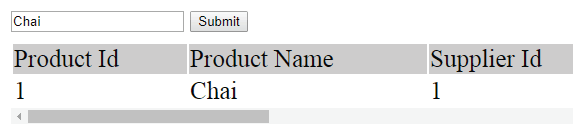
Go to the Search view, enter a product name (e.g., Chai), and you’ll see the API return the matching products, which are then displayed inside the message div.
Download link:
Conclusion
I hope you learned How to Consume ASP NET Web API in jQuery and enjoyed this 3 part series on ASP NET Web API. The below 2 links are it’s previous parts.
SHARE THIS ARTICLE


Related Tutorials:




ABOUT THE AUTHOR
I hope you enjoyed reading this tutorial. If it helped you then consider buying a cup of coffee for me. This will help me in writing more such good tutorials for the readers. Thank you.

HELLO EVERYONE
 Welcome to YogiHosting - A Programming Tutorial Website. It is used by millions of people around the world to learn and explore about ASP.NET Core, Blazor, jQuery, JavaScript, Docker, Kubernetes and other topics.
SUBSCRIBE TO NEWSLETTER
Enter your email address to subscribe to this blog and receive notifications of new posts by email.
Join 90K other subscribers