


ASP.NET Core Minimal API – Start till Finish [.NET 10]
![ASP.NET Core Minimal API – Start till Finish [.NET 10]](https://www.yogihosting.com/wp-content/uploads/2023/10/aspnet-core-minimal-apis.png "ASP.NET Core Minimal API – Start till Finish [.NET 10]")
Minimal APIs are used to create HTTP APIs in a quick span of time with minimum dependencies. They are best suited for microservices and apps that require only minimum files with minimum dependencies. In ASP.NET Core Minimal APIs we do not use controllers instead all the API codes are written in the Program.cs file.
What are the advantages of minimal API? Minimal APIs are lightweight and have a fast execution as compared to traditional controller-based API. They can be built very quickly and easier for new developers to understand their codes.
Page Contents
Single-File Architecture in Minimal APIs – Unlike traditional ASP.NET Core applications that organize code across multiple files—such as controllers, startup classes, and configuration files—a Minimal API can be built entirely within a single Program.cs file. This streamlined approach eliminates much of the boilerplate code, making applications easier to create, read, and maintain.
All essential components, including service registration, middleware configuration, route definitions, and request handlers, can be defined in one place. This is especially useful for small applications, prototypes, microservices, and APIs where simplicity and rapid development are priorities.
By reducing the number of files and abstractions, developers can focus on implementing business logic instead of navigating a complex project structure. As an application grows, the code can still be refactored into separate files without changing the core Minimal API programming model.
Blueprint of Minimal APIs
var builder = WebApplication.CreateBuilder(args);
var app = builder.Build();

app.MapGet("/", () => "Hello Minimal APIs");

app.Run();
ASP.NET Core Minimal API Project
In this article we are going to create a Minimal API Project from start and finish it by adding CRUD operations. This project will be called DailyWork and will be used to manage the daily works of people like us. These works will be stored in InMemory database and we will use Entity Framework Core to perform database operations.
This tutorial is a part of the ASP.NET Core Web API series which contains 5 tutorials to master this area:
- 1. API Controllers – Creating API in ASP.NET Core
- 2. How to Call Web API in ASP.NET Core
- 3. How to Call Web API from jQuery
- 4. Call Web API from JavaScript with XMLHttpRequest (XHR)
- 5. Create ASP.NET Core Minimal API from Start till Finish
HTTP verbs (also called HTTP methods) are standardized request methods used by a client (such as a web browser or mobile app) to tell a web server what action should be performed on a resource. They are a fundamental part of RESTful APIs and web development.
The most commonly used HTTP verbs are:
- GET —> Retrieves data from the server.
- POST —> Creates a new resource on the server.
- PUT —> Updates an existing resource by replacing it entirely.
- PATCH —> Updates part of an existing resource.
- DELETE —> Removes a resource from the server.
- HEAD —> Retrieves only the response headers, without the response body.
The http verbs are the ones you’ll use most often when building Minimal APIs. The project which we will build here will contain the following Minimal APIs:
| API | Description | Request Body | Response Body |
|---|---|---|---|
| GET /works | Get all the works that need to be done | None | Array of works |
| GET /works/complete | Get all completed works | None | Array of works |
| GET /works/{id} | Get a work by its id | None | A work with a given id |
| POST /works | Add a new work | Work that needs to be created | The newly created work |
| PUT /works/{id} | Update an existing work | Work that needs to be updated | None |
| DELETE /works/{id} | The work to be deleted | None | None |
Open Visual Studio and then create a new app by selecting ASP.NET Core Empty template. We use empty template since Minimal API uses minimum files & dependencies.
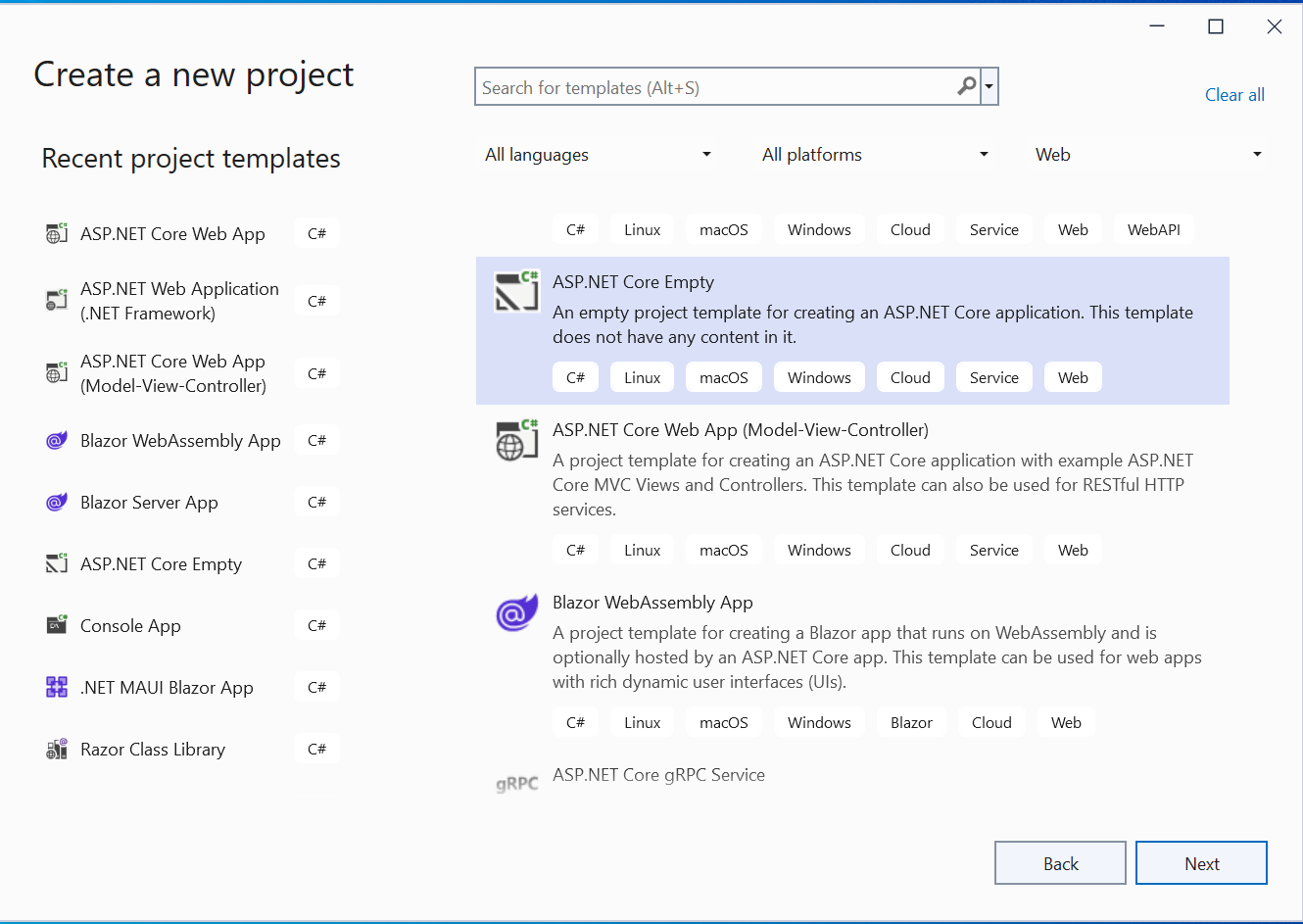
Name the app as DailyWork.
Database & Entity Framework Core
From the Tools ➤ NuGet Package Manager ➤ Manage NuGet Packages for Solution install the Microsoft.EntityFrameworkCore.InMemory package for the in-memory database for our Minimal API.
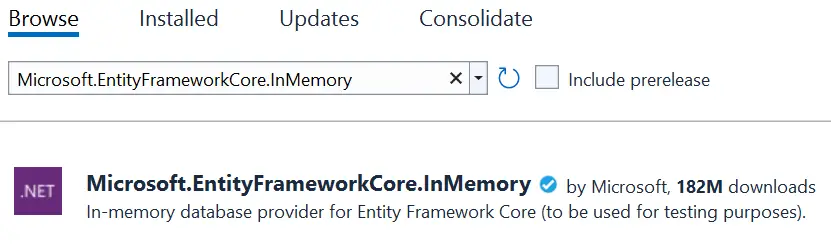
Now create a class called Work.cs with the following code:
public class Work
{
    public int Id { get; set; }

    public string Name { get; set; }

    public string TimeStart { get; set; }

    public string TimeEnd { get; set; }

    public bool IsComplete { get; set; }
}
This class will manage all the work of a person. For example the work id, name, whether it is complete or not, start and end time.
Next, create Database Context which will coordinate with Entity Framework Core and the database. Name this class WorkDB.cs and add the following code to it.
public class WorkDb : DbContext
{
    public WorkDb(DbContextOptions<WorkDb> options)
		: base(options) { }

    public DbSet<Work> Works => Set<Work>();
}
Now the final thing is to register the Database Context on the Program.cs and specify the database name for the app. The following highlighted code needs to be added.
using DailyWork;
using Microsoft.EntityFrameworkCore;

var builder = WebApplication.CreateBuilder(args);

builder.Services.AddDbContext<WorkDb>(opt => opt.UseInMemoryDatabase("WorkDatabase"));

var app = builder.Build();

app.Run();
Create Minimal APIs
Now we start adding our Minimal API to manage daily works of any person. Note that the Minimal APIs should be added inside the “builder.Build” and “app.Run” in the Program.cs class.
var app = builder.Build();

// Minimal API code

app.Run();
Minimal API Post Type – Create Work
First, we need to add the API that will create a new work on the database. So, add the following code to your Program.cs class:
app.MapPost("/works", async (Work work, WorkDb db) =>
{
    db.Works.Add(work);
    await db.SaveChangesAsync();

    return Results.Created($"/works/{work.Id}", work);
});
This API is an HTTP POST type with endpoint /works. It implements MapPost to match POST type request. The parameters include a Work class object and a Database Context object, and saves them to the database using Entity Framework Core.
We can test the API through Postman. In Postman set –
- HTTP method to POST.
- URI to https://localhost:<port>/works
- In Body tab – select raw and set type to JSON.
In the request body enter the JSON:
{
  "name":"eat breakfast",
  "isComplete":true,
  "timeStart":"8:00:00",
  "timeEnd":"8:30:00"
}
Finally click the Send button.
The API will be called and a new work will be created. The Postman will show the created work json, see the screenshot below. Since it is the first work so id number 1 is given to it.
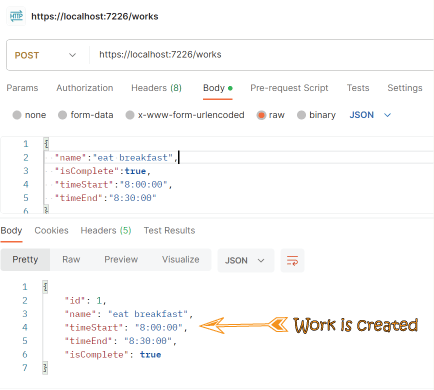
Congrats, our Minimal API is created and working properly. You can clearly see how quickly we have set it up, it hardly took just 5 minutes time. This is the power of Minimal API which you should definitely use in your apps.
Minimal API GET Type – Read Works
Here we have to create 3 API of GET type that will read the works. These are:
- Read All Works
- Read Completed Works
- Read a Work by it’s id
Add these 3 API codes to your Program class.
app.MapGet("/works", async (WorkDb db) =>
	await db.Works.ToListAsync());

app.MapGet("/works/complete", async (WorkDb db) =>
	await db.Works.Where(t => t.IsComplete).ToListAsync());

app.MapGet("/works/{id}", async (int id, WorkDb db) =>
	await db.Works.FindAsync(id)
		is Work work
			? Results.Ok(work)
			: Results.NotFound());
These 3 Minimal API implement MapGet method to match HTTP GET requests, however their endpoints are different. The API with /works endpoint simply returns all the works from the database.
The /works/complete API uses a “Where” condition to get all the completed works and returns them as a list in json format.
The remaining /works/{id} endpoint API, gets the work id in the URI itself and then uses FindAsync method to fetch it from the database.
First testing theGET /works Minimal API.
In Postman set –
- HTTP method to GET.
- URI to https://localhost:<port>/works
- Click Send button.
It produces a response similar to the following:
[
    {
        "id": 1,
        "name": "eat breakfast",
        "timeStart": "8:00:00",
        "timeEnd": "8:30:00",
        "isComplete": true
    }
]
See the postman image below.

Now testing theGET /works/complete Minimal API. Here we change the URI to https://localhost:<port>/works/complete, and click the Send button.
The output will show only the works that have the isComplete field “true”. Check this by adding a few works with isComplete field “false”. When you call the complete method, you will see only the completed works.
To test theGET /works{id} Minimal API.
In Postman set –
- HTTP method to GET.
- URI to https://localhost:<port>/works/1
- Click Send button.
It will give the following response.
{
    "id": 1,
    "name": "eat breakfast",
    "timeStart": "8:00:00",
    "timeEnd": "8:30:00",
    "isComplete": true
}
Minimal API PUT Type – Update a Work
Add the Update Minimal API which has a PUT endpoint /works/{id} which it implements using MapPut. The code is given below.
app.MapPut("/works/{id}", async (int id, Work work, WorkDb db) =>
{
    var todo = await db.Works.FindAsync(id);

    if (todo is null) return Results.NotFound();

    todo.Name = work.Name;
    todo.TimeStart = work.TimeStart;
    todo.TimeEnd = work.TimeEnd;
    todo.IsComplete = work.IsComplete;

    await db.SaveChangesAsync();

    return Results.NoContent();
});
A successful response returns 204 (No Content). The API requires the client to send the entire updated work in the request.
Note that a PUT request requires the client to send the entire updated entity, not just the changes. So we have added all the fields of the Work class inside the MapPut method.
In Postman set –
- HTTP method to PUT.
- URI to https://localhost:<port>/works/1
- In Body tab – select raw and set type to JSON.
In the request body enter the JSON:
{
  "id": 1,
  "name":"eat supper",
  "timeStart":"9:00:00",
  "timeEnd":"9:30:00",
  "isComplete":false
}
Note that we changed all the fields that is – name to “eat supper”, timeStart to “9:00:00”, timeEnd to “9:30:00” and isComplete to “false”.
Click the Send button to update this work.
Check Postman image below.

Now make a new GET request to see the every field values are updated.
It is not necessary to change all the fields like what we did earlier. For example if you want to change only the name to “eat supper” and keep the remaining fields as they are then the json should be.
{
  "id": 1,
  "name":"eat supper",
  "isComplete":true,
  "timeStart":"8:00:00",
  "timeEnd":"8:30:00"
}
Note that the isComplete, timeStart and timeEnd field values are send the original ones (since we don’t want them to be changed).
Minimal API PATCH Type – Update a Work
HTTP PATCH method only updates the fields provided in the request that is it enables partial updates. So this means clients send only the fields that need to be changed. We can thus say that HTTP PATCH is lighter and faster that HTTP PUT and you should use it more often than the PUT.
For working with Patch create a new DTO called WorkDto.cs as shown below.
public class WorkDto
{
    public string Name { get; set; }

    public string TimeStart { get; set; }

    public string TimeEnd { get; set; }

    public bool? IsComplete { get; set; }
}
Next, to the Program.cs class add the HTTP PATCH code as given below.
app.MapPatch("/works/{id}", async (int id, WorkDto workDto, WorkDb db) =>
{
    var todo = await db.Works.FindAsync(id);

    if (todo is null) return Results.NotFound();

    if (workDto.Name is not null) todo.Name = workDto.Name;
    if (workDto.IsComplete is not null) todo.IsComplete = workDto.IsComplete.Value;
    if (workDto.TimeStart is not null) todo.TimeStart = workDto.TimeStart;
    if (workDto.TimeEnd is not null) todo.TimeEnd = workDto.TimeEnd;

    await db.SaveChangesAsync();

    return Results.NoContent();
});
The PATCH endpoint uses a WorkDto.cs with nullable properties to support partial updates correctly. Nullable properties make it possible to distinguish between fields that were omitted from the request (null) and fields that were intentionally provided with a value, including false for boolean properties. Without nullable types, a non-nullable bool would default to false, making it impossible to determine whether the client explicitly set the value or simply left the field out. This could unintentionally overwrite an existing true value during an update.
Strings fields are by default nullable in .NET so no need to make them nullables – like public string? Name { get; set; }.
In Postman set –
- HTTP method to PATCH.
- URI to https://localhost:
/works/1 - In Body tab – select raw and set type to JSON.
In the request body enter the JSON:
{
  "name": "study",
  "isComplete":false
}
Note that we are only sending 2 fields – name and isComplete in the json with the new values. So only these 2 fields will be updated by Patch. It is up to you how many fields you want to change with the patch method.
Click the Send button to update this work.
Check Postman image below.

Minimal API DELETE Type – Delete a Work
Finally we add the DELETE Minimal API that uses MapDelete method to delete a given work whose id is sent in the uri and returns status 204 on successful deletion. It’s code is shown below.
app.MapDelete("/works/{id}", async (int id, WorkDb db) =>
{
    if (await db.Works.FindAsync(id) is Work work)
    {
        db.Works.Remove(work);
        await db.SaveChangesAsync();
        return Results.NoContent();
    }
    return Results.NotFound();
});
In Postman set –
- HTTP method to DELETE.
- URI to https://localhost:<port>/works/1
- Click Send button.
This will delete the work with id 1 from the database.
MapGroup – grouping related endpoints
The MapGroup() method is used to group related endpoints under a common URL prefix and apply shared configurations. Thus allowing you to define routes efficiently, reduce code duplication, and manage security or metadata rules globally for that group.
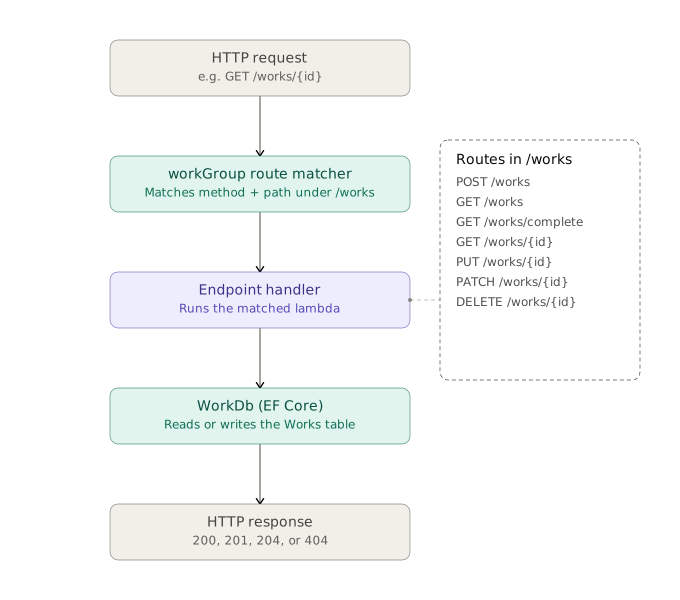
This is how we can use MapGroup in Minimal API.
var workGroup = app.MapGroup("/works");

workGroup.MapPost("/", async (Work work, WorkDb db) =>
{
    db.Works.Add(work);
    await db.SaveChangesAsync();

    return Results.Created($"/works/{work.Id}", work);
});

workGroup.MapGet("/", async (WorkDb db) =>
    await db.Works.ToListAsync());

workGroup.MapGet("/complete", async (WorkDb db) =>
    await db.Works.Where(t => t.IsComplete).ToListAsync());

workGroup.MapGet("/{id}", async (int id, WorkDb db) =>
    await db.Works.FindAsync(id)
        is Work work
            ? Results.Ok(work)
            : Results.NotFound());

workGroup.MapPut("/{id}", async (int id, Work work, WorkDb db) =>
{
    var todo = await db.Works.FindAsync(id);

    if (todo is null) return Results.NotFound();

    todo.Name = work.Name;
    todo.TimeStart = work.TimeStart;
    todo.TimeEnd = work.TimeEnd;
    todo.IsComplete = work.IsComplete;

    await db.SaveChangesAsync();

    return Results.NoContent();
});

workGroup.MapPatch("/{id}", async (int id, WorkDto workDto, WorkDb db) =>
{
    var todo = await db.Works.FindAsync(id);

    if (todo is null) return Results.NotFound();

    if (workDto.Name is not null) todo.Name = workDto.Name;
    if (workDto.IsComplete is not null) todo.IsComplete = workDto.IsComplete.Value;
    if (workDto.TimeStart is not null) todo.TimeStart = workDto.TimeStart;
    if (workDto.TimeEnd is not null) todo.TimeEnd = workDto.TimeEnd;

    await db.SaveChangesAsync();

    return Results.NoContent();
});

workGroup.MapDelete("/{id}", async (int id, WorkDb db) =>
{
    if (await db.Works.FindAsync(id) is Work work)
    {
        db.Works.Remove(work);
        await db.SaveChangesAsync();
        return Results.NoContent();
    }

    return Results.NotFound();
});
The preceding code has the following changes:
- Adds
var var workGroup = app.MapGroup("/works");to set up the group using the URL prefix /works. - Changes all the app.Map
methods to workGroup.Map . - Removes the URL prefix /works from the Map
method calls.
Chaining MapGroup().RequireAuthorization() allows you to secure an entire group of endpoints simultaneously, preventing the need to add authorization rules to each route individually. For example in project we would like only authorized users to execute the POST, PUT, PATCH and DELETE verbs so we can use RequireAuthorization with MapGroup as shown below. Also note that the GET verb does not require authentication so we will use AllowAnonymous method.
using DailyWork;
using Microsoft.EntityFrameworkCore;

var builder = WebApplication.CreateBuilder(args);

builder.Services.AddDbContext<WorkDb>(opt => opt.UseInMemoryDatabase("WorkDatabase"));

// 1. Register required authentication and authorization services

builder.Services.AddAuthentication().AddJwtBearer();
builder.Services.AddAuthorization();

var app = builder.Build();

// 2. Ensure both middlewares are added to the HTTP pipeline

app.UseAuthentication();
app.UseAuthorization();

// 3. Create an authorized route group

var protectedGroup = app.MapGroup("/works").RequireAuthorization(); // Requires a valid user for all endpoints below

// These endpoints automatically inherit the group's authorization rule

protectedGroup.MapPost("/", async (Work work, WorkDb db) =>
{
    db.Works.Add(work);
    await db.SaveChangesAsync();

    return Results.Created($"/works/{work.Id}", work);
});

protectedGroup.MapPut("/{id}", async (int id, Work work, WorkDb db) =>
{
    var todo = await db.Works.FindAsync(id);

    if (todo is null) return Results.NotFound();

    todo.Name = work.Name;
    todo.TimeStart = work.TimeStart;
    todo.TimeEnd = work.TimeEnd;
    todo.IsComplete = work.IsComplete;

    await db.SaveChangesAsync();

    return Results.NoContent();
});

protectedGroup.MapPatch("/{id}", async (int id, WorkDto workDto, WorkDb db) =>
{
    var todo = await db.Works.FindAsync(id);

    if (todo is null) return Results.NotFound();

    if (workDto.Name is not null) todo.Name = workDto.Name;
    if (workDto.IsComplete is not null) todo.IsComplete = workDto.IsComplete.Value;
    if (workDto.TimeStart is not null) todo.TimeStart = workDto.TimeStart;
    if (workDto.TimeEnd is not null) todo.TimeEnd = workDto.TimeEnd;

    await db.SaveChangesAsync();

    return Results.NoContent();
});

protectedGroup.MapDelete("/{id}", async (int id, WorkDb db) =>
{
    if (await db.Works.FindAsync(id) is Work work)
    {
        db.Works.Remove(work);
        await db.SaveChangesAsync();
        return Results.NoContent();
    }

    return Results.NotFound();
});

// 4. Override protection for a GET endpoints. No authentication is needed for HTTP GET

protectedGroup.MapGet("/", async (WorkDb db) =>
    await db.Works.ToListAsync()).AllowAnonymous();

protectedGroup.MapGet("/complete", async (WorkDb db) =>
    await db.Works.Where(t => t.IsComplete).ToListAsync()).AllowAnonymous();

protectedGroup.MapGet("/works/{id}", async (int id, WorkDb db) =>
{
    var found = await db.Works.FindAsync(id);
    return found is Work work ? Results.Ok(work) : Results.NotFound();
}).AllowAnonymous();

app.Run();
TypedResults – strongly-typed HTTP responses
With TypedResults we can return strongly-typed HTTP responses. This thing is missing in “Results” method which we used earlier. TypedResults improve code readability, unit testing, and reduce the chance of runtime errors. The implementation type automatically supplies the response type metadata used by OpenAPI to document the endpoint.
The following endpoint successfully responds with a 200 OK status code and the expected JSON payload.
app.MapGet("/hello", () => Results.Ok(new Message() { Text = "Hello World!" }))
    .Produces<Message>();
The Produces extension method is typically used to document an endpoint’s response. When TypedResults is used instead of Results, however, this step is not required because TypedResults automatically provides the metadata needed for OpenAPI to describe the endpoint. See the code below:
app.MapGet("/hello", () => TypedResults.Ok(new Message() { Text = "Hello World!" }));Return different types with TypedResults
To use TypedResults, the return type must be fully declared, the declaration requires wrapping the return type in a Task
.app.MapGet("/Products/{id}", async Task<Results<Ok<Product>, NotFound>> (int id, ProductDb db) =>
await db.Products.FindAsync(id)
is Product product
? TypedResults.Ok(product)
: TypedResults.NotFound());The following method compiles successfully because both “Results.Ok” and “Results.NotFound” return “IResult”. Although the underlying objects are different concrete types, they share the same declared return type.
app.MapGet("/Products/{id}", async (int id, ProductDb db) =>
    await db.Products.FindAsync(id)
        is Product product
            ? Results.Ok(product)
            : Results.NotFound());
The following method does not compile because “TypedResults.Ok” and “TypedResults.NotFound” return different concrete types. Since there is no common inferred return type, the compiler cannot determine the appropriate type automatically.
app.MapGet("/Products/{id}", async (int id, ProductDb db) =>
     await db.Products.FindAsync(id)
     is Product product
        ? TypedResults.Ok(product)
        : TypedResults.NotFound());
Minimal API with TypedResults
With TypeResults our Minimal API can be written as shown below.
app.MapPost("/works", async Task<Results<IResult, BadRequest<string>>> (Work work, WorkDb db) =>
{
    try
    {
        db.Works.Add(work);
        await db.SaveChangesAsync();
        return TypedResults.Created($"/works/{work.Id}", work);
    }
    catch (Exception e)
    {
        return TypedResults.BadRequest(e.Message);
    }
});

app.MapGet("/works", async Task<IResult> (WorkDb db) =>
{
    return TypedResults.Ok(await db.Works.ToArrayAsync());
});

app.MapGet("/works/complete", async Task<IResult> (WorkDb db) =>
{
    return TypedResults.Ok(await db.Works.Where(t => t.IsComplete).ToListAsync());
});

app.MapGet("/works/{id}", async Task<IResult> (int id, WorkDb db) =>
    await db.Works.FindAsync(id)
        is Work work
            ? TypedResults.Ok(work)
            : TypedResults.NotFound());

app.MapPut("/works/{id}", async Task<IResult> (int id, Work work, WorkDb db) =>
{
    var todo = await db.Works.FindAsync(id);

    if (todo is null) return TypedResults.NotFound();

    todo.Name = work.Name;
    todo.TimeStart = work.TimeStart;
    todo.TimeEnd = work.TimeEnd;
    todo.IsComplete = work.IsComplete;

    await db.SaveChangesAsync();

    return TypedResults.NoContent();
});

app.MapPatch("/works/{id}", async Task<IResult> (int id, WorkDto workDto, WorkDb db) =>
{
    var todo = await db.Works.FindAsync(id);

    if (todo is null) return TypedResults.NotFound();

    if (workDto.Name is not null) todo.Name = workDto.Name;
    if (workDto.IsComplete is not null) todo.IsComplete = workDto.IsComplete.Value;
    if (workDto.TimeStart is not null) todo.TimeStart = workDto.TimeStart;
    if (workDto.TimeEnd is not null) todo.TimeEnd = workDto.TimeEnd;

    await db.SaveChangesAsync();

    return TypedResults.NoContent();
});

app.MapDelete("/works/{id}", async Task<IResult> (int id, WorkDb db) =>
{
    if (await db.Works.FindAsync(id) is Work work)
    {
        db.Works.Remove(work);
        await db.SaveChangesAsync();
        return TypedResults.NoContent();
    }

    return TypedResults.NotFound();
});
Prevent Over-Posting in Minimal API
Over-posting, also known as mass assignment, occurs when a client intentionally or unintentionally includes additional fields in an HTTP POST or PUT request that should not be modifiable. While traditional Minimal APIs reduces this risk through the use of dedicated Data Transfer Objects (DTOs). This approach ensures that only the intended data is accepted and processed, reducing the risk of unauthorized updates.
DTO will provide the following benefits:
- Prevent over-posting.
- Hide secret properties that clients should not view.
- Omit somee properties to reduce payload size.
We have a Work.cs class that we have been using to build minimal api.
public class Work
{
    public int Id { get; set; }

    public string Name { get; set; }

    public string TimeStart { get; set; }

    public string TimeEnd { get; set; }

    public bool IsComplete { get; set; }
}
Update it to include a new Secret string value as shown below.
public class Work
{
    public int Id { get; set; }

    public string Name { get; set; }

    public string TimeStart { get; set; }

    public string TimeEnd { get; set; }

    public bool IsComplete { get; set; }

    public string? Secret { get; set; }
}
This Secret field is never to be exposed to the client as it is only for administrative purpose. So we create a new DTO called WorkItemDTO.cs as shown below.
public class WorkItemDto
{
    public int Id { get; set; }
    public string Name { get; set; }

    public string TimeStart { get; set; }

    public string TimeEnd { get; set; }

    public bool IsComplete { get; set; }

    public WorkItemDto() { }
    public WorkItemDto(Work work) =>
    (Id, Name, TimeStart, TimeEnd, IsComplete) = (work.Id, work.Name, work.TimeStart, work.TimeEnd, work.IsComplete);
}
The DTO does not have the Secret field and in it’s constructor we are binding it’s field’s values with the work class fields (leaving aside the Secret field).
And that’s it we can now use this DTO in minimal API code.
Check the below code where the MapPost method is now using this DTO to create a new Work on the database. Notice the Secret field is never used.
app.MapPost("/works", async (WorkItemDto wiDto, WorkDb db) =>
{
    var work = new Work
    {
        Name = wiDto.Name,
        TimeStart = wiDto.TimeStart,
        TimeEnd = wiDto.TimeEnd,
        IsComplete = wiDto.IsComplete,
    };

    db.Works.Add(work);
    await db.SaveChangesAsync();

    wiDto = new WorkItemDto(work);

    return Results.Created($"/works/{work.Id}", wiDto);
});
Validations In Minimal APIs
Validations in Minimal APIs are done by the use of [DataAnnotations] attribute. When a parameter to a Minimal API endpoint is a class or record type, validation attributes are automatically applied. For example:
public class Product
{
    [Required, StringLength(100)]
    public string Name { get; set; }

    [Range(0.01, 999999.99)]
    public decimal Price { get; set; }

    [Range(0, int.MaxValue)]
    public int Stock { get; set; }
}
These are standard System.ComponentModel.DataAnnotations attributes:
- [Required] – The property “Name” must have a non-null, non-empty value.
- [StringLength(100)] – Maximum “Name” value is 100 characters. In the same way we can also set MinimumLength.
- [Range(0.01, 999999.99)] – Int value for “Stock” must be within the specified range. Here it is from 0 to max value of int. This prevents negative prices and absurdly high values.
Enable the validations for Minimal APIs by calling the AddValidation extension method to register the required services in the service container of the application in the Program.cs class:
builder.Services.AddValidation();The implementation is basically that one overly enthusiastic coworker who knows everyone. It automatically hunts down types used in Minimal API handlers, then tracks down their base types too—because why stop there? After rounding them all up, it assigns the validation rules to each endpoint that makes sure everyone behaves and passes validation before joining the party.
With validations in place the Minimal APIs now:
- Inspects incoming request bodies for models decorated with DataAnnotations validation attributes.
- Performs model validation before the endpoint handler is invoked.
- Returns a standardized validation error response if validation fails, preventing the handler from executing.
If validation fails, the response containing the validation errors are returned. This maps property names to their validation messages, making it easy for clients to display field-specific errors. An example of the validation error is given below:
{
  "type": "https://tools.ietf.org/html/rfc9110#section-15.5.1",
  "title": "One or more validation errors occurred.",
  "status": 400,
  "errors": {
    "Name": ["The Name field is required."],
    "Price": ["The field Price must be between 0.01 and 999999.99."]
  }
}Disable validation by calling DisableValidation method on specific endpoints:
app.MapPost("/product/shoes", (List<Product> p) => { /* handler */ })
    .DisableValidation();
DisableValidation() method disables automatic request validation for the current endpoint. Use this option when implementing custom validation logic, processing raw request data, or optimizing performance by performing validation manually within the endpoint handler.
CancellationToken in ASP.NET Core Minimal API
A CancellationToken lets ASP.NET Core tell your endpoint handler that the client has disconnected (closed the browser tab, aborted the request, hit a timeout) so you can stop doing unnecessary work — cancel database calls, HTTP requests, or long loops instead of running them to completion for no one.
Just add CancellationToken as a parameter to your endpoint delegate. Minimal APIs automatically bind it from the incoming request — no attribute needed:
app.MapGet("/data/{id}", async (int id, AppDbContext db, CancellationToken ct) =>
{
    var item = await db.Items.FindAsync(new object[] { id }, ct);
    return item is not null ? Results.Ok(item) : Results.NotFound();
});
Here ct is tied to HttpContext.RequestAborted. If the client disconnects mid-request, the token is signaled (cancelled), and FindAsync will throw an OperationCanceledException instead of continuing to hit the database.
How server knows client disconnected since http is stateless?
The key idea: HTTP semantics vs. the transport connection – “HTTP is stateless” means the protocol doesn’t remember anything between requests — no session state is baked into HTTP itself. But every HTTP request still travels over a TCP connection (or QUIC, for HTTP/3), and that connection is a stateful, long-lived pipe between the client’s socket and the server’s socket. Statelessness is a property of the application-level protocol, not of the network connection carrying it.
So the server isn’t inferring disconnection from “HTTP” — it’s watching the socket underneath.
How Kestrel actually detects it
- Kestrel (ASP.NET Core’s web server) holds an open socket for the duration of the request/response.
- While your handler is running (e.g., awaiting a slow DB query), Kestrel keeps a background read/write operation active on that socket.
If the client closes the tab, kills the connection, or the network drops:
– On a graceful close, the OS delivers a FIN packet, and Kestrel’s socket read returns 0 bytes / EOF.
– On an abrupt close (crash, network cut), the OS may deliver an RST, or Kestrel eventually notices via a failed write / broken pipe error.
- Kestrel translates that low-level socket event into cancelling the CancellationTokenSource behind HttpContext.RequestAborted.
- Your ct — bound from RequestAborted — flips to cancelled, and anything awaiting with that token (EF Core, HttpClient, etc.) throws OperationCanceledException.
Combining with your own timeout
Sometimes you want cancellation on a timeout in addition to client disconnect:
app.MapGet("/slow", async (CancellationToken ct) =>
{
    using var timeoutCts = CancellationTokenSource.CreateLinkedTokenSource(ct);
    timeoutCts.CancelAfter(TimeSpan.FromSeconds(5));

    await Task.Delay(10_000, timeoutCts.Token); // will throw after 5s or on disconnect
    return Results.Ok();
});
Handling the exception
If you don’t handle it, an OperationCanceledException from a disconnected client just results in the response never being sent (harmless — the client isn’t listening anyway). But if you want to log it or do cleanup, ASP.NET Core has built-in middleware behavior: cancellation-related exceptions from a disconnected client are typically not logged as errors by default. You generally don’t need a try/catch for the common case — just let the exception bubble and the framework handles it gracefully. If you do want custom behavior:
app.MapGet("/work", async (CancellationToken ct) =>
{
    try
    {
        await DoWorkAsync(ct);
        return Results.Ok();
    }
    catch (OperationCanceledException)
    {
        // client disconnected — nothing to return, but you could log metrics here
        return Results.StatusCode(499); // "Client Closed Request" (non-standard but common)
    }
});
Key points:
- Free binding: Minimal APIs inject CancellationToken automatically — you don’t need [FromServices] or anything special.
- It’s HttpContext.RequestAborted under the hood.
- Always forward it to downstream async calls (EF Core, HttpClient, Task.Delay), or cancellation won’t have any real effect.
- Not just for disconnects — you can combine it with CancellationTokenSource.CreateLinkedTokenSource for custom timeouts.
- Don’t rely on it for business logic — it’s for stopping wasted work, not for control flow like “cancel if invalid input.”
If you’re dealing with long-running background work per-request rather than just DB/HTTP calls, this pattern also pairs well with IHostApplicationLifetime.ApplicationStopping for graceful shutdown scenarios — happy to go into that if relevant.
The link to download the full source code of this tutorial is given below:
This completes the ASP.NET Core Minimal APIs where we have covered all the types GET, POST, PUT and DELETE. This hardly took no more than 20 minutes to learn and implement them in our app. I hope you enjoyed learning this great concept.
SHARE THIS ARTICLE


Related Tutorials:


ABOUT THE AUTHOR
I hope you enjoyed reading this tutorial. If it helped you then consider buying a cup of coffee for me. This will help me in writing more such good tutorials for the readers. Thank you.

HELLO EVERYONE
 Welcome to YogiHosting - A Programming Tutorial Website. It is used by millions of people around the world to learn and explore about ASP.NET Core, Blazor, jQuery, JavaScript, Docker, Kubernetes and other topics.
SUBSCRIBE TO NEWSLETTER
Enter your email address to subscribe to this blog and receive notifications of new posts by email.
Join 90K other subscribers