


How to call a JWT secured APIs with jQuery AJAX [with source codes]
![How to call a JWT secured APIs with jQuery AJAX [with source codes]](https://www.yogihosting.com/wp-content/uploads/2020/04/JWT-jquery.png "How to call a JWT secured APIs with jQuery AJAX [with source codes]")
Page Contents
JWT authentication is a popular standard for securing Web APIs. In my previous tutorial, I explained in detail how to implement ASP.NET Core JWT Authentication and Authorization of Web API — if you haven’t read it yet, make sure to check it out before continuing.
ASP.NET Core JWT Bearer Token
When you make an API Call to a JWT protected Web API then you have to add a Bearer token to the Authorization request. This is done in jQuery as shown below.
headers: {
    Authorization: 'Bearer ' + token
}
Let us now call the Web API (that is JWT secured) with jQuery AJAX method. The most important thing to note here is that you have to add the JWT Token value on the header of the HTTP request, and prepend the token’s value with the word – Bearer (note the space at the end of the word).
This tutorial is a part of series called JSON Web Token (JWT) in ASP.NET Core. There are 3 tutorials to master it:
- ASP.NET Core JWT Authentication and Authorization of Web API [Detailed]
- Implementing JWT Refresh Token in ASP.NET Core MVC
- How to call a JWT secured APIs with jQuery AJAX [with source codes]
This is shown in the below code:
$.ajax({
    type: "POST",
    url: "https://localhost:44360/Reservation",
    headers: {
        Authorization: 'Bearer ' + token
    },
    dataType: 'json',
    success: function (result, status, xhr) {
        ShowData(result);
    },
    error: function (xhr, status, error) {
         alert(error);
    }
});
I will call the below shown Web API with jQuery:
[Route("[controller]")]
[ApiController]
[Authorize]
public class ReservationController : ControllerBase
{
    [HttpGet]
    public IEnumerable<Reservation> Get() {
        // returns a list of reservations
    }
}
Once this feature is created it will work as shown by the below video:
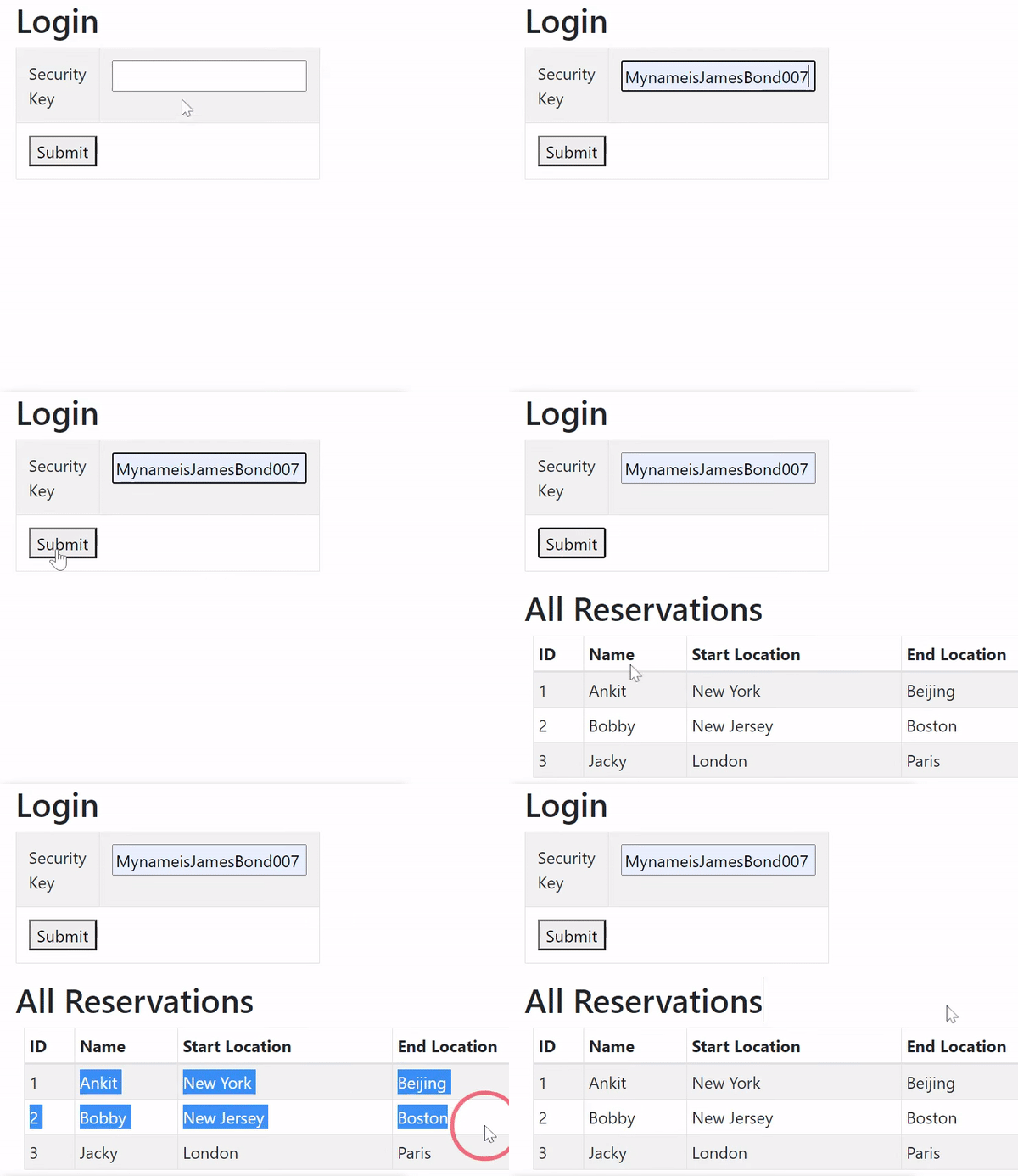
Some related API tutorials which you need to read are:
- 1. Implementing Google Contacts API Version 3.0 & OAuth 2.0 in cSharp and ASP.NET [Updated]
- 2. Example: How to use JQuery AJAX Method to Call an API
- 3. Implementing TheMovieDB (TMDB) API in ASP.NET MVC – [with full codes]
- 4. Implementing TheMovieDB (TMDB) API with jQuery AJAX
- 5. Tutorial – Implementing your own ASP NET Web API from Start [with Code]
- 6. Tutorial – Consuming ASP NET Web API from Start [with Code]
- 7. How to Implement Discord API in ASP.NET MVC & C#
Creating full Client JWT Application in jQuery
Make sure you add System.IdentityModel.Tokens.Jwt package from NuGet. This package enables you to create JWT tokens in your application.
Next, create a controller called jQueryApiController.cs in your project and add the following code to it:
public class jQueryApiController : Controller
{
    public IActionResult Index()
    {
        return View();
    }

    [HttpPost]
    public string Index(string key)
    {
        string tokenString = GenerateJSONWebToken(key);
        return tokenString;
    }

    private string GenerateJSONWebToken(string key)
    {
        var securityKey = new SymmetricSecurityKey(Encoding.UTF8.GetBytes(key));
        var credentials = new SigningCredentials(securityKey, SecurityAlgorithms.HmacSha256);

        var token = new JwtSecurityToken(
            issuer: "https://www.yogihosting.com",
            audience: "dotnetclient",
            expires: DateTime.Now.AddHours(3),
            signingCredentials: credentials
            );

        return new JwtSecurityTokenHandler().WriteToken(token);
    }

    [HttpPost]
    public IActionResult Reservation([FromBody]List<Reservation> rList)
    {
        return PartialView("Reservation", rList);
    }
}
Explanation: Index action of HTTP Post type will be called by AJAX code on the View. This action method calls the GenerateJSONWebToken(key) method to create the JWT token.
ASP.NET Core JWT Token Expiration
The expiry time of JWT Token is set with “expires” property of JwtSecurityToken class. I have set 3 hours expiry time of the token with the below code.
var token = new JwtSecurityToken(
    ...
    expires: DateTime.Now.AddHours(3),
);
Also note that this is the sliding expiry time.
There’s also a Reservation action that accepts a list of reservations — the data returned by the API — and returns a partial view displaying all these reservations.
You’ll understand exactly how the API call is made once you see the code in the views. So, go ahead and create the Index view, with the code given below:
@{ ViewBag.Title = "Login";}

<h2>Login</h2>

<div id="messageDiv" style="display:none" class="alert alert-danger"></div>
<table class="w-25 table table-striped table-bordered">
    <tbody>
        <tr>
            <td>Security Key</td>
            <td><input type="text" id="key" name="key" /></td>
        </tr>
        <tr>
            <td colspan="2">
                <button id="submit">Submit</button>
            </td>
        </tr>
    </tbody>
</table>

<div id="processDiv" style="display:none">Processing.....</div>
<div id="reservations"></div>

<script src="https://code.jquery.com/jquery-3.3.1.min.js"></script>
<script>
    $(document).ready(function () {
        $("#submit").click(function (e) {
            $.ajax({
                type: "POST",
                url: "@Url.Action("Index")",
                data: {key: $("#key").val()},
                dataType: "text",
                success: function (result) {
                    if (result != "Error")
                        CallAPI(result);
                    else {
                        $("#messageDiv").show();
                        $("#messageDiv").html("Error");
                    }
                },
                error: function (req, status, error) {
                    alert(error);
                }
            });
        });

        function CallAPI(token) {
            $.ajax({
                type: "GET",
                url: "https://localhost:44314/Reservation",
                headers: {
                    Authorization: 'Bearer ' + token
                },
                dataType: 'json',
                success: function (result, status, xhr) {
                    ShowData(result);
                },
                error: function (xhr, status, error) {
                     alert(error);
                }
            });
        }

        function ShowData(reservations) {
            $.ajax({
                type: "POST",
                contentType: "application/json",
                url: "@Url.Action("Reservation")",
                data: JSON.stringify(reservations),
                success: function (result) {
                    $("#reservations").html(result)
                    $("#messageDiv").hide();
                },
                error: function (req, status, error) {
                    alert(error);
                }
            });
        }

        $(document).ajaxStart(function () {
            $("#processDiv").show();
        });

        $(document).ajaxStop(function () {
            $("#processDiv").hide();
        });
    });
</script>
Explanation: There is an input control for accepting the Security Key / Private Key which is MynameisJamesBond007_MynameisJamesBond007. The screen shot is shown below:
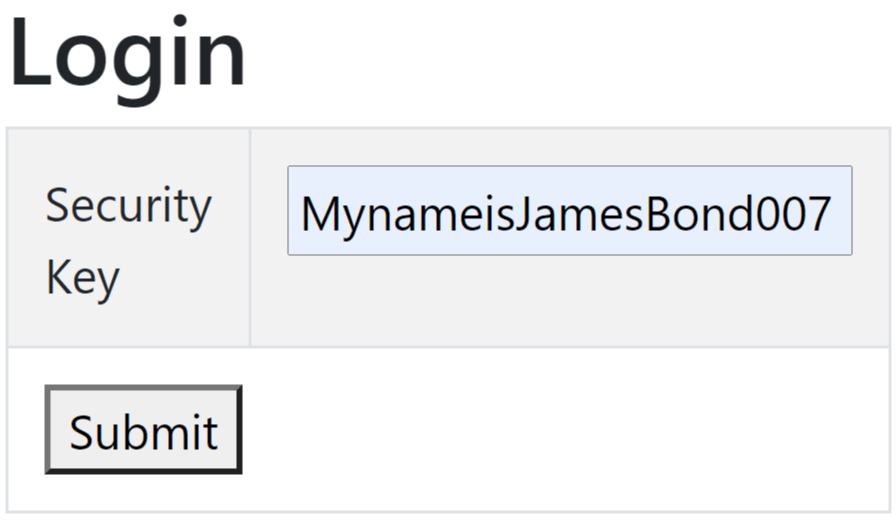
The div with id as reservations will show the reservations returned by the API.
Notice that when the submit button is clicked, jQuery calls the “Index” action method. This method returns the JWT Token, and in the success callback, I call another jQuery function named CallAPI, passing the token to it.
The CallAPI() function’s code is given below:
function CallAPI(token) {
    $.ajax({
        ...
    });
}
The CallAPI method makes the API call and adds the JWT Token to the Authorization Header of the request like this:
headers: {
    Authorization: 'Bearer ' + token
},
Notice the space after ‘Bearer ‘ text. On the success callback it calls another function called ShowData(result) whose task is to show the reservations data on the View.
See the ShowData(result) function’s code below. It makes an AJAX call to the Reservation action method, which returns a partial view bound to the data returned by the API.
function ShowData(reservations) {
    $.ajax({
        type: "POST",
        contentType: "application/json",
        url: "@Url.Action("Reservation")",
        data: JSON.stringify(reservations),
        success: function (result) {
            $("#reservations").html(result)
        },
        error: function (req, status, error) {
            alert(error);
        }
    });
}
Note: Inside the success callback, we bind the reservations div with this data.
Next, add the Partial View called Reservation.cshtml inside the Shared folder and add the below code to it.
@model IEnumerable<Reservation>
@{ ViewBag.Title = "All Reservations";}

<h2>All Reservations</h2>
<table class="table table-sm table-striped table-bordered m-2">
    <thead><tr><th>ID</th><th>Name</th><th>Start Location</th><th>End Location</th></tr></thead>
    <tbody>
        @if (Model != null)
        {
            foreach (var r in Model)
            {
                <tr>
                    <td>@r.Id</td>
                    <td>@r.Name</td>
                    <td>@r.StartLocation</td>
                    <td>@r.EndLocation</td>
                </tr>
            }
        }
    </tbody>
</table>
Now run your app and open the URL – https://localhost:7154/jQueryApi. Here enter the private key which is “MynameisJamesBond007_MynameisJamesBond007” and you will be see the reservations received from the API call.
JWT Token with Claims
JWT Claims allow us to include additional information within the token. For example, a JWT token might contain a claim called Name that asserts the user’s name is “Bobby.” This claim can then be used to filter records — for instance, retrieving only those where the person’s name matches “Bobby.”
To support this, add a new row to the table in the Index view containing a text box for entering the person’s name. The added code is highlighted below.
<table class="w-25 table table-striped table-bordered">
    <tbody>
        <tr>
            <td>Security Key</td>
            <td><input type="text" id="key" name="key" /></td>
        </tr>
        <tr>
            <td>Person</td>
            <td><input type="text" id="person" name="person" /></td>
        </tr>
        <tr>
            <td colspan="2">
                <button id="submit">Submit</button>
            </td>
        </tr>
    </tbody>
</table>
The value entered in this text box needs to be included in the data parameters of the AJAX call. Update the submit button’s code as follows:
$("#submit").click(function (e) {
    $.ajax({
        type: "POST",
        url: "@Url.Action("Index")",
        data: { key: $("#key").val(), person: $("#person").val()},
        dataType: "text",
        success: function (result) {
            if (result != "Error")
                CallAPI(result);
            else {
                $("#messageDiv").show();
                $("#messageDiv").html("Error");
            }
        },
        error: function (req, status, error) {
            alert(error);
        }
    });
});
Next, change the controllers code to receive this person’s value.
[HttpPost]
public string Index(string key, string person)
{
    string tokenString = GenerateJSONWebToken(key, person);
    return tokenString;
}

private string GenerateJSONWebToken(string key, string person)
{
    var claims = new[] {
        new Claim("Name", person)
    };

    var securityKey = new SymmetricSecurityKey(Encoding.UTF8.GetBytes(key));
    var credentials = new SigningCredentials(securityKey, SecurityAlgorithms.HmacSha256);

    var token = new JwtSecurityToken(
        issuer: "https://www.yogihosting.com",
        audience: "dotnetclient",
        expires: DateTime.Now.AddHours(3),
        signingCredentials: credentials,
        claims: claims
        );

    return new JwtSecurityTokenHandler().WriteToken(token);
}
The key part of the code above is that I create a claim called Name, assigning it the value of the person’s name entered in the text box.
Finally, update the API to retrieve this claim’s value using the HttpContext.User.Claims class, and filter the reservations to include only those that exactly match the Name value from the claim. See the code below:
[HttpGet]
public IEnumerable<Reservation> Get()
{
    var claims = HttpContext.User.Claims;
    return CreateDummyReservations().Where(t => t.Name == claims.FirstOrDefault(c => c.Type == "Name").Value);
}
Check the below video to understand how the filtering works:
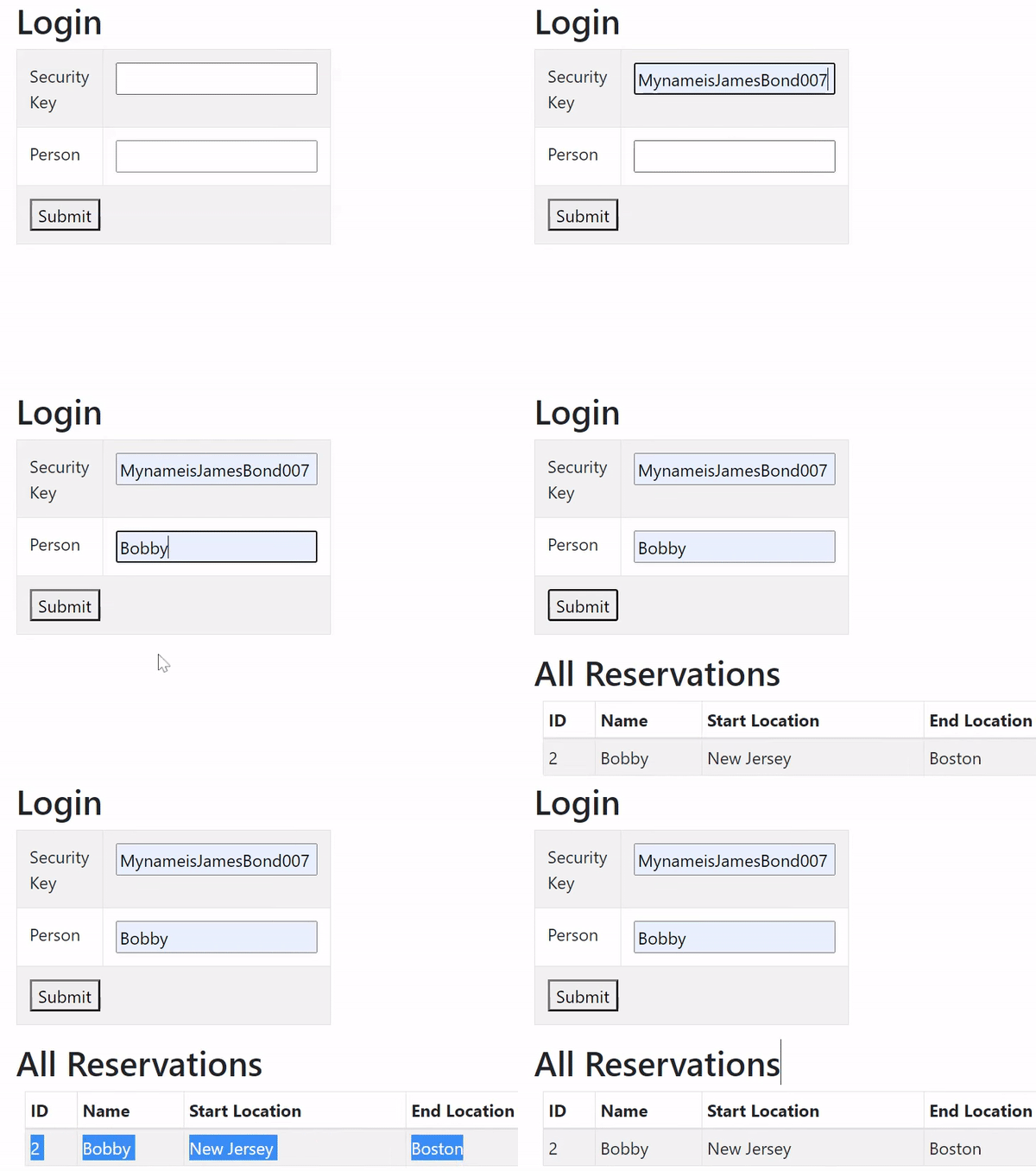
ASP.NET Core GET JWT Token from Request
We can get the JWT Token which is added to the authorization header of the request by using the code – var jwtToken = Request.Headers[HeaderNames.Authorization];. Here HeaderNames lies in the Microsoft.Net.Http.Headers namespace. Use this code in your controller where you want to extract the token from the request.
public class SomeController : Controller
{
    public IActionResult Index()
    {
        var jwtToken = Request.Headers[HeaderNames.Authorization];
        return View();
    }
}
You can download the full codes of this tutorial from the below link:
I hope you enjoyed learning how to build this JWT-powered feature with jQuery, and that this tutorial helped clear up how access tokens, refresh tokens, and claims work together in a real ASP.NET Core application. We covered a lot of ground — from generating and refreshing tokens securely, to handling stolen-token scenarios, to using claims for filtering data on the API side. As always, feel free to download the complete source code from the link above and experiment with it on your own.
If you found this tutorial helpful, please consider sharing it with your friends and colleagues who might benefit from it too. If you have any questions or run into issues along the way, feel free to drop a comment below — I’ll do my best to help. Thank you for reading, and happy coding!
SHARE THIS ARTICLE


Related Tutorials:


ABOUT THE AUTHOR
I hope you enjoyed reading this tutorial. If it helped you then consider buying a cup of coffee for me. This will help me in writing more such good tutorials for the readers. Thank you.

HELLO EVERYONE
 Welcome to YogiHosting - A Programming Tutorial Website. It is used by millions of people around the world to learn and explore about ASP.NET Core, Blazor, jQuery, JavaScript, Docker, Kubernetes and other topics.
SUBSCRIBE TO NEWSLETTER
Enter your email address to subscribe to this blog and receive notifications of new posts by email.
Join 90K other subscribers