


How to Create Web APIs in ASP.NET Core [.NET 10.0 RESTful pattern]
![How to Create Web APIs in ASP.NET Core [.NET 10.0 RESTful pattern]](https://www.yogihosting.com/wp-content/uploads/2019/03/api-controllers-aspnet-core.png "How to Create Web APIs in ASP.NET Core [.NET 10.0 RESTful pattern]")
Creating Web APIs in ASP.NET Core is simple and follows a few standard conventions. An ASP.NET Core Web API controller must include the following three requirements:
- Add the [ApiController] attribute – Apply the [ApiController] attribute to the controller class. This enables API-specific features such as automatic model validation, parameter binding, and consistent HTTP API responses, making it the recommended approach for building RESTful APIs..
- Inherit from the ControllerBase class – A Web API controller should derive from the ControllerBase class instead of the Controller class. ControllerBase provides the functionality required for handling HTTP requests and returning JSON or other API responses without the view-rendering features used in MVC applications.
- Configure Attribute Routing – Define routes using the [Route] attribute so clients can access your API endpoints. A common routing pattern is:
[Route("someUrl/[controller]")]. Attribute routing gives you complete control over your API URLs and is the recommended routing approach for ASP.NET Core Web API development.
The controller of a Web API looks like:
[ApiController]
[Route("someURL/[controller]")]
public class ExampleController : ControllerBase
This ASP.NET Core Web API tutorial series is based on .NET 10.0 version and consits of 5 articles.
- 1. How to Create Web APIs in ASP.NET Core [RESTful pattern]
- 2. How to Call Web API in ASP.NET Core [with Codes]
- 3. How to Call Web API from jQuery
- 4. Call Web API from JavaScript with XMLHttpRequest (XHR)
- 5. Create ASP.NET Core Minimal API from Start till Finish
Page Contents
What is Web API?
A Web API (Web Application Programming Interface) is an API that enables applications to communicate with each other over the HTTP protocol. It allows software systems built with different programming languages and frameworks to exchange data seamlessly over the web. For example, a Stock Market Web API can provide the latest stock prices directly to your browser or application through an HTTP request. A Web API can be developed using technologies such as ASP.NET Core, Java, Python, Node.js, or PHP, and it can be consumed by virtually any platform or application. This platform-independent nature makes Web APIs the foundation of modern RESTful services, powering communication between web applications, mobile apps, desktop software, cloud services, and third-party systems.
The work of the Web API is to transfer data over the internet. The data is transferred with the HTTP Protocol’s Request methods which are commonly known as HTTP Verbs. The mostly used HTTP Verbs are GET, POST, PUT, PATCH and DELETE. JSON and XML file formats are used by Web APIS to transmit data over the internet.
When creating an Web API controller, always inherit from the ControllerBase class instead of the Controller class. The Controller class extends ControllerBase by adding support for MVC views and Razor pages, making it suitable for rendering web pages rather than handling Web API requests. Since Web APIs only need features for processing HTTP requests and returning data (such as JSON or XML), ControllerBase is the recommended and lightweight choice.
The only exception is when you want the same controller to serve both MVC views and Web API endpoints—in that case, you should derive it from the Controller class. The following example shows the basic structure of an ASP.NET Core Web API which derives from ControllerBase class.
[ApiController]
[Route("api/[controller]")]
public class ReservationController : ControllerBase
{
...
}
The ControllerBase class provides many properties and methods that are useful for handling HTTP requests. Some of these are:
| Name | Description |
|---|---|
| BadRequest | Returns 400 status code. |
| Ok | Returns a 200 status code along with the result object. |
| NotFound | Returns 404 status code. |
| PhysicalFile | Returns a file. |
What is an ApiController attribute?
Every ASP.NET Core Web API controller should be decorated with the [ApiController] attribute. This attribute enables several API-specific features that simplify development and improve the consistency of your REST APIs. Its key benefits include:
- 1. Respond to Attribute Routing.
- 2. Automatically triggers an HTTP 400 response when resource is not found on the server.
- 3. Defines the location at which an action method’s parameter value is found. We use [FromBody], [FromForm], [FromHeader], [FromQuery], [FromRoute] attributes to define these locations.
- 4. When action method’s parameter is annotated with the [FromForm] attribute then the multipart/form-data request content type is inferred.
- 5. API errors are formatted according to the RFC 7807 Problem Details specification. This standardized error format improves interoperability, allowing applications built with technologies such as ASP.NET Core, Java, Python, Node.js, and Ruby to communicate more reliably and handle errors consistently.
Create the Example Project
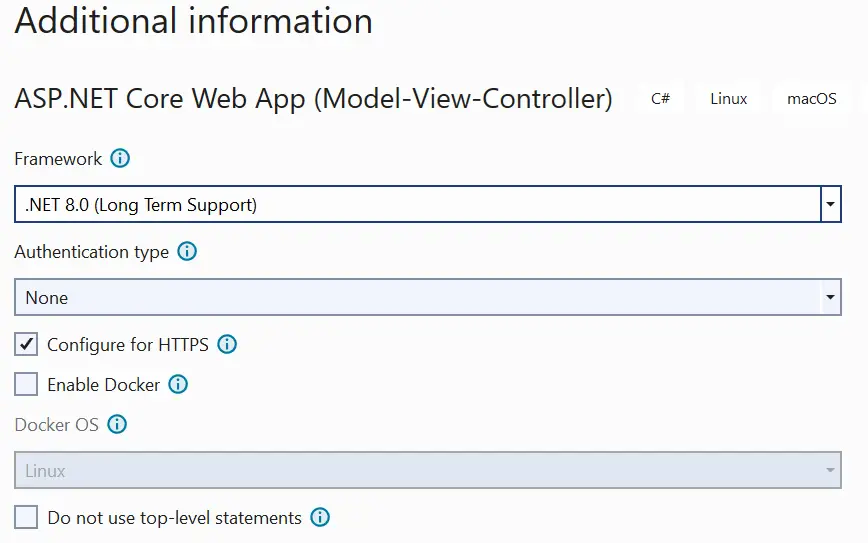
Create a new project in Visual Studio, choose ASP.NET Core Web APP (MVC) template and name it APIControllers. Select the latest version of the DOT NET framework which is .NET 10.0. I have shown this in the below image.
Model & Repository
Inside the Models folder, add a class called Reservation.cs to it. The class code is given below:
namespace APIControllers.Models
{
    public class Reservations
    {
        public int Id { get; set; }
        public string Name { get; set; }
        public string StartLocation { get; set; }
        public string EndLocation { get; set; }
    }
}
Next add a class file called IRepository.cs to the Models folder and used it to define an interface as shown in the below code.
namespace APIControllers.Models
{
    public interface IRepository
    {
        IEnumerable<Reservation> Reservations { get; }
        Reservation this[int id] { get; }
        Reservation AddReservation(Reservation reservation);
        Reservation UpdateReservation(Reservation reservation);
        void DeleteReservation(int id);
    }
}
Finally add a class file called Repository.cs to the Models folder and used it to define a non-persistent store of reservations. It inherits the IRepository interface we defined earlier.
namespace APIControllers.Models
{
    public class Repository : IRepository
    {
        private Dictionary<int, Reservation> items;

        public Repository()
        {
            items = new Dictionary<int, Reservation>();
            new List<Reservation> {
                new Reservation {Id=1, Name = "Ankit", StartLocation = "New York", EndLocation="Beijing" },
                new Reservation {Id=2, Name = "Bobby", StartLocation = "New Jersey", EndLocation="Boston" },
                new Reservation {Id=3, Name = "Jacky", StartLocation = "London", EndLocation="Paris" }
                }.ForEach(r => AddReservation(r));
        }

        public Reservation this[int id] => items.ContainsKey(id) ? items[id] : null;

        public IEnumerable<Reservation> Reservations => items.Values;

        public Reservation AddReservation(Reservation reservation)
        {
            if (reservation.Id == 0)
            {
                int key = items.Count;
                while (items.ContainsKey(key)) { key++; };
                reservation.Id = key;
            }
            items[reservation.Id] = reservation;
            return reservation;
        }

        public void DeleteReservation(int id) => items.Remove(id);

        public Reservation UpdateReservation(Reservation reservation) => AddReservation(reservation);
    }
}
The Repository class initializes 3 sample reservation records when it is instantiated. Because the application uses in-memory storage instead of a persistent database, any data added, updated, or deleted is lost whenever the application is stopped or restarted.
The repository stores all reservation records in a Dictionary<int, Reservation> collection and exposes methods and properties to perform standard CRUD (Create, Read, Update, and Delete) operations. These members provide the functionality required to manage reservation data throughout the application’s runtime.
The Class contains methods and properties to do CRUD Operations and all the reservations are stored in a Dictionary<int, Reservation> type object. These methods and properties are:
- AddReservation – method is used for creating new reservations.
- Reservations – property for reading reservation.
- UpdateReservation – method is used for updating reservations.
- DeleteReservation – method to delete reservations.
Configuration in the Program class
We use AddSingleton method to set up the service mapping for the reservation repository. We do this by adding the below given code line to the Program.cs class.
builder.Services.AddSingleton<IRepository, Repository>();Controller for Web API
Now comes the most important part of creating a Controller for the Web API. Remember that this Controller is just a normal Controller, that allows data in the model to be retrieved or modified, and then deliver it to the client. It does this without having to use the actions provided by the regular controllers.
REST stands for REpresentational State Transfer is an architectural pattern used for data delivery between systems, commonly used in web APIs. REST Web APIs are built on two core components: action methods and URLs. Together, they define how clients interact with a server to send or receive data:
1. Action Methods
Action methods are functions that perform specific operations and return data to the client. These methods are decorated with attributes (annotations) that restrict them to being invoked only through HTTP requests — such as GET, POST, PUT, or DELETE.
Key characteristics:
- Execute a specific server-side operation
- Return data (or a response) to the client
- Triggered only via HTTP requests
- Mapped to HTTP verbs using attributes/decorators
2. URLs (Endpoints)
URLs in a REST API define the operational tasks available to the client. Each URL acts as an endpoint representing a specific action or resource.
Common operations include:
- Retrieving data — full or partial records
- Creating — adding new records
- Updating — modifying existing records
- Deleting — removing records
- Essentially, any defined server-side operation
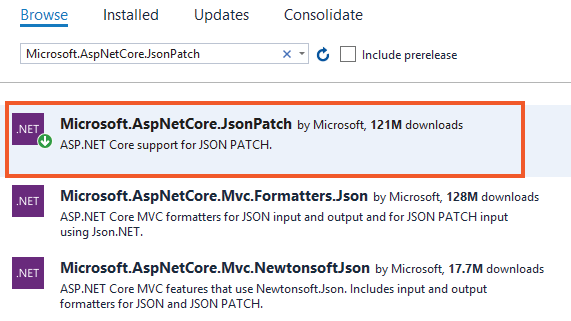
First add the package called Microsoft.AspNetCore.JsonPatch from NuGet. This is needed to support JSON Patch. I have shown this package in the below image.
Next to the Controllers folder of the project, add a new Controller called ReservationController.cs. Add the following code to it.
using APIControllers.Models;
using Microsoft.AspNetCore.JsonPatch;
using Microsoft.AspNetCore.Mvc;

namespace APIControllers.Controllers
{
    [ApiController]
    [Route("api/[controller]")]
    public class ReservationController : ControllerBase
    {
        private IRepository repository;
        public ReservationController(IRepository repo) => repository = repo;

        [HttpGet]
        public IEnumerable<Reservation> Get() => repository.Reservations;

        [HttpGet("{id}")]
        public ActionResult<Reservation> Get(int id)
        {
            if (id == 0)
                return BadRequest("Value must be passed in the request body.");
            return Ok(repository[id]);
        }

        [HttpPost]
        public Reservation Post([FromBody] Reservation res) =>
        repository.AddReservation(new Reservation
        {
            Name = res.Name,
            StartLocation = res.StartLocation,
            EndLocation = res.EndLocation
        });

        [HttpPut]
        public Reservation Put([FromForm] Reservation res) => repository.UpdateReservation(res);

        [HttpPatch("{id}")]
        public StatusCodeResult Patch(int id, [FromBody] JsonPatchDocument<Reservation> patch)
        {
            var res = (Reservation)((OkObjectResult)Get(id).Result).Value;
            if (res != null)
            {
                patch.ApplyTo(res);
                return Ok();
            }
            return NotFound();
        }

        [HttpDelete("{id}")]
        public void Delete(int id) => repository.DeleteReservation(id);
    }
}
Notice the Controller derives from ControllerBase class and has an attribute called [ApiController] applied to it. The Controller gets the Reservation class object in the constructor through the Dependency Injection feature.
Route of the API Controller
The route by which this controller can be reached is defined by Attribute Routes. You can check my tutorial called Learn Attribute Routing in ASP.NET Core to know it in full details.
This Web API Controller is reached through the URL – https://localhost:44324/api/Reservation. Here “44324” is the port number.
[ApiController]
[Route("api/[controller]")]
public class ReservationController : ControllerBase
{
...
}
Now test this thing by running the application and then opening the URL – https://localhost:44324/api/Reservation on the browser. You will see the JSON of the 3 reservations as shown in the below image.
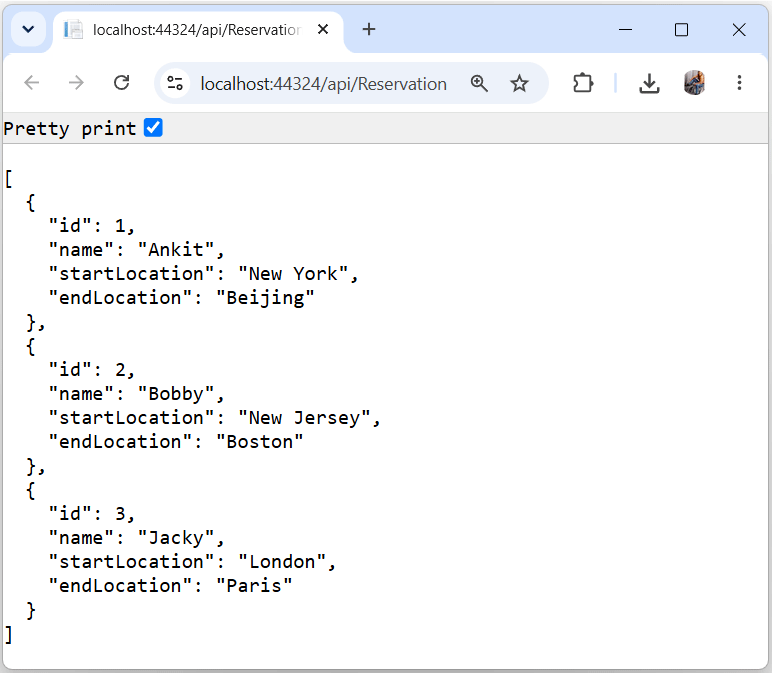
The URL calls the Get method of the Reservation controller. This method is shown below:
[HttpGet]
public IEnumerable<Reservation> Get() => repository.Reservations;
As you can see this method returns all the reservations so you get the JSON of the reservations on the browser.
Web API Action Methods
A Web API supports multiple types of action methods, each corresponding to a standard HTTP verb: GET, POST, PUT, PATCH, DELETE, and HEAD. When a request reaches the Web API, it inspects the HTTP method type of the incoming request and routes it to the matching action method.
How Request Routing Works
The Web API matches incoming requests to action methods based on their HTTP verb:
| HTTP Method | Action Method Type | Typical Use Case |
|---|---|---|
| GET | GET action method | Retrieve/read data |
| POST | POST action method | Create new data |
| PUT | PUT action method | Fully update existing data |
| PATCH | PATCH action method | Partially update existing data |
| DELETE | DELETE action method | Remove data |
| HEAD | HEAD action method | Retrieve headers only (no body) |
By default ASP.NET CORE does the following things:
- 1. Sends the data to the client as string if the action method returns a string. It also sets the Content-Type header of the response as text/plain.
- 2. Sends the data to the client as JSON if the action method return type is anything but not string like int, datetime, object, simple type, complex type, etc. It also sets the Content-Type header of the response as application/json.
The Web API Controller action methods have been applied some HTTP attributes. So they are invoked only by the specific HTTP method known as VERBS.
Examples of VERBS are – GET, POST, PUT, PATCH, DELETE and HEAD.
| Name | Description |
|---|---|
| HttpGet | It specifies that the action method can be invoked only by HTTP requests that use the GET verb. |
| HttpPost | It specifies that the action method can be invoked only by HTTP requests that use the POST verb. |
| HttpDelete | It specifies that the action method can be invoked only by HTTP requests that use the DELETE verb. |
| HttpPut | It specifies that the action method can be invoked only by HTTP requests that use the PUT verb. |
| HttpPatch | It specifies that the action method can be invoked only by HTTP requests that use the PATCH verb. |
| HttpHead | It specifies that the action method can be invoked only by HTTP requests that use the HEAD verb. |
Note – for action methods accepting multiple verbs use the C# attribute called [AcceptVerbs].
[HttpGet] Action Methods
This API defines two [HttpGet] action methods, both triggered by an HTTP GET request. Each serves a distinct purpose based on whether a specific record ID is provided.
- 1. The first action method delivers all the reservation records to the client in JSON. The default return type of a Controller’s action is JSON so when a class object is delivered then it is done by JSON format. Notice the HttpGet attribute does not contain a routing segment so the URL to invoke this action method is – https://localhost:44324/api/Reservation. This action method is shown below.
[HttpGet]
public IEnumerable<Reservation> Get() => repository.Reservations;- 2. The second action method contains the id routing segment as the argument. It then delivers the reservation record for that particular id only, in JSON format. I have used Ok() method which returns the status code 200 along with the reservation record to the client. The return type of this method is ActionResult<Reservation>. The URLs to invoke this Action method are:
https://localhost:44324/api/Reservation/1
https://localhost:44324/api/Reservation/2
https://localhost:44324/api/Reservation/3
etc
This action method is shown below.
[HttpGet("{id}")]
public ActionResult<Reservation> Get(int id)
{
    if (id == 0)
        return BadRequest("Value must be passed in the request body.");
    return Ok(repository[id]);
}
If the client does not sends an id in the request then in that case the id gets the default value of 0. So I am simply returning BadRequest() for the response.
The HTTP GET requests can be made directly from the browser. Run your application and go to the URL https://localhost:44324/api/Reservation, where you will see a JSON containing all the reservations:
[
  {
    "id": 1,
    "name": "Ankit",
    "startLocation": "New York",
    "endLocation": "Beijing"
  },
  {
    "id": 2,
    "name": "Bobby",
    "startLocation": "New Jersey",
    "endLocation": "Boston"
  },
  {
    "id": 3,
    "name": "Jacky",
    "startLocation": "London",
    "endLocation": "Paris"
  }
]
The image is given below:
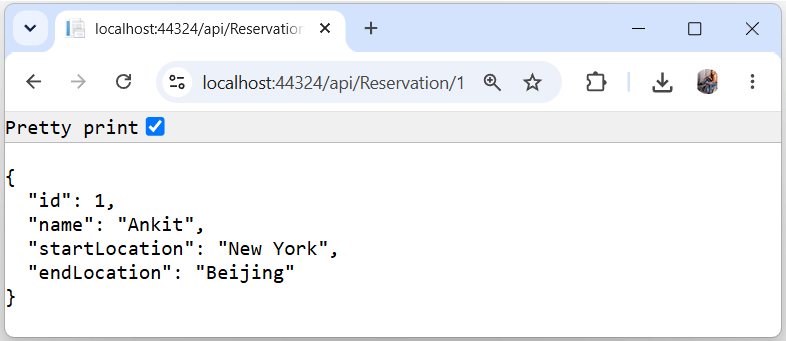
Similarly if you go to the URL – https://localhost:44324/api/Reservation/1 in your browser, then you will get the JSON for the first Reservation:
{
  "id": 1,
  "name": "Ankit",
  "startLocation": "New York",
  "endLocation": "Beijing"
}
Check the below image:
[HttpPost] Action
The HttpPost Action method is used to create a new Reservation. It receives the Reservation object in it’s argument. The [FromBody] attribute applied to it’s argument ensures the body content send from the client will be decoded, and put to this argument, using the Model Binding concept of ASP.NET Core.
The URL to invoke this Action method is – https://localhost:44324/api/Reservation. Note that although it’s URL is same as that of the GET Action, the presence of [HttpPost] attribute ensures that it is invoked only for HTTP request of type POST.
This action returns the newly added Reservation object in JSON format. The reservation object also contains the value of the created Id field. This method is given below.
[HttpPost]
public Reservation Post([FromBody] Reservation res) =>
repository.AddReservation(new Reservation
{
    Name = res.Name,
    StartLocation = res.StartLocation,
    EndLocation = res.EndLocation
});
[HttpPut] Action
The HttpPut Action is used for doing the update of a Reservation object. It will be invoked when Http request of type PUT is made to the URL – https://localhost:44324/api/Reservation. This method is given below.
[HttpPut]
public Reservation Put([FromForm] Reservation res) => repository.UpdateReservation(res);
The [FromForm] attribute on the argument ensure that the form data sent by the client will be used to bind this Reservation object using Model Binding.
This action method returns the Updated Reservation object in JSON format.
[HttpDelete] Action
The HttpDelete action deletes a reservation from the repository. This method is called when Http request of type DELETE is initiated on the URLs given below –
https://localhost:44324/api/Reseration/1
https://localhost:44324/api/Reseration/2
https://localhost:44324/api/Reseration/3
etcNote: The id of the reservation to be deleted is passed as the 3rd segment of the URL. This method is shown below.
[HttpDelete("{id}")]
public void Delete(int id) => repository.DeleteReservation(id);
[HttpPatch] Action
The HttpPatch Action can do multiple operations, like Adding, Removing, Updating, Copying, etc, of a Reservation object which is sent by the client. Here the client only sends a specific set of Reservation properties instead of the whole reservation object to the API in JSON format.
How It Works:
- The client sends only a subset of Reservation properties — not the full object — in JSON format.
- The API applies the requested changes to the existing record without requiring the complete resource payload.
- This makes PATCH more efficient than PUT for small, targeted updates.
This JSON format of Patch request looks like:
[
    { "op": "replace", "path": "Name", "value": "Ram"},
    { "op": "replace", "path": "StartLocation", "value": "Moscow"}
]
The JSON has op property which specifies the type of the operation, and a path property which specifies where the operation will be applied. The value property specifies it’s new value.
Microsoft now ships an official package for this: Microsoft.AspNetCore.JsonPatch.SystemTextJson, which gives you a JsonPatchDocument<t> that works natively with System.Text.Json.
- Install the package:
dotnet add package Microsoft.AspNetCore.JsonPatch.SystemTextJson - Update your controller’s using statement and type : swap the namespace from
Microsoft.AspNetCore.JsonPatchtoMicrosoft.AspNetCore.JsonPatch.SystemTextJson
ASP.NET Core will automatically process the JSON data and sends it to the action method as a JsonPatchDocument<T> object, where T is the type of the model object to be modified (here it is the Reservation object).
The JsonPatchDocument object is then used to modify an object from the repository using the ApplyTo() method. See it’s code below.
[HttpPatch("{id}")]
public StatusCodeResult Patch(int id, [FromBody]JsonPatchDocument<Reservation> patch)
{
    var res = (Reservation)((OkObjectResult)Get(id).Result).Value;
    if (res != null)
    {
        patch.ApplyTo(res);
        return Ok();
    }
    return NotFound();
}
The reservation is fetched by calling Get(id) method and casting the result to OkObjectResult. One more casting is perfomed afterwards to get the value in Reservation type object – var res = (Reservation)((OkObjectResult)Get(id).Result).Value.
HTTP PATCH quick reference table:
| HTTP Method | Update Type | Payload Sent by Client |
|---|---|---|
| PUT | Full update | Entire object |
| PATCH | Partial update | Only changed fields/properties |
Finally before I conclude, lets see the table given below that summarizes the working details for each of the Web APIs action methods:
| HTTP Request Type | URL | Data from Client | Returns |
|---|---|---|---|
| GET | /api/Reservation | No data | Returns all the reservations in JSON |
| GET | /api/Reservation/1, /api/Reservation/2, etc | No data | Returns the reservation data of the id which is sent to its parameter in JSON |
| POST | /api/Reservation | The Reservation object in JSON. | Returns the newly created Reservation object in JSON |
| PUT | /api/Reservation | The Reservation object in JSON. | Returns the newly updated Reservation object in JSON |
| DELETE | /api/Reservation/1, /api/Reservation/2, etc | No data | None |
| PATCH | /api/Reservation/1, /api/Reservation/2, etc | A JSON that contains set of modifications to be applied. | Returns confirmation that the changes have been applied. |
The link to download the full source code of this tutorial is given below:
In this way the API is created in ASP.NET Core. In the next tutorial I will consume this API, link is – How to Call Web API in ASP.NET Core.
SHARE THIS ARTICLE


Related Tutorials:




ABOUT THE AUTHOR
I hope you enjoyed reading this tutorial. If it helped you then consider buying a cup of coffee for me. This will help me in writing more such good tutorials for the readers. Thank you.

HELLO EVERYONE
 Welcome to YogiHosting - A Programming Tutorial Website. It is used by millions of people around the world to learn and explore about ASP.NET Core, Blazor, jQuery, JavaScript, Docker, Kubernetes and other topics.
SUBSCRIBE TO NEWSLETTER
Enter your email address to subscribe to this blog and receive notifications of new posts by email.
Join 90K other subscribers