


How to integrate OpenTelemetry with Jaeger for Distributed Tracing in ASP.NET Core
Distributed tracing is a digital “breadbox trail” that allows engineers to follow a single request as it hops across various servers, databases, and microservices. It transforms a chaotic web of data into a clear timeline, making it easy to pinpoint exactly where a system is breaking or slowing down. Distributed tracing isolates a single request’s journey, stitching together every task performed across different services while filtering out the noise of thousands of other simultaneous users. It effectively “colors” one specific thread of execution so you can follow it from start to finish without getting lost in the crowd.
OpenTelemetry (often called OTel) is the global industry standard for how software applications generate and send data about their health and performance. It is an open source observability framework for cloud native software which provides a single set of APIs, libraries, agents, and collector services to capture distributed traces and metrics from your application.
What is Trace and Activity? Each time a new request is received by an app, it can be associated with a trace. In .NET, a trace are represented by instances of System.Diagnostics.Activity and it can be spanning across many distinct processes. The first Activity is the root of the trace tree and it tracks the overall duration and success/failure. Child activities can be created to subdivide the work into different steps that can be tracked individually.
What is Jaeger
Jaeger is an observability platforms to track requests going through a complex web of services. Jaeger acts as the connective tissue, mapping every hop and uncovering hidden delays or failures. By bridging the gaps between isolated components, Jaeger transforms fragmented data into a clear roadmap for troubleshooting, allowing engineers to pinpoint bottlenecks and boost reliability. It is a fully open-source, cloud-native powerhouse built to scale alongside the most demanding architectures.
Jaeger does the following things:
- Monitor distributed workflows
- Find & fix performance bottlenecks
- Track down root causes
- Analyze service dependencies
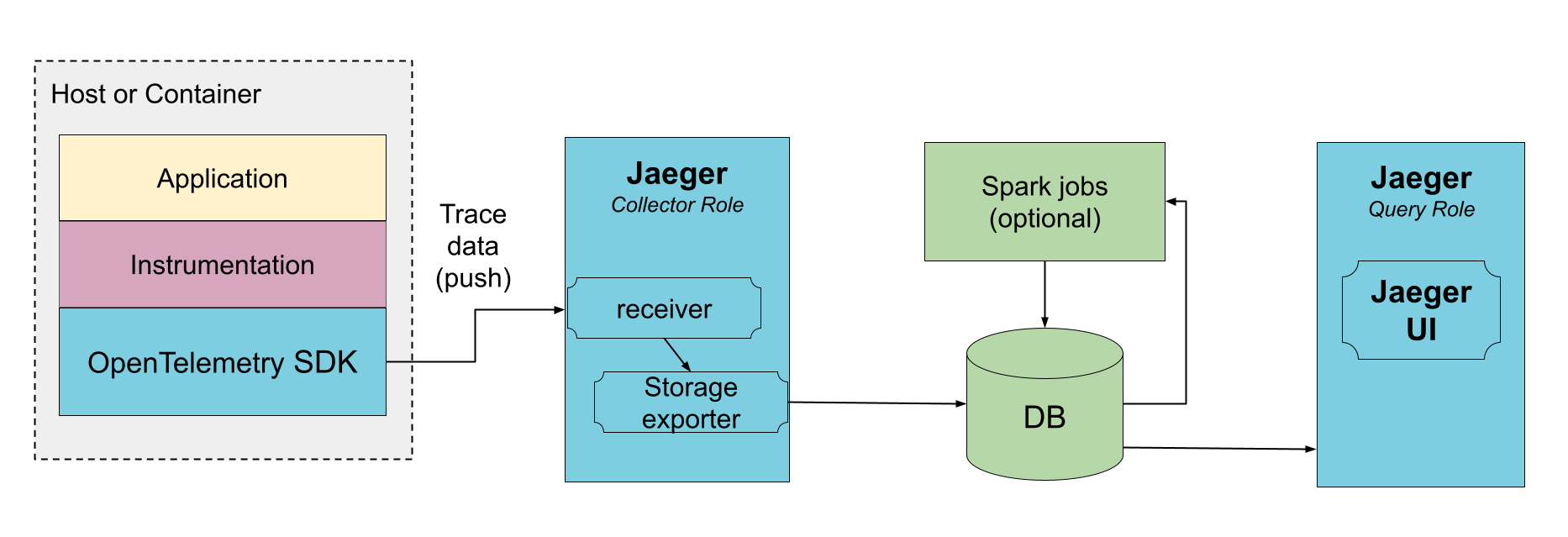
The below figure explains the Jaeger architecture where it receives the data from traced applications and write it directly to storage. The Jaeger UI is a web-based interface for visualizing and analyzing distributed tracing data, playing a critical role in microservices monitoring. It enables developers to search for specific traces, map request flows, analyze latency bottlenecks, compare trace data, and troubleshoot service errors.
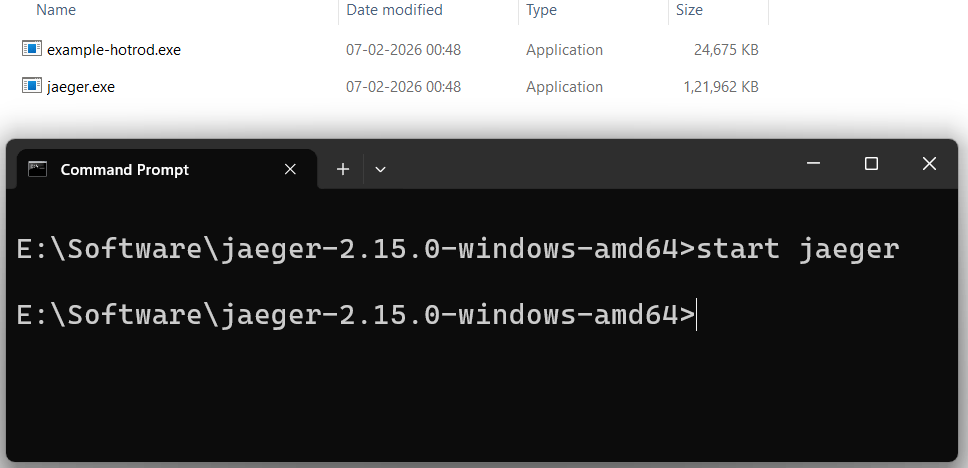
First download Jaeger from the official website. I am using windows so I will proceed with the windows version. The download file is a compressed file which you need to extract to a folder. You will get jaeger.exe file, next navigate to this folder from command prompt and run the command – start jaeger. See the below image where I am starting jaeger from command prompt.
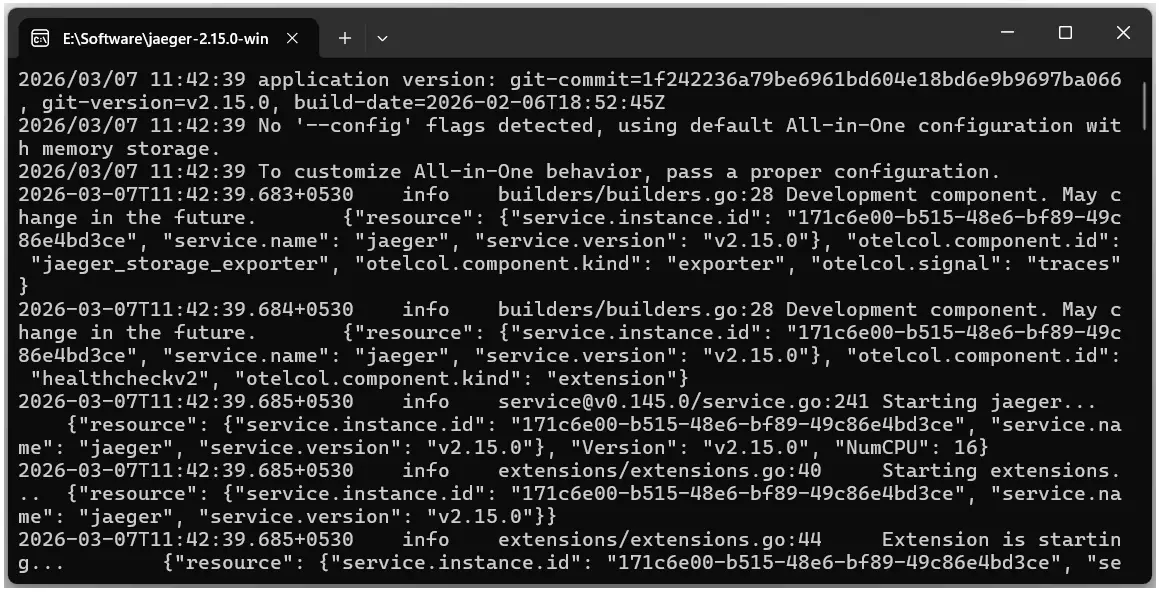
A new command prompt window will open which will show Jaeger logs – version, ports and configurations. This means Jaeger is in the running state.
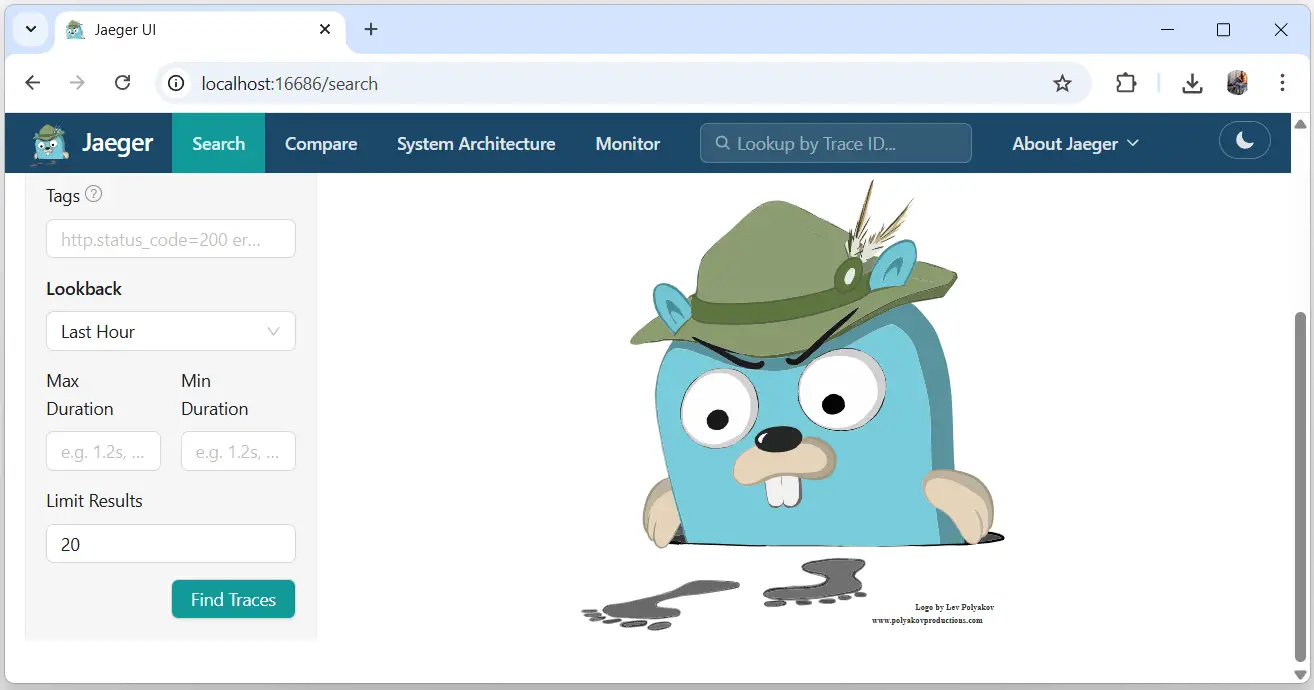
Open the url – http://localhost:16686 on your browser which will open the Jaeger UI.
Integrate Jaeger in ASP.NET Core
First I need to add OpenTelemetry libraries and SDKs to add instrumentation into my ASP.NET Core app. These instrumentations automatically capture the traces, metrics, and logs we are interested in. These libraries need to be installed from NuGet:
dotnet add package OpenTelemetry.Exporter.OpenTelemetryProtocol
dotnet add package OpenTelemetry.Instrumentation.AspNetCore
dotnet add package OpenTelemetry.Extensions.Hosting
dotnet add package OpenTelemetry.Instrumentation.Http
dotnet add package OpenTelemetry.Exporter.Console
It’s time to configure some services in the program class.
Update the code of Program.cs file as given below.
var tracingOtlpEndpoint = builder.Configuration["OTLP_ENDPOINT_URL"];
var otel = builder.Services.AddOpenTelemetry();

otel.ConfigureResource(resource => resource.AddService(serviceName: builder.Environment.ApplicationName));

otel.WithTracing(tracing =>
{
    tracing.AddAspNetCoreInstrumentation();
    tracing.AddHttpClientInstrumentation();
    if (tracingOtlpEndpoint != null)
    {
        tracing.AddOtlpExporter(otlpOptions =>
        {
            otlpOptions.Endpoint = new Uri(tracingOtlpEndpoint);
        });
    }
    else
    {
        tracing.AddConsoleExporter();
    }
});
In the above code:
- AddOpenTelemetry – adds OpenTelemetry SDK services
- AddAspNetCoreInstrumentation – adds ASP.NET Core instrumentation
- AddHttpClientInstrumentation – adds HttpClient instrumentation for outgoing requests
I am reading the url of Jaeger endpoint from the appsettings.json from the code line:
var tracingOtlpEndpoint = builder.Configuration\["OTLP\_ENDPOINT\_URL"];Then I am adding OpenTelemetry (OTLP) exporter to the trace provider which is Jaeger. The below code line does this work.
tracing.AddOtlpExporter(otlpOptions =>
{
    otlpOptions.Endpoint = new Uri(tracingOtlpEndpoint);
});
I will have to add the “OTLP_ENDPOINT_URL” in the appsettings.json as shown below.
"OTLP_ENDPOINT_URL": "http://localhost:4317/"The url – http://localhost:4317/ is where Jaeger is listening to the traffic. This is given on the Jaeger console (which opened when I ran the start jaeger start command). Find the line where Jaeger is listening for OTLP traffic via gRPC to contain this url. The below given line is the one which contains this – “endpoint”: “127.0.0.1:4317”.
2026-03-07T11:42:39.708+0530 info otlpreceiver@v0.145.0/otlp.go:120 Starting GRPC server {"resource": {"service.instance.id": "171c6e00-b515-48e6-bf89-49c86e4bd3ce", "service.name": "jaeger", "service.version": "v2.15.0"}, "otelcol.component.id": "otlp", "otelcol.component.kind": "receiver", "endpoint": "127.0.0.1:4317"}Lets run the app and check whether Jaeger is capturing the Traces or not. I will have to refresh the Jaeger UI tab.
Jaeger has captured my Apps traces. My apps name is “JaegerTutorial” and it is visible on the dropdown list, the below image shows it.
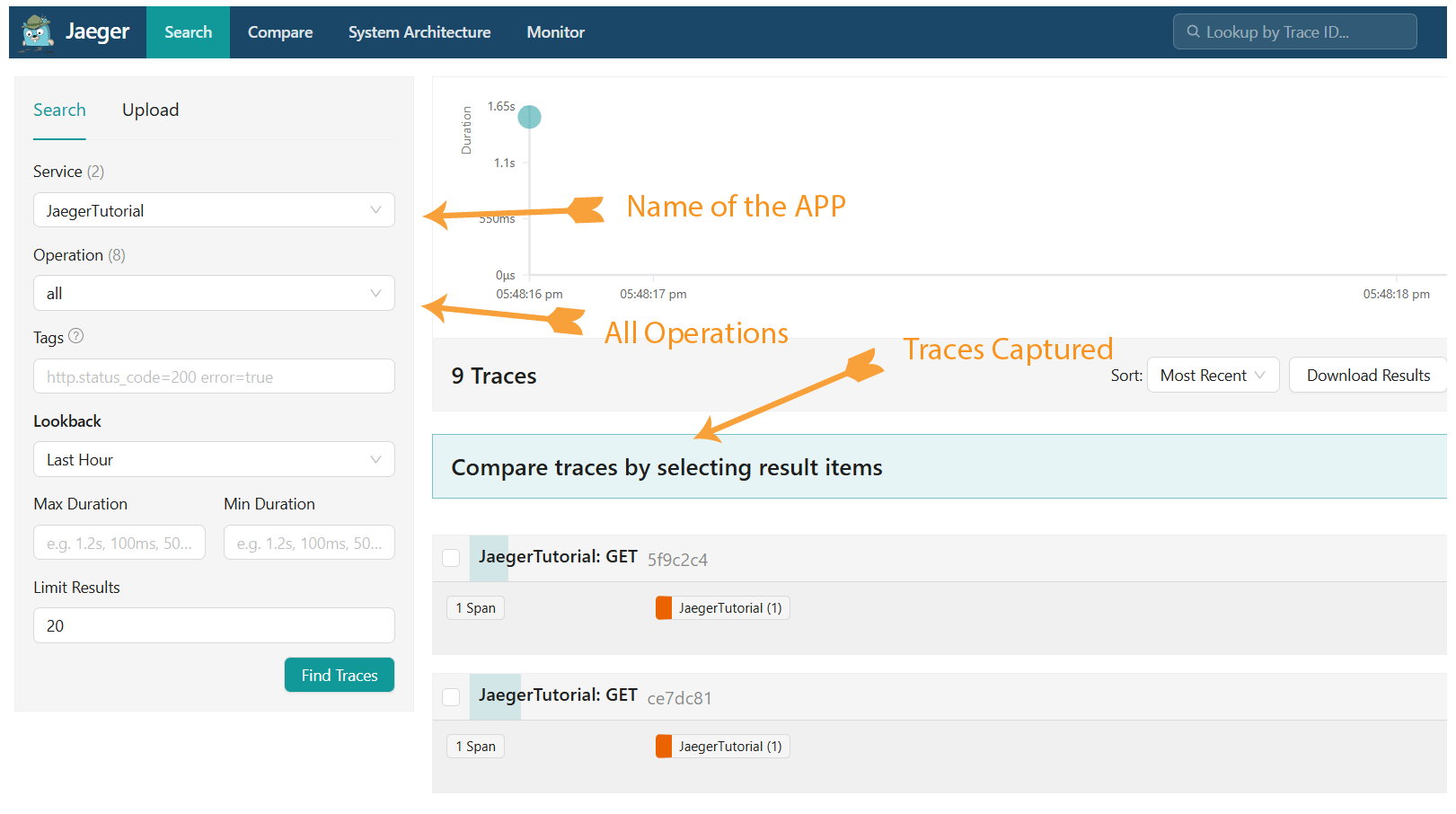
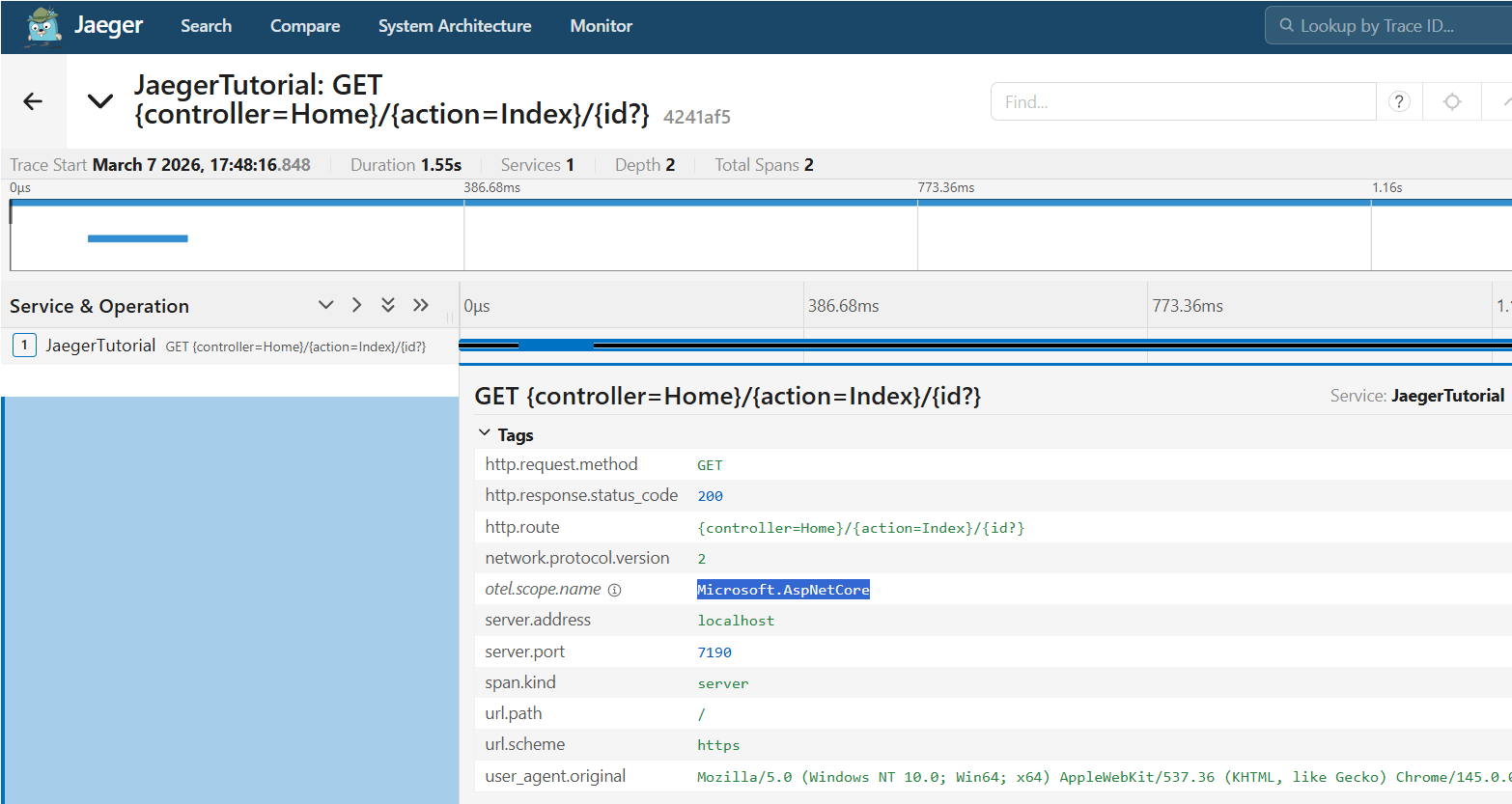
I click on the Find Traces button to see all the traces. Next I select the trace called – JaegerTutorial: GET {controller=Home}/{action=Index}/{id?} 4241af5. This shown the HTTP GET traces captured when the Home page of the app is called. Also notice the otel.scope.name as Microsoft.AspNetCore. Check the below image:
I have successfully integrated Jaeger to my ASP.NET Core app.
SQL Server Tracing in Jaeger + ASP.NET Core
To collect SQL Server traces and export to Jaeger, I first need to add the NuGet package called OpenTelemetry.Instrumentation.SqlClient. So I run the below given dotnet add package command:
dotnet add package OpenTelemetry.Instrumentation.SqlClientNext, I enable Enable SqlClient Instrumentation in the Program class with the following code line – AddSqlClientInstrumentation(). Check the highlighted code below:
otel.WithTracing(tracing =>
{
    tracing.AddAspNetCoreInstrumentation();
    tracing.AddHttpClientInstrumentation();
    tracing.AddSqlClientInstrumentation();
    if (tracingOtlpEndpoint != null)
    {
        tracing.AddOtlpExporter(otlpOptions =>
        {
            otlpOptions.Endpoint = new Uri(tracingOtlpEndpoint);
        });
    }
    else
    {
        tracing.AddConsoleExporter();
    }
});
This will record the following:
- error type
- namespace
- operation name
- query summary
- query text
- response status code
- stored procedure name
- system name
- server address
- server port
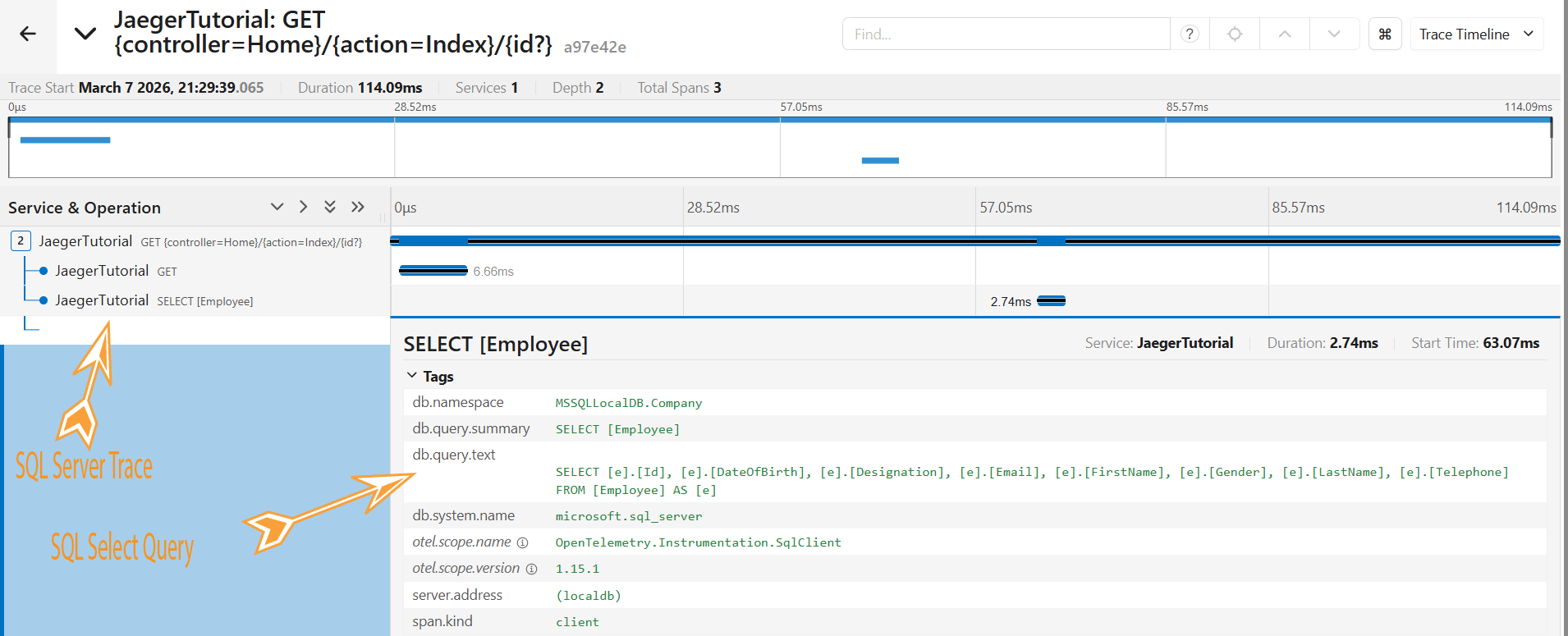
With this configuration in place, when the app fetched the records from the SQL Server database. The SQL Server traces are recorded and can be viewed on Jaeger. On Jaeger UI, I can see details like:
- db.system.name microsoft.sql\_server
- otel.scope.name OpenTelemetry.Instrumentation.SqlClient
To test it, I added a Read action method in the HomeController.cs which reads Employee records from the database. See below code.
public async Task<IActionResult> Read()
{
    var employees = context.Employee;
    return View(employees);
}
Next, on Jaeger I can see the traces along with the SQL Select query that ran against the database.
SELECT [e].[Id], [e].[DateOfBirth], [e].[Designation], [e].[Email], [e].[FirstName], [e].[Gender], [e].[LastName], [e].[Telephone]
FROM [Employee] AS [e]
Check the below Jaeger screenshot where I have shown this information.
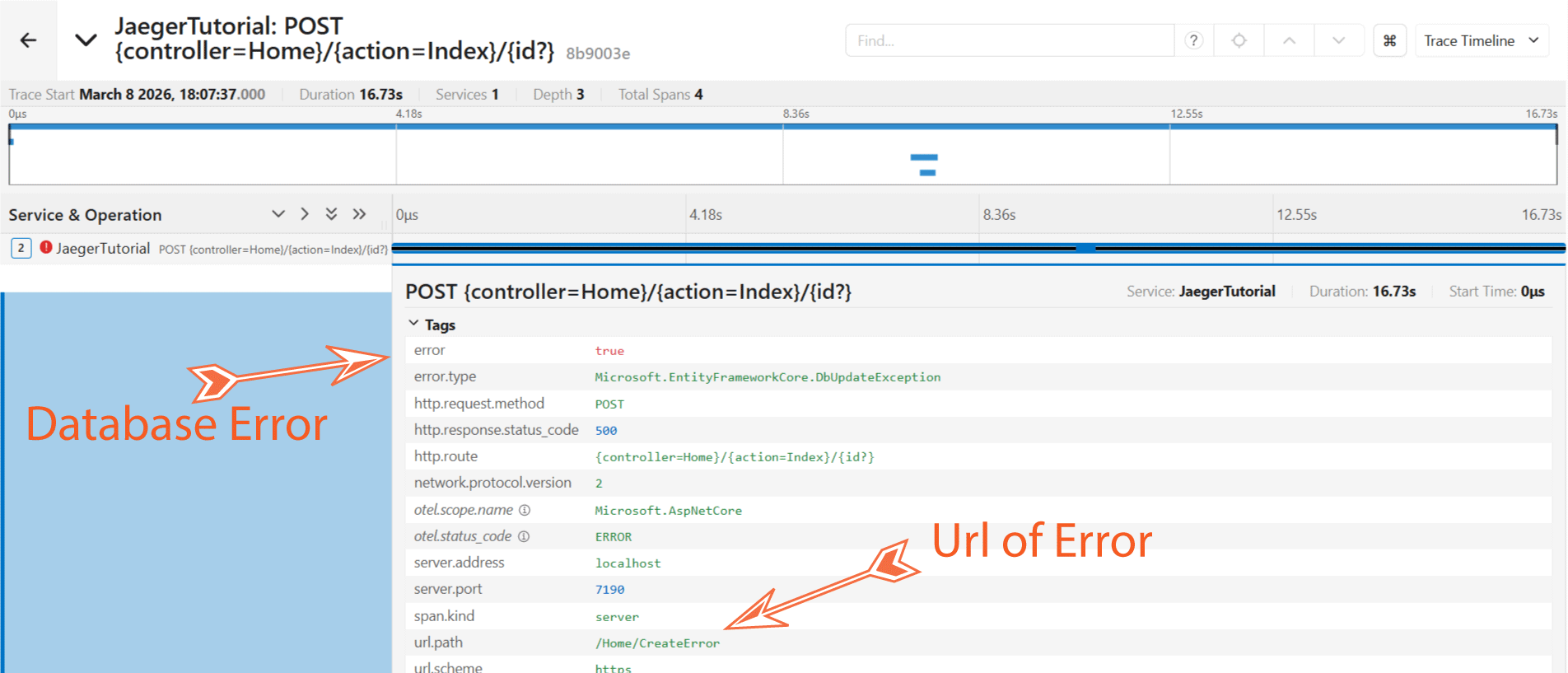
This is very helpful in cases where there are databases errors like connection errors, sql query errors and so on. We can find the causes and location of these error and can quicky fix them. See the below image which shows error trace displayed on Jaeger. This database error came when trying to insert a record. Jaeger also displayed the url path in the app from where this db error was raised.
Create Custom Traces with ActivitySource class
We can create custom traces or Activities with ActivitySource class. An Activity has an operation name, an ID, a start time and duration, tags, and baggage. I added a class named AppActivitySource.cs inside the Models folder of the app, see it’s code below.
public class AppActivitySource : IDisposable
{
    public static readonly string ActivitySourceName = "AppCustomActivity";
    private readonly ActivitySource activitySource = new ActivitySource(ActivitySourceName);

    public Activity AppActivity(string activityName, ActivityKind kind = ActivityKind.Internal)
    {
        var activity = activitySource.StartActivity(activityName, kind);
        return activity;
    }

    public void Dispose()
    {
        activitySource.Dispose();
    }
}
The above class creates an ActivitySource object with name “AppCustomActivity”. The name is provided in a static variable so that it can be added to the TracerProviderBuilder object in the Program class.
See the AppActivity() method which creates a new Activity using the StartActivity() method.
Now, I register the AppActivitySource class as a Singleton in the Program.cs and add it to the Trace builder. The code for this is given below.
builder.Services.AddSingleton<AppActivitySource>();

otel.WithTracing(tracing =>
{
    tracing.AddAspNetCoreInstrumentation();
    tracing.AddHttpClientInstrumentation();
    tracing.AddSqlClientInstrumentation();
    tracing.AddEntityFrameworkCoreInstrumentation();
    tracing.AddSource(AppActivitySource.ActivitySourceName); // custom Activity

    if (tracingOtlpEndpoint != null)
    {
        tracing.AddOtlpExporter(otlpOptions =>
        {
            otlpOptions.Endpoint = new Uri(tracingOtlpEndpoint);
        });
    }
    else
    {
        tracing.AddConsoleExporter();
    }
});
I now create custom Activites in the Create action method of the HomeController.cs. This action method adds a new employee to the database. See the highlighted code below.
public class HomeController : Controller
{
    private CompanyContext context;
    private AppActivitySource appActivitySource;

    public HomeController(CompanyContext context, AppActivitySource appActivitySource)
    {
        this.context = context;
        this.appActivitySource = appActivitySource;
    }

    // other methods

    public IActionResult Create()
    {
        return View();
    }

    [HttpPost]
    public async Task<IActionResult> Create(Employee emp)
    {
        context.Add(emp);
        await context.SaveChangesAsync();

        using (Activity? activity = appActivitySource.AppActivity("CRUD Operations"))
        {
            activity?.SetTag("CREATE Employee", "Create Action HTTPOST");
        }

        ViewBag.Message = "Employee created successfully!";
        return View();
    }
}
After the employee is added I create a new custom Activity so that a new trace is created with the below code.
using (Activity? activity = appActivitySource.AppActivity("CRUD Operations"))
{
    activity?.SetTag("CREATE Employee", "Create Action HTTPOST");
}
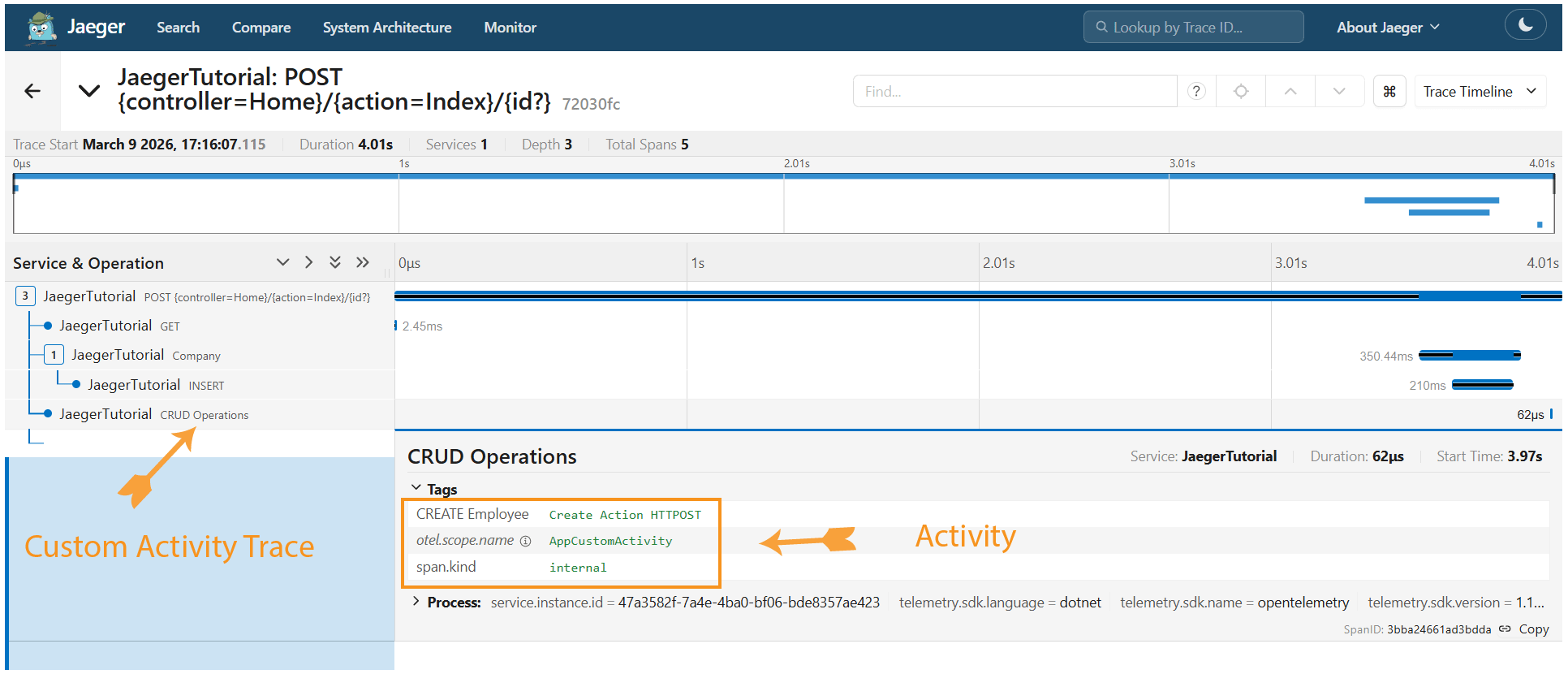
On Jaeger this activity is recorded as shown by the below image.
Entity Framework Core Tracing in Jaeger + ASP.NET Core
To collect Entity Framework Core traces the process is similar to that of SQL Server. I need to add the package called OpenTelemetry.Instrumentation.EntityFrameworkCore. The command to run on NuGet is:
dotnet add package OpenTelemetry.Instrumentation.EntityFrameworkCore --version 1.15.0-beta.1Next, on the Program class add the following code – AddEntityFrameworkCoreInstrumentation(). Check the highlighted code below.
otel.WithTracing(tracing =>
{
    tracing.AddAspNetCoreInstrumentation();
    tracing.AddHttpClientInstrumentation();
    tracing.AddSqlClientInstrumentation();
    tracing.AddEntityFrameworkCoreInstrumentation();

    if (tracingOtlpEndpoint != null)
    {
        tracing.AddOtlpExporter(otlpOptions =>
        {
            otlpOptions.Endpoint = new Uri(tracingOtlpEndpoint);
        });
    }
    else
    {
        tracing.AddConsoleExporter();
    }
});
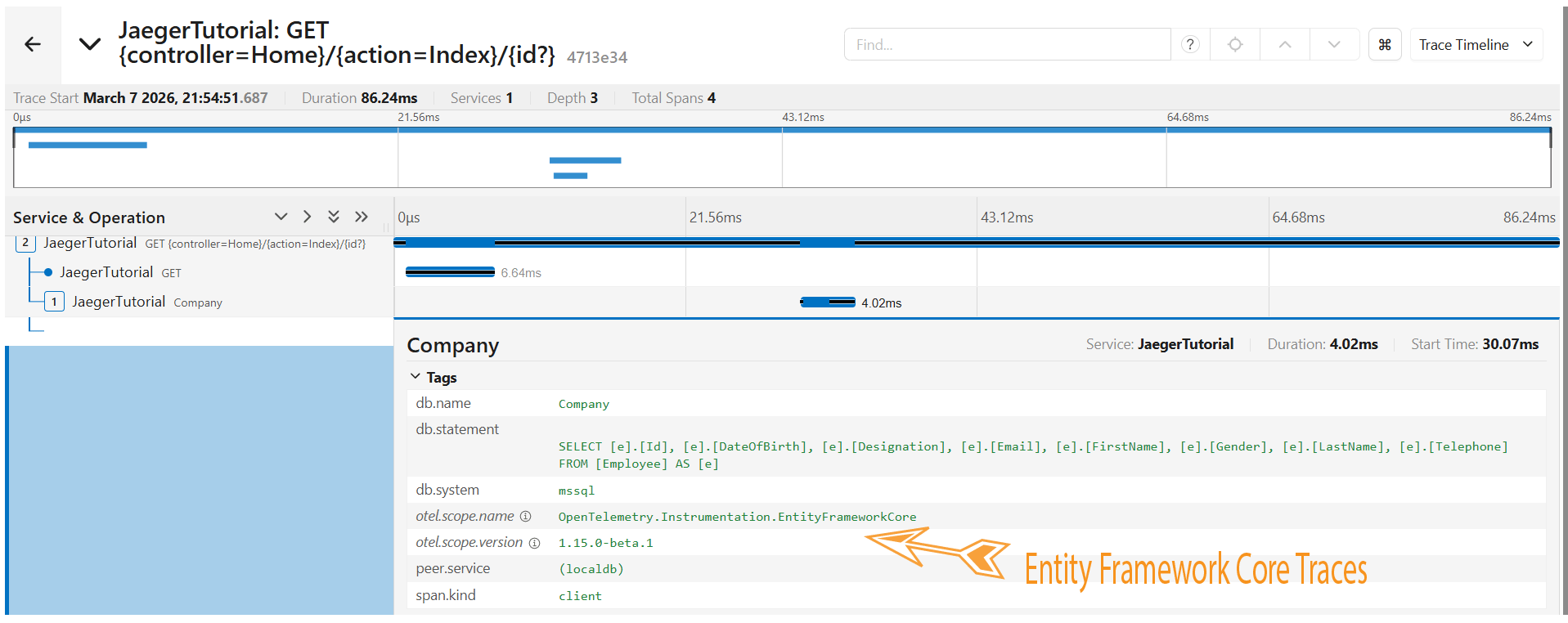
Now, whenever EF core is used to communicate with the database, the traces are recorded and viewed on Jaeger. Check the below image where Jaeger is showing the traces Entity Framework Core code that fetched the records from the database.
Web API Tracing in Jaeger + ASP.NET Core
In order to collect HTTP Web API traces I need to enable AddHttpClientInstrumentation() on the program class.
otel.WithTracing(tracing =>
{
    tracing.AddAspNetCoreInstrumentation();
    tracing.AddHttpClientInstrumentation();
    tracing.AddSqlClientInstrumentation();
    tracing.AddEntityFrameworkCoreInstrumentation();

    if (tracingOtlpEndpoint != null)
    {
        tracing.AddOtlpExporter(otlpOptions =>
        {
            otlpOptions.Endpoint = new Uri(tracingOtlpEndpoint);
        });
    }
    else
    {
        tracing.AddConsoleExporter();
    }
});
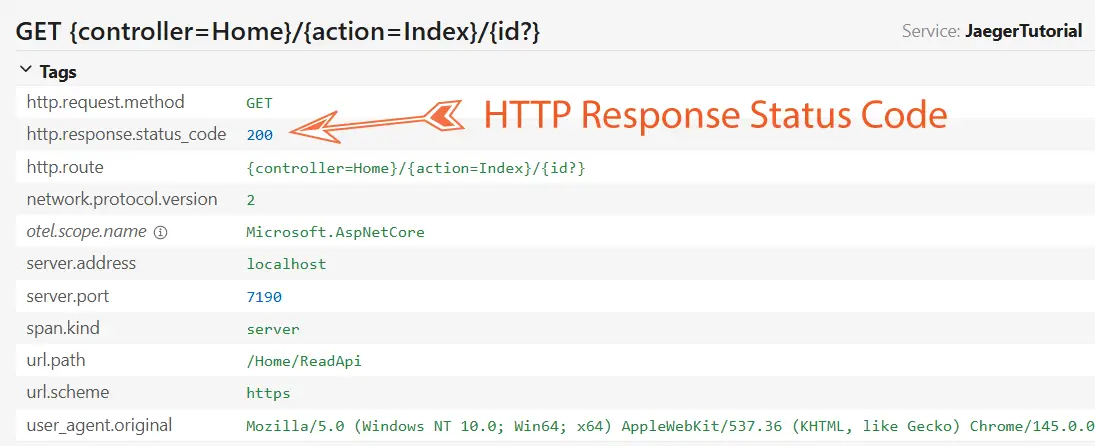
Next, when a web api is called then it’s traces are viewable on Jaeger. See the below image showing HTTP Response Status Code of 200 received from the web api.
Redis Cache Tracing in Jaeger + ASP.NET Core
Redis and Jaeger are often used together in modern cloud-native architectures to manage application performance and visibility. Redis serves as a high-speed, in-memory cache to speed up data retrieval, while Jaeger provides distributed tracing to visualize how requests flow through systems, including the time spent accessing Redis.
Firstly I run Redis from a Docker Container. The command is given below:
docker run --name redis -d -p 6379:6379 redisNext, I install the package OpenTelemetry.Instrumentation.StackExchangeRedis for Redis Instrumentation and Microsoft.Extensions.Caching.StackExchangeRedis for working with Redis on the app. The NuGet command is given below:
dotnet add package OpenTelemetry.Instrumentation.StackExchangeRedis --version 1.0.0-rc9.15
dotnet add package Microsoft.Extensions.Caching.StackExchangeRedis
After this, on the program class, I add IConnectionMultiplexer object to create a connection to the Redis server which is running from localhost:6379 url. I also register the redis cache as a service in the program class. See the below code.
IConnectionMultiplexer connectionMultiplexer = ConnectionMultiplexer.Connect("localhost:6379");

builder.Services.AddStackExchangeRedisCache(options =>
{
    options.ConnectionMultiplexerFactory = () => Task.FromResult(connectionMultiplexer);
});
Now final thing is to add the Redis service to the trace builder. See the highlighted code below.
otel.WithTracing(tracing =>
{
    tracing.AddAspNetCoreInstrumentation();
    tracing.AddHttpClientInstrumentation();
    tracing.AddSqlClientInstrumentation();
    tracing.AddEntityFrameworkCoreInstrumentation();
    tracing.AddSource(AppActivitySource.ActivitySourceName);
    tracing.AddRedisInstrumentation(connectionMultiplexer);

    if (tracingOtlpEndpoint != null)
    {
        tracing.AddOtlpExporter(otlpOptions =>
        {
            otlpOptions.Endpoint = new Uri(tracingOtlpEndpoint);
        });
    }
    else
    {
        tracing.AddConsoleExporter();
    }
});
I now use the IDistributedCache interface that provides the methods to manipulate items in the distributed cache implementation which in my case is Redis cache. So I create a new class called DistributedCacheExtensions.cs which provides extension methods for IDistributedCache. These extension method will provide works like reading from Cache and adding values to cache. I have not provided the class code here but you will find this class on the source code of this app, check the “Models” folder where you will find this class.
public static class DistributedCacheExtensions
{
    // code
}
Let’s check the working of Redis Cache and find it’s instrumentation data on Jaeger. So I add a new action method called “ReadCache” in the HomeController.cs with the following code.
public async Task<IActionResult> ReadCache()
{
    var employees = await GetAll();
    return View(employees);
}

public async Task<List<Employee>> GetAll()
{
    var cacheKey = "employees";
    var cacheOptions = new DistributedCacheEntryOptions()
            .SetAbsoluteExpiration(TimeSpan.FromMinutes(20))
            .SetSlidingExpiration(TimeSpan.FromMinutes(2));
    var products = await cache.GetOrSetAsync(
        cacheKey,
        async () =>
        {
            return await context.Employee.ToListAsync();
        },
        cacheOptions)!;
    return products!;
}
When this action method executes, the first time there is no cache so database is called to get the records. These records are also saved on the Redis Cache so that for the next time, the records are fetched from the Cache itself.
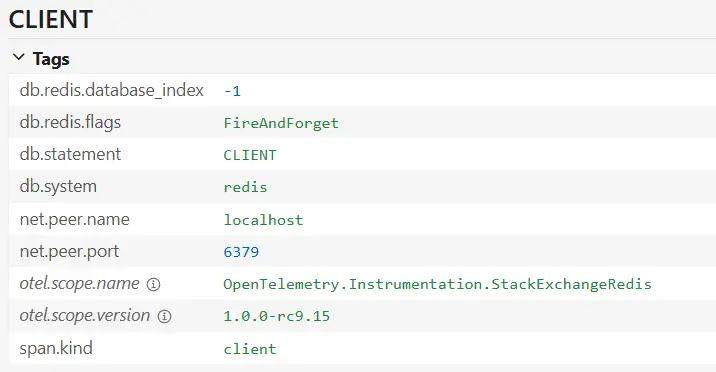
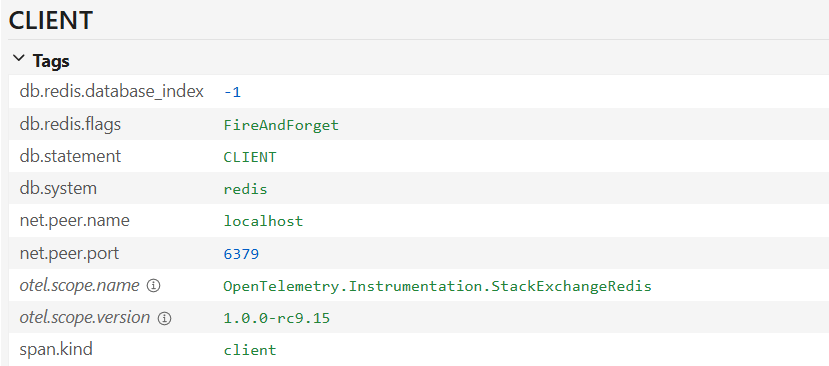
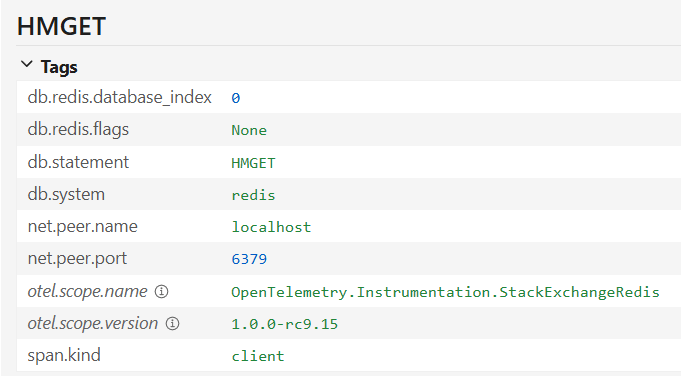
Now on Jaeger, I can see the full Redis Cache traces. I have shown this in the below images.
Microservices – MassTransit – RabbitMQ Cache Tracing in Jaeger + ASP.NET Core
I will now implement tracing for MassTransit and RabbitMQ. I will send Messages to RabbitMQ with MassTransit so that RabbitMQ publishes the messages to the consumer.
First thing I have to do is to run RabbitMQ from a Docker Container. The command is given below.
docker run -it --rm --name rabbitmq -p 5672:5672 -p 15672:15672 rabbitmq:4-managementIn the app I install the RabbitMQ OpenTelemetry NuGet package:
dotnet add package RabbitMQ.Client.OpenTelemetry --version 1.0.0-rc.2Next, on the program class, I add AddRabbitMQInstrumentation() as shown below.
otel.WithTracing(tracing =>
{
    tracing.AddAspNetCoreInstrumentation();
    tracing.AddHttpClientInstrumentation();
    tracing.AddSqlClientInstrumentation();
    tracing.AddEntityFrameworkCoreInstrumentation();
    tracing.AddSource(AppActivitySource.ActivitySourceName);
    tracing.AddRedisInstrumentation(connectionMultiplexer);
    tracing.AddRabbitMQInstrumentation();

    if (tracingOtlpEndpoint != null)
    {
        tracing.AddOtlpExporter(otlpOptions =>
        {
            otlpOptions.Endpoint = new Uri(tracingOtlpEndpoint);
        });
    }
    else
    {
        tracing.AddConsoleExporter();
    }
});
To test it, I first add the NuGet Package RabbitMQ.Client with the following command:
dotnet add package RabbitMQ.ClientNext, I add SendMessage action in the HomeController which sends the message to RabbitMQ.
public async Task<IActionResult> SendMessage(Employee emp)
{
    var factory = new ConnectionFactory { HostName = "localhost" };
    using var connection = await factory.CreateConnectionAsync();
    using var channel = await connection.CreateChannelAsync();

    await channel.QueueDeclareAsync(queue: "hello", durable: false, exclusive: false, autoDelete: false,
        arguments: null);

    const string message = "Hello World!";
    var body = Encoding.UTF8.GetBytes(message);

    await channel.BasicPublishAsync(exchange: string.Empty, routingKey: "hello", body: body);

    return RedirectToAction("Index");
}
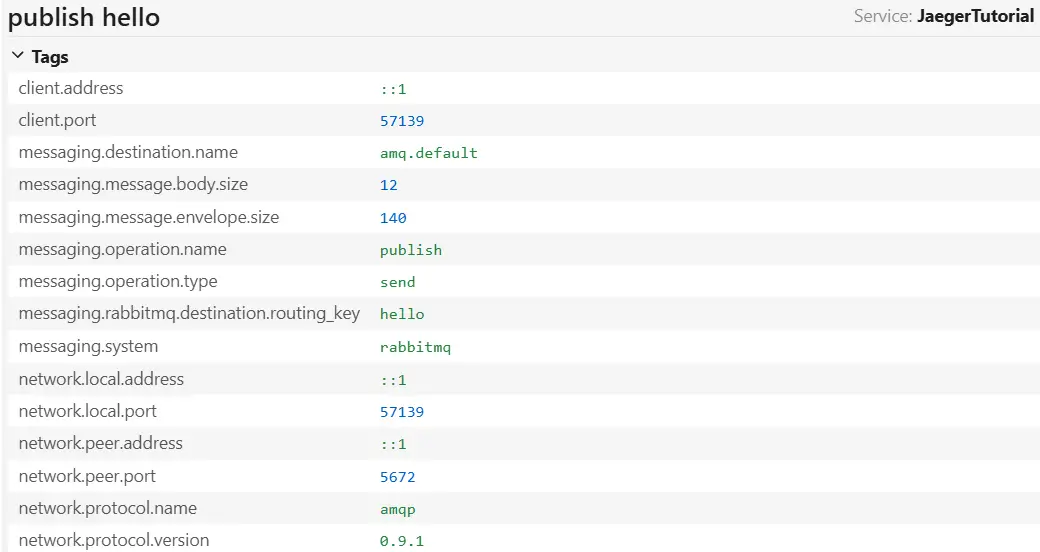
The traces of the messages are viewed in Jaeger. Check the below screenshot.
Microservices architecture is a more complex distributed trace. Take for example the case of an Online Shopping website, I am sending a request to get the customer’s cart. This request will first hit the API gateway, which proxies it to the Microservice that owns the data. Next this microservice calls another microservice to get the authorization information. And all of this leads to the distributed trace that Jaeger will display in a beautiful manner.
In this tutorial I covered how to use Jaeger in ASP.NET Core. I explained by to capture traces of SQL Server, Entity Framework Core, ActivitySource, Web API, Redis Cache, RabbitMQ and other things. You can download the source codes of this tutorial from my GitHub account, link given at the top.
SHARE THIS ARTICLE


Related Tutorials:


ABOUT THE AUTHOR
I hope you enjoyed reading this tutorial. If it helped you then consider buying a cup of coffee for me. This will help me in writing more such good tutorials for the readers. Thank you.

HELLO EVERYONE
 Welcome to YogiHosting - A Programming Tutorial Website. It is used by millions of people around the world to learn and explore about ASP.NET Core, Blazor, jQuery, JavaScript, Docker, Kubernetes and other topics.
SUBSCRIBE TO NEWSLETTER
Enter your email address to subscribe to this blog and receive notifications of new posts by email.
Join 90K other subscribers