


A Practical Guide to API Versioning in ASP.NET Core – Complete Guide
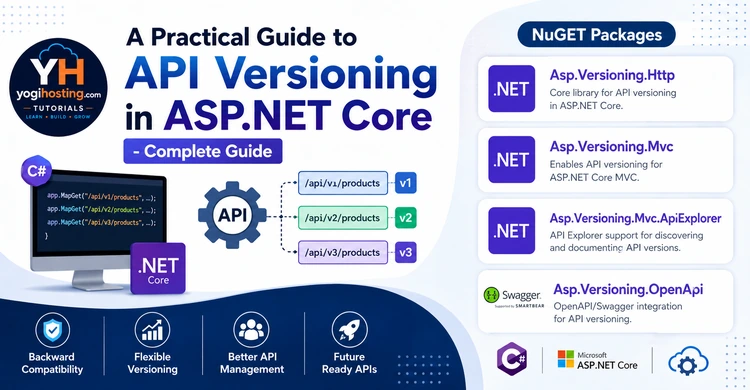
API versioning is the practice of managing changes to an API over time by labeling different iterations of it, so that existing consumers (apps, scripts, other services) aren’t broken when the API evolves.
In practice, it means: instead of having one single, ever-changing version of your API, you maintain distinct, identifiable versions — like v1 and v2 — so that:
- Old clients can keep calling the version they were built against.
- New clients (or updated old ones) can call the newer version with new features/fields/behavior.
- Both can coexist during a transition period.
A Simple Example
Say you have an endpoint that returns a user’s name as a single field:
GET /v1/users/123
{
  "name": "Jane Doe"
}
Later, you decide to split that into first and last name:
GET /v2/users/123
{
  "firstName": "Jane",
  "lastName": "Doe"
}
Rather than changing /users/123 in place (which would break every app still expecting a single name field), you introduce /v2/users/123 as a new version. Old clients keep using /v1/users/123 until they’re ready to migrate.
It’s essentially a contract mechanism: it lets an API provider make changes — even breaking ones — without immediately forcing every consumer to adapt at the same time.
Page Contents
Why API Versioning Matters
API versioning is important because APIs change over time, but you can’t force every consumer to update at the same moment you do. Here’s the core reasoning:
- Breaking changes are inevitable
- You don’t control your consumers’ release cycles
- Stability builds trust
- It enables safe, incremental evolution
- It supports clear deprecation policies
4 Ways to Version an API in ASP.NET Core
There are four common strategies for signaling which API version a client wants. ASP.NET Core’s Asp.Versioning library supports all of them, and you can even combine several at once.
1. URL Segment (Path) Versioning
The version is embedded directly in the URL path.
GET /api/v1/users
GET /api/v2/usersPros: Highly visible and discoverable, easy to test in a browser, plays nicely with caching/CDNs and logs.
Cons: Considered less “pure” REST (the URL is supposed to represent a resource, not its version); changes the URL every time you version.
Most common choice — the vast majority of public APIs use this because it’s simple and unambiguous.
2. Query String Versioning
The version is passed as a query parameter.
GET /api/users?api-version=1.0
GET /api/users?api-version=2.0Pros: Easy to implement, doesn’t change the route structure, easy to test manually.
Cons: Easy for clients to forget/omit, less visible in logs, can be stripped by some caching layers, clutters the URL.
3. Header Versioning
The version is sent in a custom HTTP header.
GET /api/users
X-Api-Version: 2.0Pros: Keeps URLs clean; considered more “correct” from a REST standpoint since the resource identifier doesn’t change.
Cons: Less discoverable (you can’t just visit a URL in a browser to test it), easy to forget when calling manually, harder to debug from logs unless you explicitly log headers.
4. Media Type (Content Negotiation) Versioning
The version is embedded in the Accept header’s media type — the most REST-purist approach.
GET /api/users
Accept: application/json;v=2.0
or vendor-specific:
Accept: application/vnd.myapi.v2+jsonPros: Most aligned with REST/HATEOAS principles — the URL represents the resource, and content negotiation determines its representation.
Cons: Most complex for consumers to use correctly, poor discoverability, awkward to test casually (can’t just hit it in a browser), rarely used outside of API-purist shops.
Combining Strategies
You’re not locked into one. It’s common to support multiple readers simultaneously so clients have flexibility:
Quick Comparison Table
| Strategy | Visibility | REST Purity | Ease of Use | Popularity |
|---|---|---|---|---|
| URL Segment | High | Low | High | Most common |
| Query String | Medium | Low | High | Common |
| Header | Low | High | Medium | Moderate |
| Media Type | Very Low | Highest | Low | Rare |
Bottom Line
If you want a pragmatic default: URL segment versioning is the safest choice for most teams — it’s explicit, debuggable, and what most API consumers expect. Reach for header or media type versioning only if you have a strong architectural reason (e.g., strict REST compliance) to keep the URL itself version-agnostic.
How to perform API Versioning in ASP.NET Core
The API Versioning in ASP.NET Core is performed with Asp.Versioning library, it offers a complete solution for versioning APIs in ASP.NET Core. The Asp.Versioning librarry supports multiple versioning strategies out of the box and integrates smoothly with both Minimal APIs and traditional controller-based APIs.
Pick the packages by hosting model.
| Package | Where to use? |
|---|---|
| Asp.Versioning.Http | Use it in Minimal APIs apps |
| Asp.Versioning.Mvc | Use it in Controllers based apps like MVC |
| Asp.Versioning.Mvc.ApiExplorer | Produces metadata used by tools like Swashbuckle (Swagger) to generate documentation |
| Asp.Versioning.OpenApi | Connects the API versioning library directly to Microsoft’s built-in OpenAPI generator(Microsoft.AspNetCore.OpenApi) |
This means if you are using Minimal APIs then you need to install the following 3 packages:
dotnet add package Asp.Versioning.Http --version 10.2.3
dotnet add package Asp.Versioning.Mvc.ApiExplorer --version 10.2.1
dotnet add package Asp.Versioning.OpenApi --version 10.2.3
For Controller based API install these 3 packages:
dotnet add package Asp.Versioning.Mvc --version 10.2.1
dotnet add package Asp.Versioning.Mvc.ApiExplorer --version 10.2.1
dotnet add package Asp.Versioning.OpenApi --version 10.2.3
Configuring API Versioning
Add the AddApiVersioning() method in the Program.cs class. The AddApiVersioning() is the extension method that registers the core API versioning services into ASP.NET Core’s dependency injection container. It’s the entry point that turns on versioning support for your app.
var builder = WebApplication.CreateBuilder(args);

builder.Services.AddApiVersioning(options =>
{
    // Treat 1.0 as the default version when a client does not ask for one.
    options.DefaultApiVersion = new Asp.Versioning.ApiVersion(1, 0);
    options.AssumeDefaultVersionWhenUnspecified = true;

    options.ReportApiVersions = true; // adds api-supported-versions header

    options.ApiVersionReader = Asp.Versioning.ApiVersionReader.Combine(
        new Asp.Versioning.UrlSegmentApiVersionReader(),
        new Asp.Versioning.HeaderApiVersionReader("X-Api-Version"),
        new Asp.Versioning.QueryStringApiVersionReader("api-version")
    );
})
.AddApiExplorer(options =>
{
    options.GroupNameFormat = "'v'VVV";
    options.SubstituteApiVersionInUrl = true;
})
.AddOpenApi();

var app = builder.Build();

if (app.Environment.IsDevelopment())
{
    app.MapOpenApi().WithDocumentPerVersion();
}

app.Run();
AddApiVersioning(…)
- DefaultApiVersion = new ApiVersion(1, 0) — sets the fallback version to 1.0.
- AssumeDefaultVersionWhenUnspecified = true — if a client makes a request without specifying any version at all, the request is treated as targeting the default version (1.0) instead of failing with an error. Without this flag, an unversioned request would typically be rejected when versioning is required.
- ReportApiVersions = true — makes responses include an api-supported-versions (and api-deprecated-versions, if applicable) header, telling clients what versions the API actually supports. This is purely informational and helps clients discover versioning without guessing.
- ApiVersionReader = ApiVersionReader.Combine(…) — defines how the version is extracted from an incoming request. Combine lets you accept multiple methods simultaneously, checked in order (or merged, depending on implementation) until one yields a version:
- UrlSegmentApiVersionReader() — reads the version from the URL path, e.g. /v1/products (requires a {version:apiVersion} route template segment).
- HeaderApiVersionReader(“X-Api-Version”) — reads it from a custom request header named X-Api-Version.
- QueryStringApiVersionReader(“api-version”) — reads it from a query string parameter, e.g. ?api-version=1.0.
So a client could version its request via URL, header, or query string — whichever is most convenient.
AddApiExplorer(…)
Chains onto the versioning builder to integrate with ASP.NET Core’s API Explorer (the same subsystem that feeds Swagger/OpenAPI generation), so tooling can understand versioned endpoints as distinct API groups.
- GroupNameFormat = “‘v’VVV” — controls how version numbers are formatted into group names for documentation purposes. VVV is a format specifier meaning “major.minor, dropping trailing zeros in a readable way” (via the ApiVersion.ToString(“VVV”) formatting). So version 1.0 becomes the group name v1, 1.1 becomes v1.1, etc. The literal ‘v’ prefixes it.
- SubstituteApiVersionInUrl = true — if your route template contains a version placeholder like {version:apiVersion}, this ensures that placeholder gets replaced with the actual version value when generating the OpenAPI/Swagger document’s paths, so the docs show something like /v1/products rather than a literal unsubstituted placeholder.
AddOpenApi()
This is the method for registering OpenAPI document generation services (Microsoft’s native alternative to Swashbuckle/Swagger). Combined with the API Explorer setup above, it lets the OpenAPI document generator produce a separate, correctly labeled OpenAPI spec per API version.
ApiVersionReader.Combine is useful as a temporary bridge during migrations, but it shouldn’t stay in a shipped API indefinitely. Commit to the one versioning scheme you want clients to use, document it clearly, and use a single reader — it’s cheaper per request and removes any ambiguity about how versions are resolved. Example – I added URL Segment (Path) Versioning:
options.ApiVersionReader = new UrlSegmentApiVersionReader();WithDocumentPerVersion()
It automatically discovers 1.0 and 2.0 from your .HasApiVersion(1.0) / .HasApiVersion(2.0) declarations and creates /openapi/v1.json and /openapi/v2.json for you, with the v1 document containing only v1 paths and no cross-document contamination.
Versioning Minimal APIs
I have my Minimal API given below. For clarity it has just one endpoint which is of HTTP POST type.
var workGroup = app.MapGroup("/works");

workGroup.MapPost("/", async (Work work, WorkDb db) =>
{
    db.Works.Add(work);
    await db.SaveChangesAsync();

    return Results.Created($"/works/{work.Id}", work);
});
To add versioning, I have to turn the route group into a versioned API.
This is the key change from what I have now. Instead of app.MapGroup(“/works”), I create a versioned API and hang a version-specific group off it:
var worksApi = app.NewVersionedApi("Works");

var workGroupV1 = worksApi.MapGroup("/api/v{version:apiVersion}/works")
    .HasApiVersion(1.0);

var workGroupV2 = worksApi.MapGroup("/api/v{version:apiVersion}/works")
    .HasApiVersion(2.0);

workGroupV1.MapPost("/", async (Work work, WorkDb db) =>
{
    db.Works.Add(work);
    await db.SaveChangesAsync();

    return Results.Created($"/api/v1/works/{work.Id}", work);
});

workGroupV2.MapPost("/", async (Work work, WorkDb db) =>
{
    db.Works.Add(work);
    await db.SaveChangesAsync();

    var response = new WorkV2Response(
        work.Id,
        work.Name,
        work.TimeStart,
        work.TimeEnd,
        work.IsComplete,
        work.IsComplete ? "Low" : "High"
    );

    return Results.Created($"/api/v2/works/{work.Id}", response);
});
Notes on what changed:
- {version:apiVersion} in the route template is what lets the URL segment reader (/api/v1/works) pick up the version.
- .HasApiVersion(1.0) tags this group as belonging to v1 — needed for the API Explorer/OpenAPI grouping, and for routing if you add a v2 later.
- I updated the Results.Created location to match the versioned path so the returned Location header is actually correct.
- Added the version v2 where a different response is sent to the client.
We can now call the Web API bother versions from the .http file.
To call the Web API version 1 from .http file:
@WorkApi_HostAddress = https://localhost:7226/api/v1.0

POST {{WorkApi_HostAddress}}/works
Content-Type: application/json

{
  "name":"eat breakfast",
  "isComplete":true,
  "timeStart":"8:00:00",
  "timeEnd":"8:30:00"
}
###
To call the Web API version 2 from .http file:
@WorkApi_HostAddress = https://localhost:7226/api/v2.0

POST {{WorkApi_HostAddress}}/works
Content-Type: application/json

{
  "name":"eat breakfast",
  "isComplete":true,
  "timeStart":"8:00:00",
  "timeEnd":"8:30:00"
}
###
Notice the version 1 of the api has the uri – https://localhost:7226/api/v1.0 while version 2 has uri – https://localhost:7226/api/v2.0.
Deprecating v1 later
var workGroupV1 = worksApi.MapGroup("/api/v{version:apiVersion}/works")
    .HasApiVersion(1.0)
    .HasDeprecatedApiVersion(1.0);
This marks v1 as deprecated (clients get signaled via the api-supported-versions / api-deprecated-versions headers from ReportApiVersions = true) without removing the endpoint.
Versioning Controllers
The recommended pattern for controller based Web APIS is to separate controller per version.
This is the cleanest approach when versions diverge in shape (like your v1/v2 response difference) — one controller class per version, same route template, disambiguated by [ApiVersion].
We will add the API URI version in the [Route] attribute on the Controller.
First Controller for version 1
using Asp.Versioning;
using Microsoft.AspNetCore.Mvc;

namespace YourApp.Controllers.V1;

[ApiController]
[ApiVersion(1.0)]
[Route("api/v{version:apiVersion}/works")]
public class WorksController : ControllerBase
{
    private readonly WorkDb _db;

    public WorksController(WorkDb db)
    {
        _db = db;
    }

    [HttpPost]
    public async Task<IActionResult> Create(Work work)
    {
        _db.Works.Add(work);
        await _db.SaveChangesAsync();

        return Created($"/api/v1/works/{work.Id}", work);
    }
}
Second Controller for version 2
using Asp.Versioning;
using Microsoft.AspNetCore.Mvc;

namespace YourApp.Controllers.V2;

[ApiController]
[ApiVersion(2.0)]
[Route("api/v{version:apiVersion}/works")]
public class WorksController : ControllerBase
{
    private readonly WorkDb _db;

    public WorksController(WorkDb db)
    {
        _db = db;
    }

    [HttpPost]
    public async Task<IActionResult> Create(Work work)
    {
        _db.Works.Add(work);
        await _db.SaveChangesAsync();

        var response = new WorkV2Response(
            work.Id,
            work.Name,
            work.TimeStart,
            work.TimeEnd,
            work.IsComplete,
            work.IsComplete ? "Low" : "High"
        );

        return Created($"/api/v2/works/{work.Id}", response);
    }
}
Note: both controllers are named WorksController, which is fine here because they live in different namespaces (Controllers.V1 / Controllers.V2). This is the standard convention for versioned controllers and avoids route-naming collisions.
Deprecating for a version
To mark a controller version as deprecated, use the Deprecated: true named parameter on the [ApiVersion] attribute.
[ApiController]
[ApiVersion(1.0, Deprecated = true)]
[Route("api/v{version:apiVersion}/works")]
public class WorksController : ControllerBase
{
    private readonly WorkDb _db;

    public WorksController(WorkDb db)
    {
        _db = db;
    }

    [HttpPost]
    public async Task<IActionResult> Create(Work work)
    {
        _db.Works.Add(work);
        await _db.SaveChangesAsync();

        return Created($"/api/v1/works/{work.Id}", work);
    }
}
[VisibleInApiVersion] attribute
In .NET API versioning via the Asp.Versioning libraries, [VisibleInApiVersion] is an attribute used to control the visibility of specific data contract members (like properties on a DTO) across different API versions. Instead of creating a brand-new DTO class when a property is added or removed, you can use this attribute to specify exactly which API version ranges a member belongs to.
public class ProductDto
{
    public int Id { get; set; }

    public string Name { get; set; }

    // This property only appears/is active starting from API version 2.0
    [VisibleInApiVersion("2.0")]
    public string InternalSku { get; set; }
}
This code defines a DTO where one property InternalSku is conditionally exposed based on the API version a client is calling — everything else is always visible.
Breakdown:
- Id, Name — no attribute, so they appear in every version (v1, v2, v3…).
- InternalSku — marked [VisibleInApiVersion(“2.0”)], meaning it only exists (in both the OpenAPI schema and the actual serialized response) starting from v2.0 onward. v1 clients never see it.
Example:
Suppose you have an endpoint GET /products/{id} that returns a ProductDto, and the underlying object is:
var product = new ProductDto
{
    Id = 1,
    Name = "Wireless Mouse",
    InternalSku = "WM-2024-XYZ"
};
Calling v1 (GET /v1/products/1):
{
  "id": 1,
  "name": "Wireless Mouse"
}
InternalSku is stripped out entirely — not just empty, but absent — because v1 doesn’t know it exists.
Calling v2 (GET /v2/products/1):
{
  "id": 1,
  "name": "Wireless Mouse",
  "internalSku": "WM-2024-XYZ"
}
Now it’s included, since v2 satisfies the “2.0” requirement.
If you generate Swagger UI or Scalar docs per version:
- The v1 OpenAPI schema for ProductDto will only list id and name.
- The v2 OpenAPI schema will list id, name, and internalSku.
This lets you introduce new fields to your API over time without breaking older clients or forcing them to deal with fields they don’t understand — and without needing separate ProductDtoV1/ProductDtoV2 classes.
You can pass a range expression instead of a single version to control when a property appears and disappears across versions.
[VisibleInApiVersion("[minVersion, maxVersion)")]- [ or ] — inclusive bound
- ( or ) — exclusive bound
- Leaving one side out means “unbounded” in that direction
public class ProductDto
{
    public int Id { get; set; }
    public string Name { get; set; }

    // Only visible from 2.0 up to (but not including) 3.0
    [VisibleInApiVersion("[2.0,3.0)")]
    public string InternalSku { get; set; }

    // Visible from 1.0 up to and including 2.0, then dropped in 3.0+
    [VisibleInApiVersion("[1.0,2.0]")]
    public string LegacyCategory { get; set; }

    // Visible from 2.0 onward, no upper limit
    [VisibleInApiVersion("[2.0,)")]
    public string NewField { get; set; }

    // Visible only before 2.0 (exclusive), i.e. v1.x only
    [VisibleInApiVersion("(,2.0)")]
    public string DeprecatedField { get; set; }
}
If you wanted it to appear starting in v2.0 but be removed again once v4.0 ships:
[VisibleInApiVersion("[2.0,4.0)")]
public string InternalSku { get; set; }
The Sunset Header: A Graceful Goodbye for Your Web API
“Sunset” header — got it. This is an HTTP response header (defined in RFC 8594) used to indicate that a resource (like an API endpoint) will stop being available after a certain date. It’s commonly used for API deprecation notices.
In the below code, I am telling that the version 1.0 of my API is being retired on Dec 31, 2027 — automatically add the Sunset and Link headers to every response for that version, pointing consumers to a migration guide.
builder.Services.AddApiVersioning(options =>
{
    options.ReportApiVersions = true;

    options.Policies.Sunset(1.0)
        .Effective(new DateTimeOffset(2027, 12, 31, 0, 0, 0, TimeSpan.Zero))
        .Link("https://yogihosting.com/docs/migrating-to-v2")
            .Title("Migration Guide")
            .Type("text/html");
});
For every request to a v1.0 endpoint, the middleware automatically adds:
Sunset: Thu, 31 Dec 2027 00:00:00 GMT
Link: <https://yogihosting.com/docs/migrating-to-v2>; rel="sunset"; title="Migration Guide"; type="text/html"
This lets clients and their monitoring systems act on a known date, rather than finding out about the removal when their integration suddenly starts returning 404s. Use DateTimeOffset with an explicit offset — not a bare DateTime. Otherwise, the header gets rendered in the server’s local time zone, and you’ll ship a date that’s off by a day for roughly half the world.
Integrating Swagger UI with API versioning
To add Swagger UI support for your versioned APIs, use the Swashbuckle.AspNetCore.SwaggerUI package. It provides middleware that serves the Swagger UI interface, which you can point at your versioned OpenAPI documents so developers can explore and test your API endpoints interactively.
The setup is identical whether you’re using controllers or Minimal APIs.
if (app.Environment.IsDevelopment())
{
    app.MapOpenApi().WithDocumentPerVersion();

    // UseSwaggerUI MUST come after MapOpenApi() and the API endpoint definitions.
    app.UseSwaggerUI(options =>
    {
        // We reverse the list of API versions so the newest version is rendered first
        foreach (var description in app.DescribeApiVersions().Reverse())
        {
            options.SwaggerEndpoint(
                $"/openapi/{description.GroupName}.json",
                description.GroupName.ToUpperInvariant());
        }
    });
}
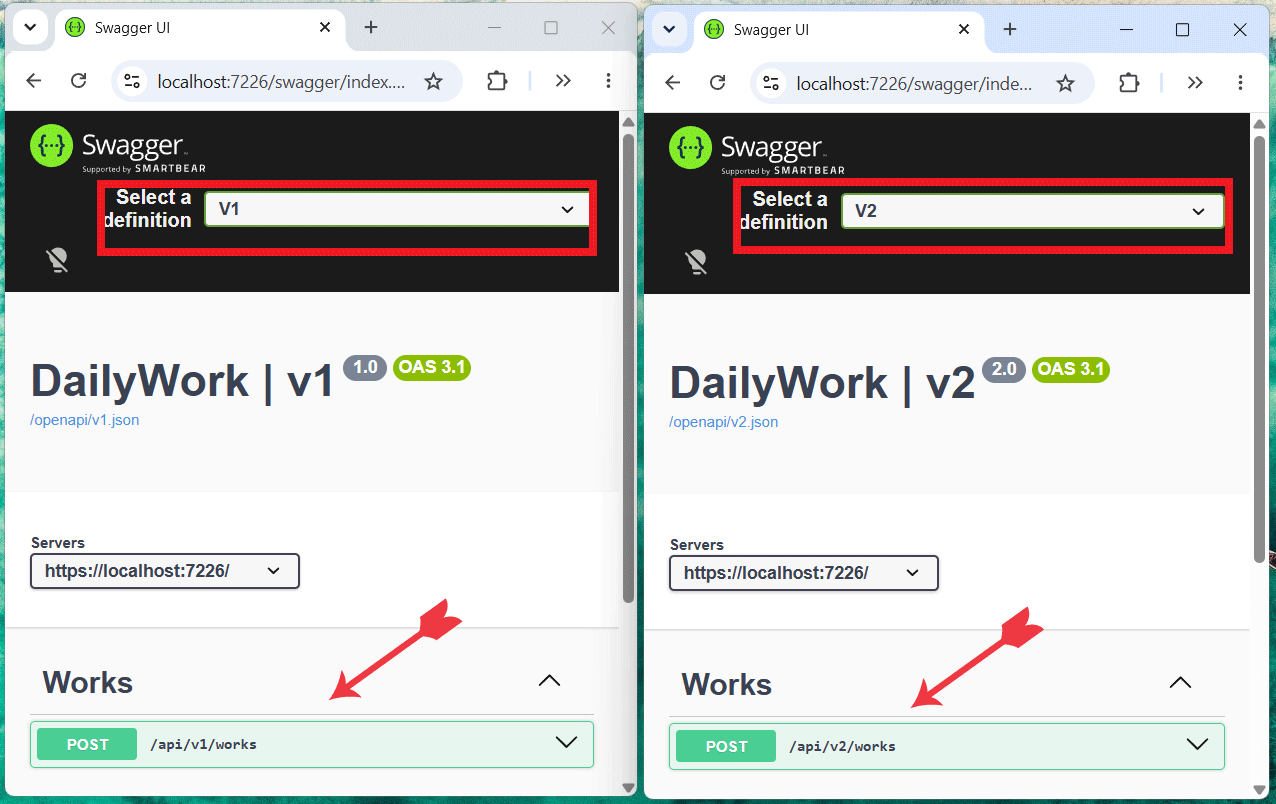
We’ve added Swagger UI support by calling app.UseSwaggerUI() and pointing it at our versioned OpenAPI documents, using the API versions retrieved via app.DescribeApiVersions().
Now, when you open the url of the app – https://localhost:
Integrating Scalar with API versioning
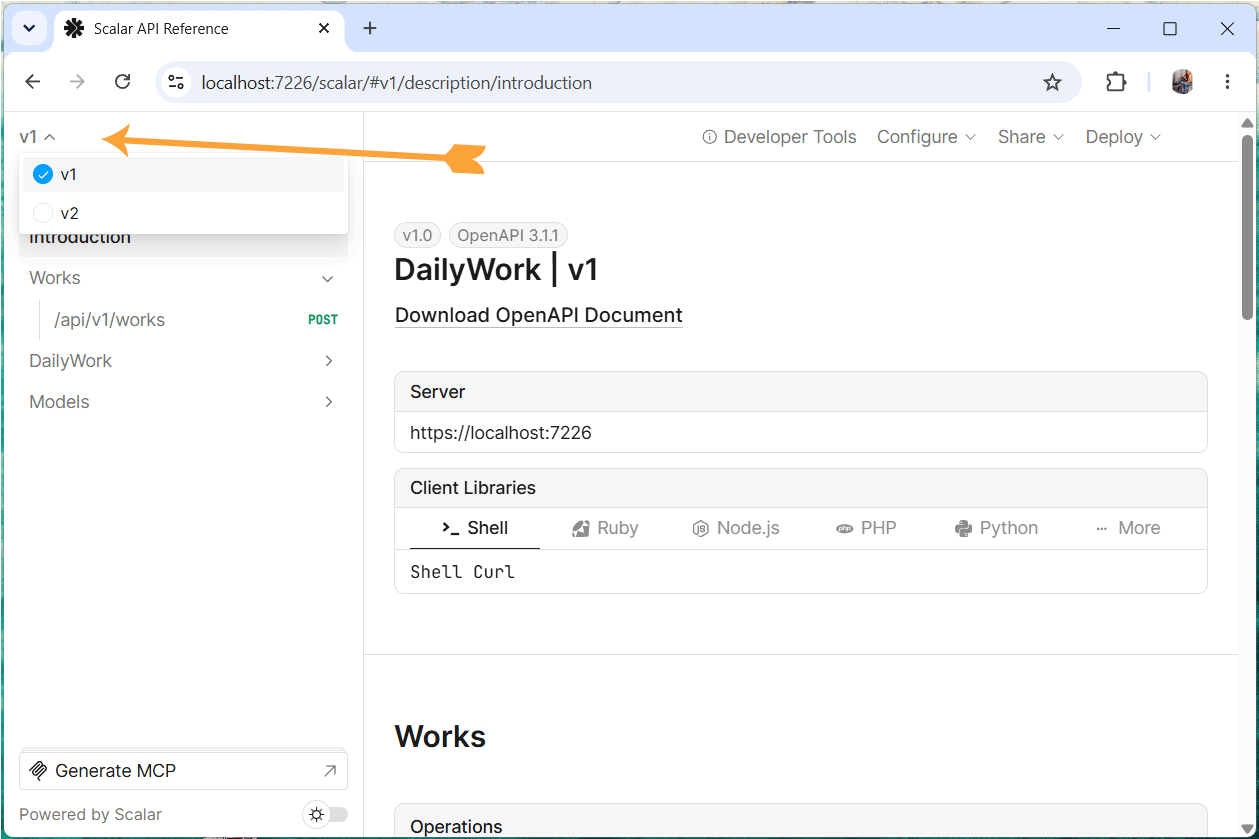
We can add Scalar support for our versioned APIs using the Scalar.AspNetCore package. This package provides middleware that serves the Scalar interface, which can be configured to point to your versioned OpenAPI documents, similar to how we set up Swagger UI.
Again, the setup is the same for both controllers and Minimal APIs.
if (app.Environment.IsDevelopment())
{
    app.MapOpenApi().WithDocumentPerVersion();

    app.MapScalarApiReference(options =>
    {
        var descriptions = app.DescribeApiVersions();

        for (var i = 0; i < descriptions.Count; i++)
        {
            var description = descriptions[i];
            var isDefault = i == descriptions.Count - 1;

            // isDefault marks the default API version in Scalar.
            // It determines which version is selected by default when users visit the Scalar UI.
            options.AddDocument(description.GroupName, description.GroupName, isDefault: isDefault);
        }
    });
}
Now, when you open the Scalar url of the app – https://localhost:
Download the source codes:
This guide walks through implementing API versioning in ASP.NET Core from the ground up, covering both Controllers and Minimal APIs. It starts with the fundamentals of setting up versioning using the Asp.Versioning package and generating version-specific OpenAPI documents. From there, it covers integrating interactive documentation tools — Swagger UI via Swashbuckle.AspNetCore.SwaggerUI and Scalar via Scalar.AspNetCore — showing how to point each at your versioned OpenAPI documents so developers can explore and test every version of your API.
The guide also dives into fine-grained schema control using the [VisibleInApiVersion] attribute, which lets you introduce, deprecate, and remove individual model properties across specific version ranges without maintaining duplicate DTOs per version. Finally, it touches on API linting — running automated checks (e.g., with Spectral) against each versioned OpenAPI document to enforce consistency and catch breaking changes early.
By the end, readers have a complete, practical workflow for evolving an API over time: defining versions, documenting them, controlling what each version exposes, and validating them in CI.
Happy Coding .NET !!
SHARE THIS ARTICLE


Related Tutorials:


ABOUT THE AUTHOR
I hope you enjoyed reading this tutorial. If it helped you then consider buying a cup of coffee for me. This will help me in writing more such good tutorials for the readers. Thank you.

HELLO EVERYONE
 Welcome to YogiHosting - A Programming Tutorial Website. It is used by millions of people around the world to learn and explore about ASP.NET Core, Blazor, jQuery, JavaScript, Docker, Kubernetes and other topics.
SUBSCRIBE TO NEWSLETTER
Enter your email address to subscribe to this blog and receive notifications of new posts by email.
Join 90K other subscribers