


Integrating JWT Authentication into ASP.NET Core Identity (MVC), with Refresh Tokens
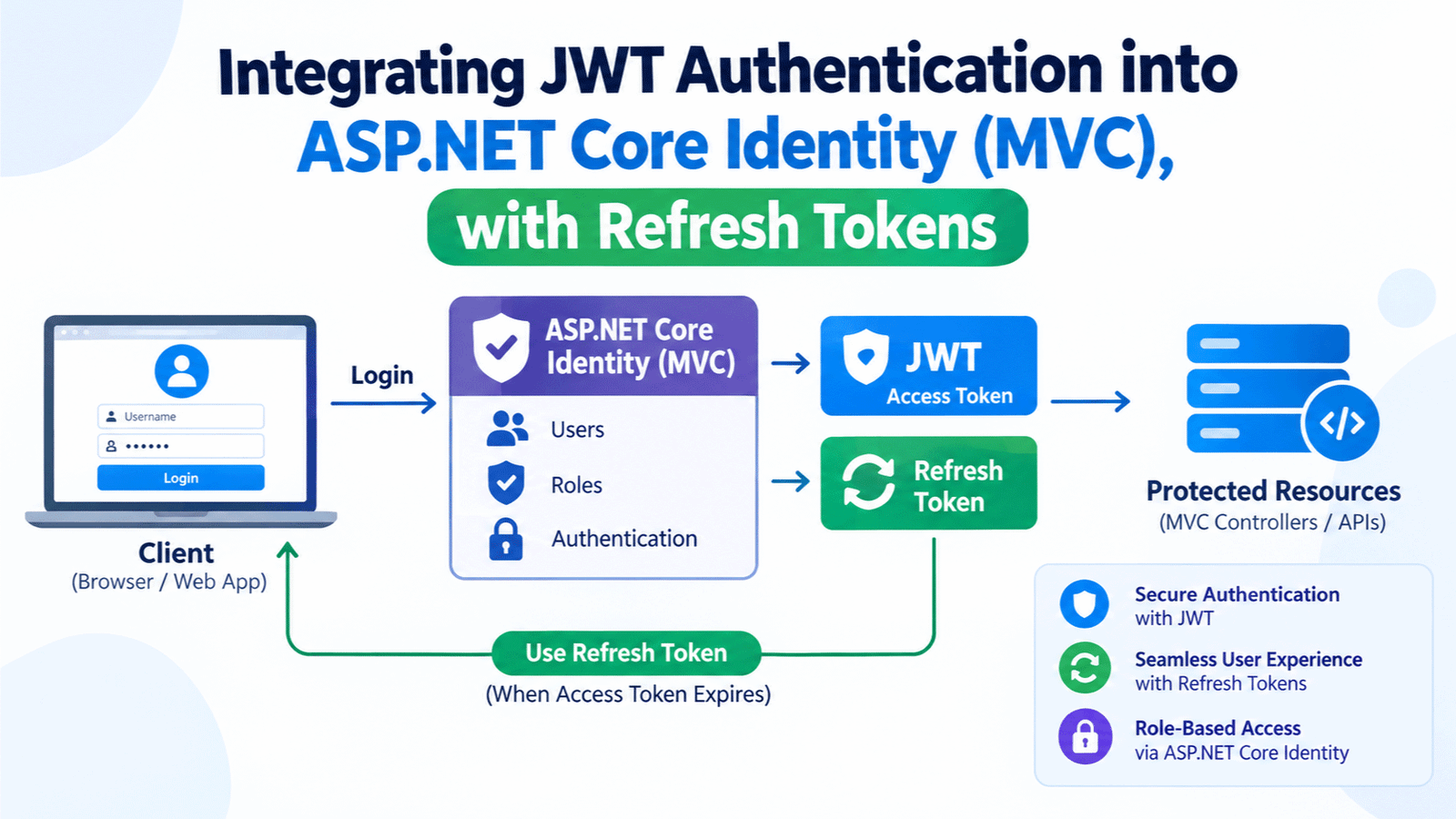
A hands-on tutorial for .NET 10: replace Identity’s cookie authentication with JWT, then add refresh tokens with rotation.
What you will Build
By the end of this tutorial your ASP.NET Core MVC app will:
- Keep users, passwords and lockout in ASP.NET Core Identity (SQL Server).
- Validate the password in your own AccountController.Login action and issue a JWT access token.
- Store the token in an HttpOnly cookie and validate it with JWT bearer authentication on every request, so a plain [Authorize] attribute protects your MVC actions.
- Redirect anonymous users to the login page and forbidden users to the access-denied page.
- (Part 2) Renew the short-lived access token silently with refresh tokens that are rotated, stored hashed in the database and revoked on logout.
No Identity cookie is issued. JWT is the only authentication scheme your pages use.
Page Contents
Why put the JWT in a cookie?
In a pure API the client sends the token in an Authorization: Bearer … header. A server-rendered MVC app is different: the browser navigates with normal links and form posts, and it cannot add custom headers to those. The simplest approach is to store the token in a cookie that the browser sends automatically.
The cookie is only a container for the token:
- HttpOnly: JavaScript cannot read it, which limits the damage of an XSS bug.
- Secure: it is sent over HTTPS only.
- SameSite=Strict: the browser does not send it on cross-site requests, which limits CSRF.
JWT bearer authentication reads the token from the cookie and still accepts a normal Authorization header, so API tools such as Postman keep working.
Prerequisites
- .NET SDK and Visual Studio or VS Code
- SQL Server LocalDB (or any SQL Server)
- An MVC app that already uses ASP.NET Core Identity, with the Identity tables created by an EF Core migration
- An AdminController that creates users, and a HomeController with an action protected by [Authorize]
The tutorial assumes these starting classes. The namespace is Identity; adjust it to match your project.
using Microsoft.AspNetCore.Identity;

namespace Identity.Models
{
    public class AppUser : IdentityUser
    {
    }
}using Microsoft.AspNetCore.Identity.EntityFrameworkCore;
using Microsoft.EntityFrameworkCore;
namespace Identity.Models
{
public class AppIdentityDbContext : IdentityDbContext<AppUser>
{
public AppIdentityDbContext(DbContextOptions<AppIdentityDbContext> options) : base(options) { }
}
}using System.ComponentModel.DataAnnotations;
namespace Identity.Models
{
public class Login
{
[Required]
public string Email { get; set; }
[Required]
public string Password { get; set; }
public string? ReturnUrl { get; set; }
public bool Remember { get; set; }
}
}Part 1: JWT Authentication
Step 1: Install the package
dotnet add package Microsoft.AspNetCore.Authentication.JwtBearerStep 2: Add the JWT settings
Add a Jwt section to appsettings.json, next to your existing connection string:
"Jwt": {
  "Key": "replace-with-a-long-random-secret-at-least-32-chars!!",
  "Issuer": "IdentityApp",
  "Audience": "IdentityAppClients",
  "ExpiryMinutes": 60
}
- The signing key must be at least 32 characters, or token creation fails.
- Issuer and Audience are checked when a token is validated.
Step 3: Create the token service
The token service turns a user into a signed JWT. Create a Services folder with two files.
using Identity.Models;

namespace Identity.Services
{
    public interface ITokenService
    {
        Task<string> CreateTokenAsync(AppUser user);
    }
}
using Identity.Models;
using Microsoft.AspNetCore.Identity;
using Microsoft.IdentityModel.Tokens;
using System.IdentityModel.Tokens.Jwt;
using System.Security.Claims;
using System.Text;

namespace Identity.Services
{

    public class TokenService : ITokenService
    {
        private readonly IConfiguration _config;
        private readonly UserManager<AppUser> _userManager;
        public TokenService(IConfiguration config, UserManager<AppUser>
        userManager)
        {
            _config = config;
            _userManager = userManager;
        }
        public async Task<string> CreateTokenAsync(AppUser user)
        {
            var claims = new List<Claim>
            {

                new(JwtRegisteredClaimNames.Sub, user.Id),
                new(JwtRegisteredClaimNames.Email, user.Email ?? ""),
                new(ClaimTypes.Name, user.UserName ?? ""),
                new(JwtRegisteredClaimNames.Jti, Guid.NewGuid().ToString())
            };

            var roles = await _userManager.GetRolesAsync(user);
            claims.AddRange(roles.Select(r => new Claim(ClaimTypes.Role,
            r)));

            var key = new
            SymmetricSecurityKey(Encoding.UTF8.GetBytes(_config["Jwt:Key"]!));
            var creds = new SigningCredentials(key,
            SecurityAlgorithms.HmacSha256);
            var token = new JwtSecurityToken(
            issuer: _config["Jwt:Issuer"],
            audience: _config["Jwt:Audience"],
            claims: claims,
            expires:
            DateTime.UtcNow.AddMinutes(double.Parse(_config["Jwt:ExpiryMinutes"]!)),
            signingCredentials: creds);
            return new JwtSecurityTokenHandler().WriteToken(token);
        }
    }

}
What the claims are for:
- sub carries the user id. ASP.NET Core maps it to ClaimTypes.NameIdentifier, which is what UserManager.GetUserAsync(User) uses to load the user.
- ClaimTypes.Name becomes User.Identity.Name.
- Each role becomes a ClaimTypes.Role claim, so [Authorize(Roles = “…”)] works later without extra code.
- jti is a unique id per token.
Step 4: Make JWT the authentication scheme in Program.cs
AddIdentity registers Identity’s cookie schemes and makes the Identity cookie the
default. Registering JWT bearer afterwards, with JWT set as the default, overrides those
defaults. Your AddIdentity line stays exactly as it is.
using Identity.Models;
using Identity.Services;
using Microsoft.AspNetCore.Authentication.JwtBearer;
using Microsoft.AspNetCore.Identity;
using Microsoft.EntityFrameworkCore;
using Microsoft.IdentityModel.Tokens;
using System.Text;

var builder = WebApplication.CreateBuilder(args);

builder.Services.AddDbContext<AppIdentityDbContext>(options => options.UseSqlServer(builder.Configuration["ConnectionStrings:DefaultConnection"]));

builder.Services.AddIdentity<AppUser, IdentityRole>().AddEntityFrameworkStores<AppIdentityDbContext>().AddDefaultTokenProviders();

// JWT is now the default scheme. This runs after AddIdentity, so it overrides
// the cookie defaults that AddIdentity sets.

var jwt = builder.Configuration.GetSection("Jwt");
builder.Services.AddAuthentication(options =>
{
    options.DefaultScheme = JwtBearerDefaults.AuthenticationScheme;
    options.DefaultAuthenticateScheme =
    JwtBearerDefaults.AuthenticationScheme;
    options.DefaultChallengeScheme = JwtBearerDefaults.AuthenticationScheme;
})
.AddJwtBearer(JwtBearerDefaults.AuthenticationScheme, options =>
{
    options.TokenValidationParameters = new TokenValidationParameters
    {
        ValidateIssuer = true,
        ValidateAudience = true,
        ValidateLifetime = true,
        ValidateIssuerSigningKey = true,
        ValidIssuer = jwt["Issuer"],
        ValidAudience = jwt["Audience"],
        IssuerSigningKey = new
    SymmetricSecurityKey(Encoding.UTF8.GetBytes(jwt["Key"]!)),
        ClockSkew = TimeSpan.Zero
    };
    options.Events = new JwtBearerEvents
    {

        // read the token from the "jwt" cookie when there is no Authorization header
        OnMessageReceived = context =>
        {
            if (string.IsNullOrEmpty(context.Request.Headers.Authorization))
                context.Token = context.Request.Cookies["jwt"];
            return Task.CompletedTask;
        },

        OnChallenge = context =>
        {
            if (!context.Request.Path.StartsWithSegments("/api"))
            {
                context.HandleResponse();
                var returnUrl = Uri.EscapeDataString(context.Request.Path +
        context.Request.QueryString);
                context.Response.Redirect($"/Account/Login?returnUrl={returnUrl}");
            }
            return Task.CompletedTask;
        },
        // logged in but missing the role: send browser pages to AccessDenied
        OnForbidden = context =>
        {
            if (!context.Request.Path.StartsWithSegments("/api"))
                context.Response.Redirect("/Account/AccessDenied");
            return Task.CompletedTask;
        }
    };
});
builder.Services.AddScoped<ITokenService, TokenService>();

// Add services to the container.
builder.Services.AddControllersWithViews();
var app = builder.Build();

// Configure the HTTP request pipeline.
if (!app.Environment.IsDevelopment())
{
    app.UseExceptionHandler("/Home/Error");
    app.UseHsts();
}
app.UseHttpsRedirection();
app.UseStaticFiles();
app.UseRouting();

app.UseAuthentication();
app.UseAuthorization();

app.MapControllerRoute(
    name: "default",
    pattern: "{controller=Home}/{action=Index}/{id?}");

app.Run();
The three parts that matter:
- Default schemes: with JWT as the default authenticate and challenge scheme, a plain [Authorize] checks the JWT.
- OnMessageReceived: tells the JWT handler where to find the token. It uses the jwt cookie unless the request already carries an Authorization header.
- OnChallenge and OnForbidden: JWT bearer never redirects on its own, because it was designed forAPIs. These two events give browser pages the familiar behavior (redirect to login, redirect to access denied) while /api paths still get plain 401 and 403 responses.
Step 5: Issue the token at login
The Login POST action no longer calls PasswordSignInAsync, because that would create the Identity cookie. Instead it uses CheckPasswordSignInAsync, which verifies the password and lockout state without signing anyone in, and then writes the JWT cookie.
using Identity.Models;
using Identity.Services;
using Microsoft.AspNetCore.Authorization;
using Microsoft.AspNetCore.Identity;
using Microsoft.AspNetCore.Mvc;

namespace Identity.Controllers
{

    [Authorize]
    public class AccountController : Controller
    {
        private UserManager<AppUser> userManager;
        private SignInManager<AppUser> signInManager;
        private ITokenService tokenService;
        private IConfiguration config;
        public AccountController(UserManager<AppUser> userMgr,
        SignInManager<AppUser> signinMgr,
        ITokenService tokenSvc, IConfiguration cfg)
        {
            userManager = userMgr;
            signInManager = signinMgr;
            tokenService = tokenSvc;
            config = cfg;
        }

        [AllowAnonymous]
        public IActionResult Login(string? returnUrl)
        {
            Login login = new Login();
            login.ReturnUrl = returnUrl;
            return View(login);
        }

        [HttpPost]
        [AllowAnonymous]
        [ValidateAntiForgeryToken]
        public async Task<IActionResult> Login(Login login)
        {
            if (!ModelState.IsValid)
                return View(login);
            AppUser appUser = await userManager.FindByEmailAsync(login.Email);
            if (appUser != null)
            {
                var result = await signInManager.CheckPasswordSignInAsync(
                appUser, login.Password, lockoutOnFailure: true);
                if (result.Succeeded)
                {
                    // two-factor is not implemented in this app, so do not issue tokens for 2FA accounts
                    if (await userManager.GetTwoFactorEnabledAsync(appUser))
                    {
                        ModelState.AddModelError("", "Two-factor sign-in is not available.");
                        return View(login);
                    }
                    var token = await tokenService.CreateTokenAsync(appUser);
                    var cookieOptions = new CookieOptions
                    {
                        HttpOnly = true,
                        Secure = true,
                        SameSite = SameSiteMode.Strict
                    };
                    if (login.Remember) // otherwise it is a session cookie
                        cookieOptions.Expires =
                        DateTimeOffset.UtcNow.AddMinutes(double.Parse(config["Jwt:ExpiryMinutes"]!));
                    Response.Cookies.Append("jwt", token, cookieOptions);
                    return Url.IsLocalUrl(login.ReturnUrl)
                    ? Redirect(login.ReturnUrl)
                    : RedirectToAction("Index", "Home");
                }
                if (result.IsLockedOut)
                {
                    ModelState.AddModelError("", "Your account is locked out. Please wait a few minutes and try again.");
                    return View(login);
                }
                if (result.IsNotAllowed)
                {
                    ModelState.AddModelError(nameof(login.Email), "Email is unconfirmed, please confirm it first");
                    return View(login);
                }
            }
            // unknown email or wrong password: same message for both
            ModelState.AddModelError(nameof(login.Email), "Login Failed: Invalid Email or password");
            return View(login);
        }

        public IActionResult Logout()
        {
            Response.Cookies.Delete("jwt");
            return RedirectToAction("Index", "Home");
        }

        public IActionResult AccessDenied()
        {
            return View();
        }
    }

}
Design choices worth knowing:
- lockoutOnFailure: true counts failed attempts, so Identity’s lockout actually works. With false, passwords can be guessed without limit.
- Url.IsLocalUrl prevents an open redirect: a crafted returnUrl pointing to another site is ignored.
- One error message for an unknown email and a wrong password, so the form does not reveal which accounts exist.
- The two-factor guard: CheckPasswordSignInAsync does not look at two-factor settings, so an account with TwoFactorEnabled would otherwise get a token without a second factor.
- [AllowAnonymous] on Login overrides the class-level [Authorize] ; without it nobody could reach the login page.
Step 6: Protect an action
Nothing special is needed in the controller. Because JWT is the default scheme, the plain [Authorize] attribute checks the token. A token can outlive its user (for example when an admin deletes the account), so handle a missing user:
[Authorize]
public async Task<IActionResult> Secured()
{
    AppUser user = await userManager.GetUserAsync(HttpContext.User);
    string message = "Hello " + user.UserName;
    return View((object)message);
}
To require a role later, change the attribute to [Authorize(Roles = “Manager”)]. The roles are already inside the token.
Step 7: Test Part 1
We need to run the migrations so that the database is created. Run the following 2 commands:
dotnet ef migrations add AddJWT
dotnet ef database update- 1. Run the app on its https profile. The cookie is marked Secure, so the browser will not store it over plain http.
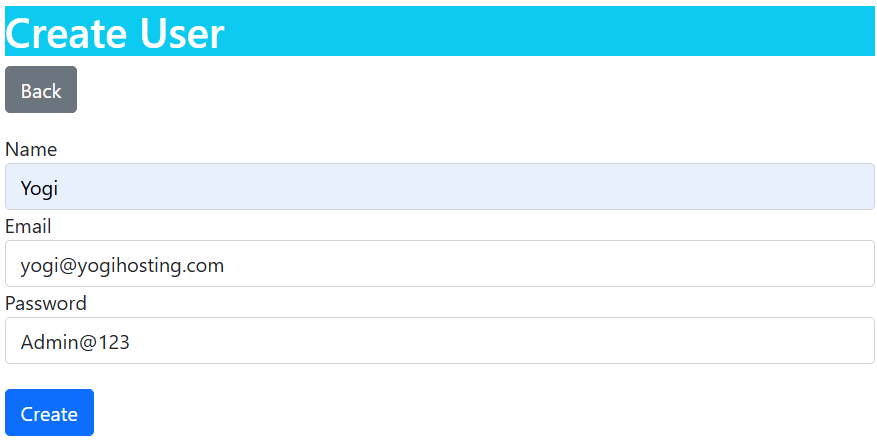
- 2. Create a user from your admin page at /Admin/Create.
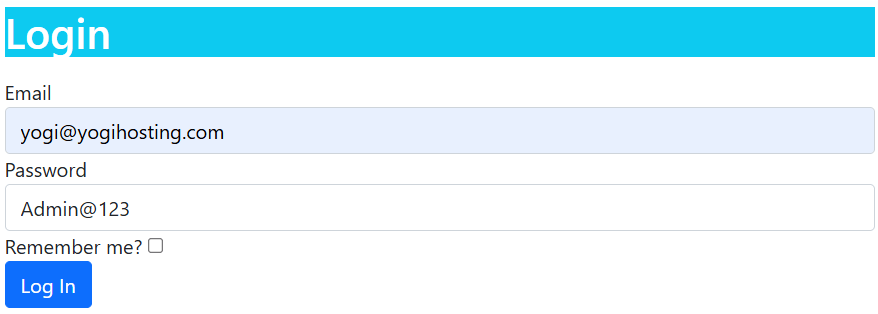
- 3. Log in at /Account/Login.
- 4. Open DevTools, Application, Cookies. You should see a jwt cookie (HttpOnly, Secure, SameSite Strict) and no Identity cookie.
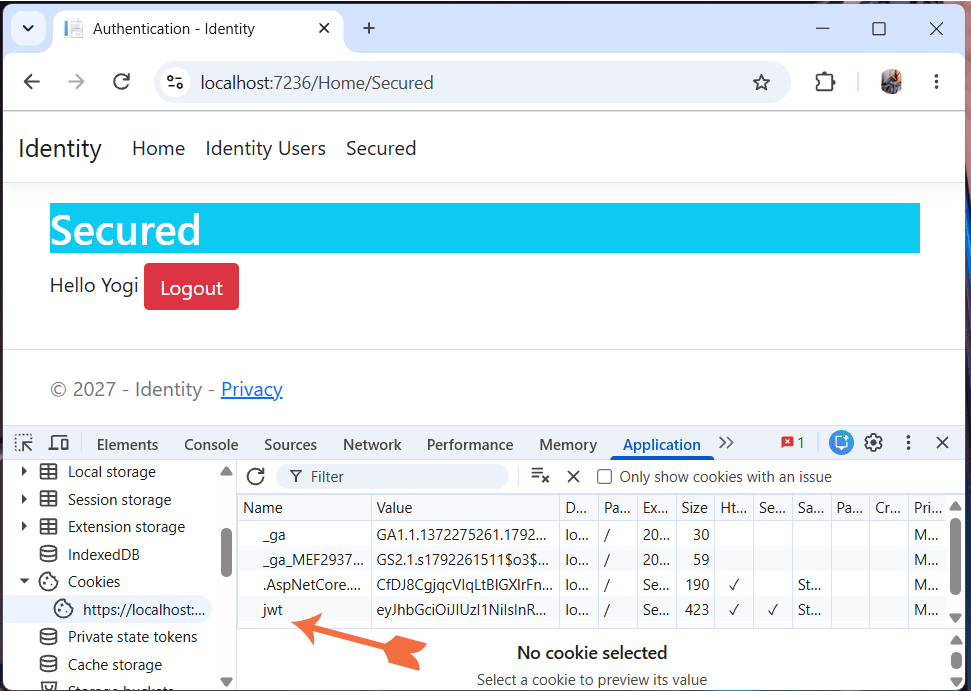
- 5. Open /Home/Secured. You should see “Hello” followed by the user name.
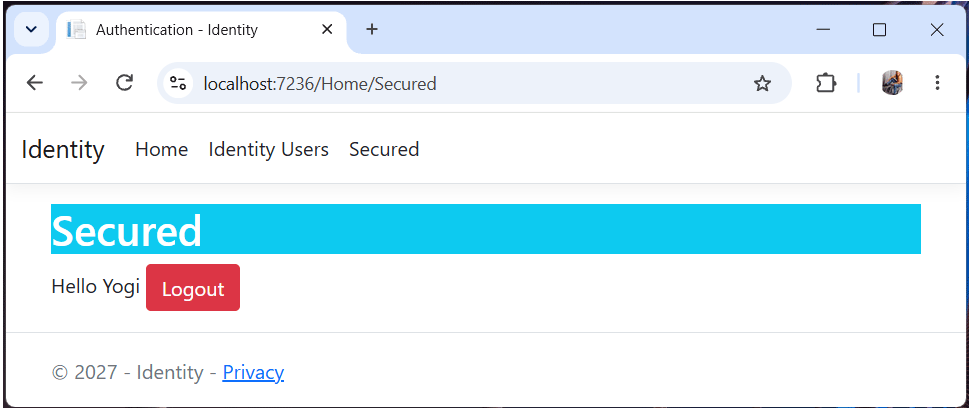
- 6. Click Logout, then open /Home/Secured again. You should be redirected to /Account/Login?returnUrl=%2FHome%2FSecured.
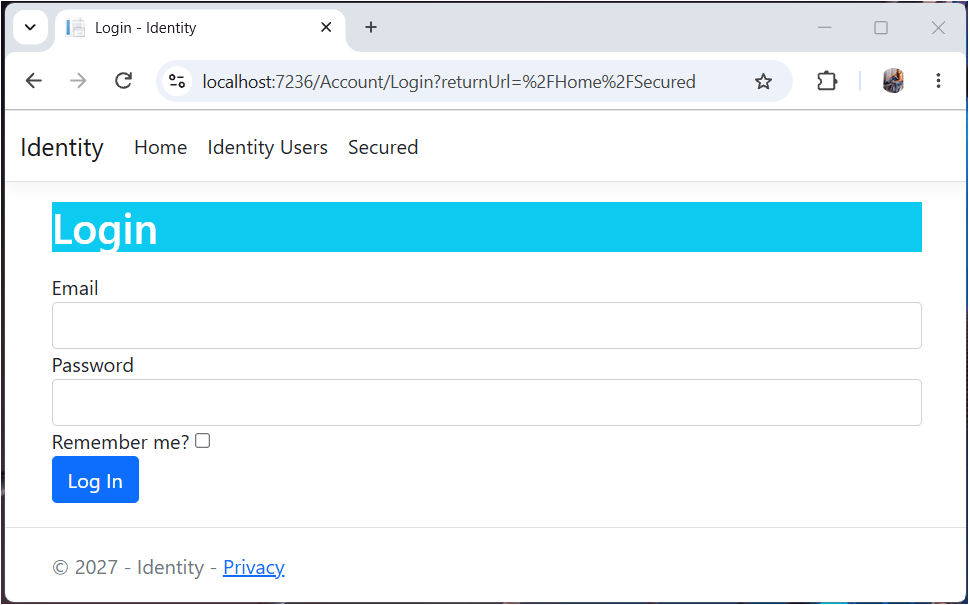
- 7. Test expiry: set ExpiryMinutes to 1, log in, wait about a minute and reload. Because ClockSkew is zero you are sent to the login page.
Set ExpiryMinutes back afterwards. At this point JWT authentication works, but users must log in again whenever the token expires. Part 2 fixes that.
This is the behavior of the JWT-only version (Part 1 of the tutorial). There is no refresh token and no database table for tokens. I assume ExpiryMinutes = 60, the value Part 1 uses.
| Situation | Remember me ticked | Remember me not ticked |
|---|---|---|
| JWT created at login | Yes, one JWT valid for 60 minutes | Yes, one JWT valid for 60 minutes |
| Cookie written | Persistent jwt cookie, Expires = login time + 60 minutes (the same moment the token expires) | Session jwt cookie, no Expires |
| Browser closed and reopened within 60 minutes | Cookie is still on disk, so the user stays logged in | Cookie is deleted, so the user must log in |
| Browser closed and reopened after 60 minutes | Cookie is gone (the browser deleted it at expiry), so the user must log in | Cookie is gone, so the user must log in |
| Token expires while the browser stays open | The browser deletes the cookie. The next request has no token, [Authorize] fails and the user is redirected to /Account/Login?returnUrl=... | The cookie stays, but the token inside is expired. The JWT handler rejects it (clock skew is zero) and the user is redirected to the login page |
| After the redirect to login | The user logs in again and a new JWT is created | The user logs in again and a new JWT is created |
| Logout | The jwt cookie is deleted from the browser. Nothing changes on the server | The jwt cookie is deleted from the browser. Nothing changes on the server |
| A copy of the token after logout | Still valid until its 60 minutes are over | Still valid until its 60 minutes are over |
- Remember me has little effect here. The cookie can never outlive the token. With the box ticked, a login survives a browser restart for at most 60 minutes after login. Without it, the login lasts until the browser closes or the token expires, whichever comes first.
- Expiry always means a new login. Without a refresh token the user can’t renew anything, so the login page appears every 60 minutes of use. Making
ExpiryMinuteslonger reduces that but makes a stolen token useful for longer. This is the problem that Part 2’s refresh tokens solve. - Logout can’t revoke the token. A JWT is stateless, so the server has no record to cancel.
- Browsers that restore sessions (“Continue where you left off” in Chrome and Edge, “Restore previous session” in Firefox) can keep session cookies across a restart. Then an unticked login may survive a restart, until the token expires.
Part 2: Refresh Tokens
Why refresh tokens? A short-lived access token limits the damage if it is ever stolen, but nobody wants to log in every 15 minutes. A refresh token solves this: it is a long-lived random secret (7 days here) that is used for one thing only, getting a new access token.
The design in this tutorial:
- At login the app issues two things: the access token in the jwt cookie and a refresh token in the refresh_token cookie. Only a SHA-256 hash of the refresh token is stored in the database, so a leaked table cannot be used to impersonate anyone.
- When the jwt cookie is missing or expired and a refresh cookie exists, a small middleware exchanges the refresh token for a new pair before authentication runs. The user never sees the login page.
- Rotation: every exchange revokes the old refresh token and creates a new one with a fresh 7-day lifetime. An old token cannot be used twice.
- Logout revokes the refresh token in the database and deletes both cookies.
- Locked-out or deleted users cannot refresh.
Step 8: Store refresh tokens in the database
Create the entity:
namespace Identity.Models
{
    public class RefreshToken
    {
        public int Id { get; set; }
        public string UserId { get; set; } = "";
        public string TokenHash { get; set; } = "";
        public DateTime CreatedAt { get; set; }
        public DateTime ExpiresAt { get; set; }
        public DateTime? RevokedAt { get; set; }
        public string? ReplacedByTokenHash { get; set; }
        public bool IsPersistent { get; set; }   // "Remember me"

        public bool IsActive => RevokedAt == null && ExpiresAt > DateTime.UtcNow;
    }
}
Add it to the DbContext. The hash is a 64-character hex string, so the column gets a maximum length; that also lets SQL Server put a unique index on it.
using Microsoft.AspNetCore.Identity.EntityFrameworkCore;
using Microsoft.EntityFrameworkCore;

namespace Identity.Models
{
    public class AppIdentityDbContext : IdentityDbContext<AppUser>
    {
        public AppIdentityDbContext(DbContextOptions<AppIdentityDbContext> options) : base(options) { }

        public DbSet<RefreshToken> RefreshTokens { get; set; }   // NEW

        protected override void OnModelCreating(ModelBuilder builder)   // NEW
        {
            base.OnModelCreating(builder);
            builder.Entity<RefreshToken>(e =>
            {
                e.Property(r => r.TokenHash).HasMaxLength(64);   // SHA-256 as hex
                e.HasIndex(r => r.TokenHash).IsUnique();
            });
        }
    }
}
Create and apply the migration:
dotnet ef migrations add AddRefreshTokens
dotnet ef database update
Step 9: Update the settings
Shorten the access token and add the refresh lifetime:
"Jwt": {
  "Key": "replace-with-a-long-random-secret-at-least-32-chars!!",
  "Issuer": "IdentityApp",
  "Audience": "IdentityAppClients",
  "ExpiryMinutes": 15,
  "RefreshTokenDays": 7
}
For testing you can temporarily set ExpiryMinutes to 1.
Step 10: A helper for the two cookies
Both Program.cs and AccountController need to write and delete the same cookies, so keep that in one place:
namespace Identity.Services
{
    public static class AuthCookies
    {
        public const string Access = "jwt";
        public const string Refresh = "refresh_token";

        public static void Append(HttpResponse response, string accessToken, string refreshToken,
                                  bool persistent, DateTime refreshExpiresAt)
        {
            response.Cookies.Append(Access, accessToken, new CookieOptions
            {
                HttpOnly = true,
                Secure = true,
                SameSite = SameSiteMode.Strict
            });

            var refreshOptions = new CookieOptions
            {
                HttpOnly = true,
                Secure = true,
                SameSite = SameSiteMode.Strict
            };
            if (persistent)                       // "Remember me" ticked
                refreshOptions.Expires = refreshExpiresAt;

            response.Cookies.Append(Refresh, refreshToken, refreshOptions);
        }

        public static void Delete(HttpResponse response)
        {
            response.Cookies.Delete(Access);
            response.Cookies.Delete(Refresh);
        }
    }
}
If “Remember me” is ticked the refresh cookie survives a browser restart; otherwise both cookies end with the browser session.
Step 11:The refresh token service
The service issues, rotates and revokes refresh tokens. The raw token exists only in the cookie; the database holds its hash.
using Identity.Models;

namespace Identity.Services
{
    public record TokenPair(string AccessToken, string RefreshToken, bool Persistent, DateTime RefreshExpiresAt);

    public interface IRefreshTokenService
    {
        Task<TokenPair> IssueAsync(AppUser user, bool persistent);   // at login
        Task<TokenPair?> RotateAsync(string refreshToken);           // null if invalid
        Task RevokeAsync(string refreshToken);                       // at logout
    }
}
using System.Security.Cryptography;
using System.Text;
using Identity.Models;
using Microsoft.AspNetCore.Identity;
using Microsoft.AspNetCore.WebUtilities;
using Microsoft.EntityFrameworkCore;

namespace Identity.Services
{
    public class RefreshTokenService : IRefreshTokenService
    {
        private readonly AppIdentityDbContext _db;
        private readonly UserManager<AppUser> _userManager;
        private readonly ITokenService _tokenService;
        private readonly int _refreshDays;

        public RefreshTokenService(AppIdentityDbContext db, UserManager<AppUser> userManager,
                                   ITokenService tokenService, IConfiguration config)
        {
            _db = db;
            _userManager = userManager;
            _tokenService = tokenService;
            _refreshDays = int.Parse(config["Jwt:RefreshTokenDays"]!);
        }

        private static string NewToken() => WebEncoders.Base64UrlEncode(RandomNumberGenerator.GetBytes(64));

        private static string Hash(string token) => Convert.ToHexString(SHA256.HashData(Encoding.UTF8.GetBytes(token)));

        public async Task<TokenPair> IssueAsync(AppUser user, bool persistent)
        {
            var raw = NewToken();
            var expires = DateTime.UtcNow.AddDays(_refreshDays);

            _db.RefreshTokens.Add(new RefreshToken
            {
                UserId = user.Id,
                TokenHash = Hash(raw),
                CreatedAt = DateTime.UtcNow,
                ExpiresAt = expires,
                IsPersistent = persistent
            });
            await _db.SaveChangesAsync();

            return new TokenPair(await _tokenService.CreateTokenAsync(user), raw, persistent, expires);
        }

        public async Task<TokenPair?> RotateAsync(string refreshToken)
        {
            var hash = Hash(refreshToken);
            var stored = await _db.RefreshTokens.SingleOrDefaultAsync(t => t.TokenHash == hash);
            if (stored == null || !stored.IsActive)
                return null;

            var user = await _userManager.FindByIdAsync(stored.UserId);
            if (user == null || await _userManager.IsLockedOutAsync(user))
            {
                stored.RevokedAt = DateTime.UtcNow;
                await _db.SaveChangesAsync();
                return null;
            }

            var newRaw = NewToken();
            var newHash = Hash(newRaw);
            var expires = DateTime.UtcNow.AddDays(_refreshDays);

            stored.RevokedAt = DateTime.UtcNow;
            stored.ReplacedByTokenHash = newHash;

            _db.RefreshTokens.Add(new RefreshToken
            {
                UserId = user.Id,
                TokenHash = newHash,
                CreatedAt = DateTime.UtcNow,
                ExpiresAt = expires,
                IsPersistent = stored.IsPersistent
            });
            await _db.SaveChangesAsync();

            return new TokenPair(await _tokenService.CreateTokenAsync(user), newRaw, stored.IsPersistent, expires);
        }

        public async Task RevokeAsync(string refreshToken)
        {
            var hash = Hash(refreshToken);
            var stored = await _db.RefreshTokens.SingleOrDefaultAsync(t => t.TokenHash == hash);
            if (stored != null && stored.RevokedAt == null)
            {
                stored.RevokedAt = DateTime.UtcNow;
                await _db.SaveChangesAsync();
            }
        }
    }
}
Notes on the service:
- The token is 64 random bytes from RandomNumberGenerator, encoded as URL-safe Base64, so it is safe to put in a cookie.
- RotateAsync returns null for an unknown, revoked or expired token, and also when the user no longer exists or is locked out.
- Rotation sets RevokedAt on the old row and stores the hash of its replacement in ReplacedByTokenHash, which leaves an audit trail.
- IsPersistent is copied to the new token, so a “Remember me” session stays persistent after every refresh.
Step 12: Register the service and add the refresh middleware
In Program.cs, add this using:
using System.IdentityModel.Tokens.Jwt;Register the service next to ITokenService:
builder.Services.AddScoped<ITokenService, TokenService>();
builder.Services.AddScoped<IRefreshTokenService, RefreshTokenService>();
Also change the OnMessageReceived event to use the shared constant instead of the hardcoded name:
context.Token = context.Request.Cookies[AuthCookies.Access];Then add the middleware directly before app.UseAuthentication();:
static bool IsMissingOrExpired(string? token)
{
    if (string.IsNullOrEmpty(token)) return true;
    try
    {
        return new JwtSecurityTokenHandler().ReadJwtToken(token).ValidTo <= DateTime.UtcNow;
    }
    catch
    {
        return true;
    }
}

// renew the access token from the refresh cookie when the jwt cookie is missing or expired
app.Use(async (context, next) =>
{
    var refreshToken = context.Request.Cookies[AuthCookies.Refresh];

    if (!string.IsNullOrEmpty(refreshToken)
        && !context.Request.Path.StartsWithSegments("/Account/Logout")
        && IsMissingOrExpired(context.Request.Cookies[AuthCookies.Access]))
    {
        var refreshService = context.RequestServices.GetRequiredService<IRefreshTokenService>();
        var tokens = await refreshService.RotateAsync(refreshToken);

        if (tokens != null)
        {
            AuthCookies.Append(context.Response, tokens.AccessToken, tokens.RefreshToken,
                               tokens.Persistent, tokens.RefreshExpiresAt);
            // let this same request authenticate with the new token
            context.Request.Headers.Authorization = "Bearer " + tokens.AccessToken;
        }
        else
        {
            AuthCookies.Delete(context.Response);
        }
    }

    await next();
});

app.UseAuthentication();
app.UseAuthorization();
- IsMissingOrExpired only reads the token to check its expiry date. It does not validate the signature; that is still done by the JWT handler later in the pipeline.
- A successful refresh writes the new cookies to the response and also sets the Authorization header on the current request, so the request that triggered the refresh is authenticated too.
- A failed refresh (invalid, revoked or expired token) deletes both cookies, and the normal challenge sends the user to the login page.
- The logout path is skipped so the middleware cannot issue a fresh token in the same request that is trying to log the user out.
Step 13: Use the refresh service in AccountController
Three changes: the constructor takes IRefreshTokenService instead of ITokenService and IConfiguration (the service creates the access token itself), Login calls IssueAsync, and Logout revokes the refresh token.
Controllers/AccountController.cs
using Identity.Models;
using Identity.Services;
using Microsoft.AspNetCore.Authorization;
using Microsoft.AspNetCore.Identity;
using Microsoft.AspNetCore.Mvc;

namespace Identity.Controllers
{
    [Authorize]
    public class AccountController : Controller
    {
        private UserManager<AppUser> userManager;
        private SignInManager<AppUser> signInManager;
        private IRefreshTokenService refreshTokenService;

        public AccountController(UserManager<AppUser> userMgr, SignInManager<AppUser> signinMgr,
                                 IRefreshTokenService refreshSvc)
        {
            userManager = userMgr;
            signInManager = signinMgr;
            refreshTokenService = refreshSvc;
        }

        [AllowAnonymous]
        public IActionResult Login(string? returnUrl)
        {
            Login login = new Login();
            login.ReturnUrl = returnUrl;
            return View(login);
        }

        [HttpPost]
        [AllowAnonymous]
        [ValidateAntiForgeryToken]
        public async Task<IActionResult> Login(Login login)
        {
            if (!ModelState.IsValid)
                return View(login);

            AppUser appUser = await userManager.FindByEmailAsync(login.Email);
            if (appUser != null)
            {
                var result = await signInManager.CheckPasswordSignInAsync(
                    appUser, login.Password, lockoutOnFailure: true);

                if (result.Succeeded)
                {
                    // the two-factor flow is switched off, so don't issue tokens for 2FA accounts
                    if (await userManager.GetTwoFactorEnabledAsync(appUser))
                    {
                        ModelState.AddModelError("", "Two-factor sign-in is not available.");
                        return View(login);
                    }

                    // access token (jwt cookie) + refresh token (refresh_token cookie)
                    var tokens = await refreshTokenService.IssueAsync(appUser, login.Remember);
                    AuthCookies.Append(Response, tokens.AccessToken, tokens.RefreshToken,
                                       tokens.Persistent, tokens.RefreshExpiresAt);

                    return Url.IsLocalUrl(login.ReturnUrl)
                        ? Redirect(login.ReturnUrl)
                        : RedirectToAction("Index", "Home");
                }

                if (result.IsLockedOut)
                {
                    ModelState.AddModelError("", "Your account is locked out. Please wait a few minutes and try again.");
                    return View(login);
                }

                if (result.IsNotAllowed)
                {
                    ModelState.AddModelError(nameof(login.Email), "Email is unconfirmed, please confirm it first");
                    return View(login);
                }
            }

            // unknown email or wrong password: same message for both
            ModelState.AddModelError(nameof(login.Email), "Login Failed: Invalid Email or password");
            return View(login);
        }

        [AllowAnonymous]
        public async Task<IActionResult> Logout()
        {
            var refreshToken = Request.Cookies[AuthCookies.Refresh];
            if (!string.IsNullOrEmpty(refreshToken))
                await refreshTokenService.RevokeAsync(refreshToken);

            AuthCookies.Delete(Response);
            return RedirectToAction("Index", "Home");
        }

        public IActionResult AccessDenied()
        {
            return View();
        }
    }
}
Logout is marked [AllowAnonymous] on purpose. Without it, a user whose access token has already expired would be redirected to the login page before the action runs, and the refresh token would never be revoked. They would then look logged in again as soon as they visited a page.
Step 14: Test Part 2
- 1. Set ExpiryMinutes to “1”, log in at
Account/Loginwith Remember me ticked and open /Home/Secured. - 2. Wait about 70 seconds and reload. You should still be logged in, and the jwt cookie value in DevTools has changed.
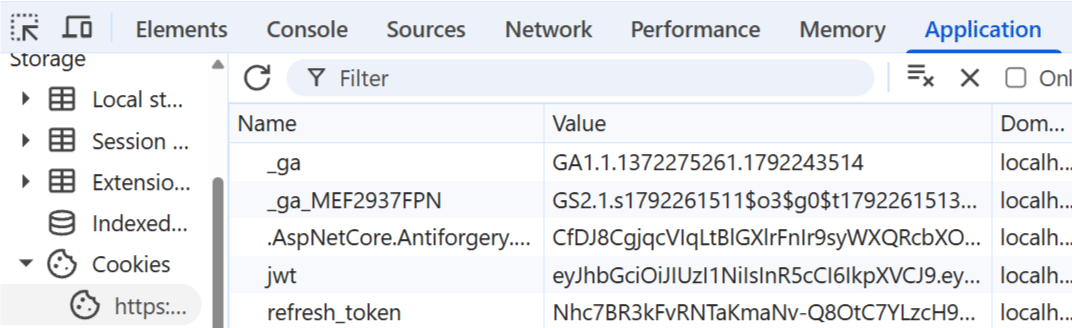
Earlier it was:
eyJhbGciOiJIUzI1NiIsInR5cCI6IkpXVCJ9.eyJzdWIiOiJiZTk2YWQxYi0wNDFkLTQzZTEtOWI0NC0wZDM0YTI2NDQ0NWUiLCJlbWFpbCI6InlvZ2lAeW9naWhvc3RpbmcuY29tIiwiaHR0cDovL3NjaGVtYXMueG1sc29hcC5vcmcvd3MvMjAwNS8wNS9pZGVudGl0eS9jbGFpbXMvbmFtZSI6IllvZ2kiLCJqdGkiOiI1NDVhNTExZS1hMzI0LTQ3ZTUtYjMxNy01NzEwZjU5YjczYmMiLCJleHAiOjE3OTMxOTUxMjEsImlzcyI6IklkZW50aXR5QXBwIiwiYXVkIjoiSWRlbnRpdHlBcHBDbGllbnRzIn0.AgTE_LsrRf59uQPsNXV2IHc-LuB0eLVHS6rBgT7nEzINew one becomes:
eyJhbGciOiJIUzI1NiIsInR5cCI6IkpXVCJ9.eyJzdWIiOiJiZTk2YWQxYi0wNDFkLTQzZTEtOWI0NC0wZDM0YTI2NDQ0NWUiLCJlbWFpbCI6InlvZ2lAeW9naWhvc3RpbmcuY29tIiwiaHR0cDovL3NjaGVtYXMueG1sc29hcC5vcmcvd3MvMjAwNS8wNS9pZGVudGl0eS9jbGFpbXMvbmFtZSI6IllvZ2kiLCJqdGkiOiI2N2E3NzhhMS03MjY0LTQxNjUtYmY0ZC04YjIyYmFhODNhNGMiLCJleHAiOjE3OTMxOTU1MTQsImlzcyI6IklkZW50aXR5QXBwIiwiYXVkIjoiSWRlbnRpdHlBcHBDbGllbnRzIn0.ghNt8Y3OWbhb0hcuQFLhMCwIDMl-4ZxfwOIvwl6jiKYThese values look similar but if you see the last 5 digits they are different (7nEzI vs 6jiKY).
- 3. Look at the
RefreshTokenstable. The first row has “RevokedAt” filled in and ReplacedByTokenHash pointing at a second, active row.
I am sharing both these image, see it by yourself.


- 4. Click Logout. Both cookies disappear and the active row gets “RevokedAt”. Opening /Home/Secured redirects to the login page.

- 5. Log in again “without” Remember me. Closing the browser ends the session and you need to log in again.
Set ExpiryMinutes back to “15” when you are done.
This is the behavior of the full version (Part 2), assuming ExpiryMinutes = 15 and RefreshTokenDays = 7.
| Situation | Remember me ticked | Remember me not ticked |
|---|---|---|
| Tokens created at login | A JWT valid for 15 minutes, plus a refresh token valid for 7 days (row in RefreshTokens with IsPersistent = true) | A JWT valid for 15 minutes, plus a refresh token valid for 7 days (row with IsPersistent = false) |
| Cookies written at login | jwt: session cookie. refresh_token: persistent, Expires = 7 days from now | jwt: session cookie. refresh_token: session cookie |
| JWT expires while the browser stays open (after 15 minutes) | The middleware exchanges the refresh token. The old row is revoked, a new row is created, and a new jwt and a new persistent refresh_token (a fresh 7 days) are written. The user notices nothing | The same exchange happens, but the new refresh_token is again a session cookie. The user notices nothing |
| Browser closed and reopened within 7 days | jwt is gone, refresh_token is still on disk. The middleware issues a new pair, so the user stays logged in | Both cookies are gone, so the user must log in |
| Browser closed and reopened after 7 days without a refresh | The browser has deleted the expired refresh_token, so the user must log in | Both cookies are gone, so the user must log in |
| Refresh token expired, revoked, or user locked out or deleted | Both cookies are deleted and the user is redirected to the login page | Same |
| After the redirect to login | The user logs in and gets a new JWT and a new refresh token (new row, fresh 7 days) | Same, with session cookies |
| Logout | The refresh token row gets RevokedAt, and both cookies are deleted | Same |
| A copy of the old refresh token after logout | Rejected, because its row is revoked | Rejected |
| A copy of the old JWT after logout | Still valid until its 15 minutes are over | Still valid until its 15 minutes are over |
Expires is not set. Note that it is not related to Session which is stored on the server.- Rotation happens on every refresh. The refresh token value changes each time, the old one stops working, and the checkbox choice is copied to the new row through
IsPersistent. - The 7 days count from the last refresh. A user who opens the app at least once a week never sees the login page, as long as Remember me was ticked.
- Without Remember me, refreshing only covers a browser that stays open. It keeps the user logged in past the 15-minute JWT, but closing the browser ends the login.
- Revoked elsewhere, still valid here. If a refresh token is revoked while the JWT is still valid (for example, the user logged out on another device), the JWT keeps working until it expires. Then the refresh fails and the user is sent to login.
- Browsers that restore sessions (“Continue where you left off” in Chrome and Edge, “Restore previous session” in Firefox) can keep session cookies across a restart. In that case an unticked login may survive a restart.
The two tables together show what refresh tokens add: logins no longer end every ExpiryMinutes, Remember me becomes meaningful (7 days instead of the JWT’s lifetime), and logout really ends the session on the server, apart from the 15 minutes an already issued JWT stays valid.
Security notes and hardening
- Keep the signing key out of source control. Use user-secrets locally and an environment variable or secret store in production, with a different key per environment.
- Use HTTPS everywhere. The cookies are marked Secure.
- Protect state-changing actions against CSRF. The token travels in a cookie, so keep [ValidateAntiForgeryToken] on every POST action, including your admin actions. SameSite=Strict is a second line of defense, not a replacement.
- Logout is not instant for the access token. The refresh token is revoked immediately, but an access token that was already issued stays valid until it expires. That is why it is short-lived.
- Authorize your admin area. This tutorial does not cover roles. Before going to production, seed an Admin role and put
[Authorize(Roles = "Admin")]on the controller that manages users. The roles are already in the token. - Clean up old rows. Revoked and expired rows accumulate in RefreshTokens. A scheduled job that deletes rows well past their expiry keeps the table small.
- Know the race at expiry. If two requests carrying the same old refresh token arrive at the same moment, the second may be sent to the login page. It is rare. Strict reuse detection (revoking everything when an old token reappears) would make it worse, which is why this tutorial does not do it.
- Role changes apply at the next refresh. Roles are copied into the token when it is issued, so a changed role takes effect after the next refresh or login.
Troubleshooting
- Login succeeds but you land on the login page again: you are probably on plain http, so the browser refuses to store the Secure cookie. Run the https profile. A signing key shorter than 32 characters also causes token creation to fail.
- You are logged out after exactly ExpiryMinutes : the refresh middleware is missing, is placed after UseAuthentication(), or IRefreshTokenService is not registered. Check the refresh_token cookie exists after login.
- A call with Authorization: Bearer returns 401: the token’s issuer or audience does not match the Jwt settings, or it has expired.
- Logout seems to do nothing: Logout must have [AllowAnonymous], and it must call RevokeAsync and AuthCookies.Delete.
- Unknown cookies appear in DevTools: browsers share cookies between all apps on localhost, whatever the port. Cookies from other projects can show up here. Delete them, or use distinctive cookie names.
You replaced Identity’s cookie authentication with JWT while keeping everything else from ASP.NET Core Identity: the user store, password hashing and lockout. You also added refresh tokens that are hashed at rest, rotated on every use and revoked on logout, with a small middleware that makes the renewal invisible to users.
Possible next steps are role-based authorization, a hard maximum session length, and a clean-up job for old refresh tokens.
SHARE THIS ARTICLE


Related Tutorials:


ABOUT THE AUTHOR
I hope you enjoyed reading this tutorial. If it helped you then consider buying a cup of coffee for me. This will help me in writing more such good tutorials for the readers. Thank you.

HELLO EVERYONE
 Welcome to YogiHosting - A Programming Tutorial Website. It is used by millions of people around the world to learn and explore about ASP.NET Core, Blazor, jQuery, JavaScript, Docker, Kubernetes and other topics.
SUBSCRIBE TO NEWSLETTER
Enter your email address to subscribe to this blog and receive notifications of new posts by email.
Join 90K other subscribers