


jQuery Post Complete Guide for Beginners and Experts – Examples & Codes

The jQuery Post method is an AJAX-based technique used to send and retrieve data from a server through an HTTP POST request. It allows web applications to communicate with server-side scripts, such as .php, .cshtml or .aspx, without requiring a full page reload. This method is commonly used for submitting form data, sending user requests, and dynamically updating webpage content with server responses..
Let us understand all about the jQuery Post method in details.
Syntax of jQuery Post Method
jQuery.post( url [, data ] [, success ] [, dataType ] )
| Name | Value |
|---|---|
| url | Required Parameter – URL to where AJAX request is made. |
| Data | Optional parameter – it’s the key-value pairs that will be send with the AJAX request. E.g. {Name: “Trump”, Job: “President of USA”} |
| success(result,status,xhr) | Optional Parameter – the function that will be called on successful AJAX request. This function has 3 parameters which are all optional. Through the result parameter we get the return value from the AJAX request. |
| dataType | Optional Parameter – the type of data returned from the AJAX request. Can be xml, json, script, or html. |
Two commonly used Deferred Object methods with the jQuery POST AJAX method are:
- deferred.done() – Executes when the AJAX POST request is completed successfully and the server returns a valid response.
- deferred.fail() – Executes when the AJAX request fails due to an error, such as a server issue, invalid request, or network failure.
Using these methods improves AJAX error handling and allows developers to write cleaner, more reliable asynchronous JavaScript code.
jQuery Post to Call a PHP Page
In this example, we will learn how to call a PHP page from an HTML page using the jQuery POST AJAX method. The HTML page contains input fields where users can enter their first name and last name.
When the user clicks the button, the entered values are sent to the PHP page using an AJAX POST request. The PHP script processes the received data and returns a personalized welcome message, which is displayed on the webpage without refreshing the page.
You can test it by entering your first and last name and clicking the button.
The given image explains this process:
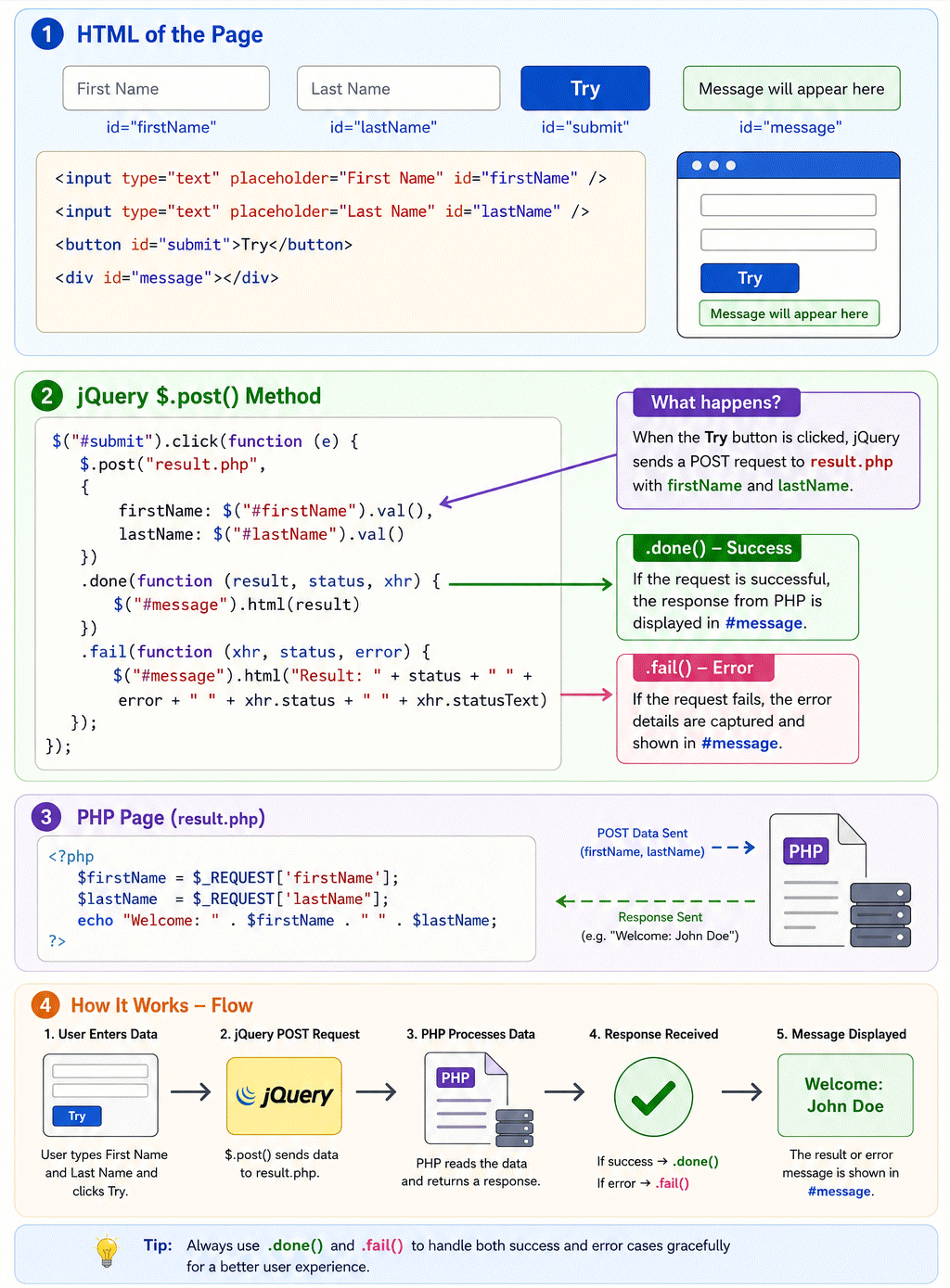
HTML Page Code:
<input type="text" placeholder="First Name" id="firstName" />
<input type="text" placeholder="Last Name" id="lastName" />
<button id="submit">Try</button>
<div id="message"></div>

$("#submit").click(function (e) {
    $.post("result.php",
    {
        firstName: $("#firstName").val(),
        lastName: $("#lastName").val()
    })
    .done(function (result, status, xhr) {
        $("#message").html(result)
    })
    .fail(function (xhr, status, error) {
        $("#message").html("Result: " + status + " " + error + " " + xhr.status + " " + xhr.statusText)
    });
});
The PHP page receives the two values, .firstName and lastName, sent from the HTML page through the jQuery POST AJAX request. It processes these input values and returns a customized response message using the PHP echo method. The HTML page then captures this server response and displays the welcome message dynamically without reloading the page.
<?php
    $firstName = $_REQUEST['firstName'];
    $lastName = $_REQUEST['lastName'];
    echo "Welcome: ". $firstName . " " . $lastName;
?>
Use .fail() deferred method to capture any errors that come during the AJAX request. The fail method can be attached to the post method at the end.
I have applied it to the example given above.
jQuery Post to Call an ASP.NET Page
Let us understand how the jQuery POST method works with a simple example. In this example, we will use two pages: an HTML page and an ASPX page.
The HTML page contains two text boxes for entering the user’s name and city, along with a button to submit the data. When the button is clicked, a jQuery AJAX POST request is triggered, sending the values entered in the text boxes to the ASPX page through an HTTP POST request.
The ASPX page receives these values, processes the submitted data, and sends back a response that can be displayed on the HTML page. This demonstrates how jQuery POST enables seamless communication between a client-side webpage and a server-side application without refreshing the entire page.
Lets understand the full codes.
The HTML Page Code:
<input type="text" placeholder="Name" id="nameInput"/>
<input type="text" placeholder="City" id="cityInput"/>
<button id="submitButtonAsp">Try</button>
<div id="returnedData"></div>

<script
src="https://ajax.googleapis.com/ajax/libs/jquery/3.7.1/jquery.min.js"></script>
<script>
    $(document).ready(function () {
        $("#submitButtonAsp").click(function (e) {
            $.post("result.aspx",
                {
                    name: $("#nameInput").val(),
                    city: $("#cityInput").val()
                },
                function (result, status, xhr) {
                    $("#returnedData").html(result);
                }
                ).fail(function (xhr, status, error) {
                    $("#returnedData").html("Result: " + status + " " + error + " " + xhr.status + " " + xhr.statusText)
            });
        });
    });
</script>
The .ASPX page gets the HTTP POST values and returns a custom welcome message.
The .ASPX Page Code:
if (!IsPostBack)
{
    string name = Request.Form["name"];
    string city = Request.Form["city"];

    Response.Write("Welcome Mr. " + name + " from " + city);
    Response.End();
}
To return the welcome message I have used Response.Write() method.
jQuery Post to Fetch Data from Database
The jQuery POST method can also be used to retrieve data from a database through a server-side page. To accomplish this, the jQuery POST request first sends a request to a server-side file, such as an .aspx or .cshtml or .php page.
The server-side page then connects to the database, executes the required query, and fetches the requested data. After processing the database result, the server sends the data back as a response to the jQuery POST method, which can then display or use the returned information on the webpage.
This approach allows web applications to load database data dynamically using AJAX without requiring a full page refresh.
Let us make a small application in asp.net that shows how it works. There are 2 pages in this application, these are –
- 1. HTML page from where jQuery Post call is made. It has 2 dropdown controls whose values are passed with the jQuery Post method call.
- 2. ASPX page is the other page which receives this call. This page receives the dropdown controls values. It fetches the corresponding data from DB and then returns it back.
HTML Page Code:
<select id="sportSelect">
    <option value="Select">Select Sports</option>
    <option value="Baseball">Baseball</option>
    <option value="Cricket">Cricket</option>
    <option value="Basketball">Basketball</option>
</select>
<select id="playerSelect">
    <option value="Select">Select Sports Person</option>
    <option value="Shoeless Joe Jackson">Shoeless Joe Jackson</option>
    <option value="Don Bradman">Don Bradman</option>
    <option value="Michael Jordan">Michael Jordan</option>
</select>
<button id="loadDatabase">Try</button>
<div id="dbData"></div>
Place the below jQuery Post Code on the HTML page.
$("#loadDatabase").click(function (e) {
    $.post("getdata.aspx",
    {
        sport: $("#sportSelect").val(),
        player: $("#playerSelect").val()
    },
    function (result, status, xhr) {
        $("#dbData").html(result);
    }).fail(function (xhr, status, error) {
        $("#dbData").html("Result: " + status + " " + error + " " + xhr.status + " " + xhr.statusText)
    });
});
The jQuery Post calls the getdata.aspx page which fetches the data from DB and returns it back.
The getdata.aspx Page Code:
List<MyDataBase> myDataBase;
protected void Page_Load(object sender, EventArgs e)
{
    if (!IsPostBack)
    {
        LoadData();
        SearchDatabase();
    }
}

void SearchDatabase()
{
    string sport = Request.Form["sport"];
    string player = Request.Form["player"];
    try
    {
        string information = myDataBase.FirstOrDefault(x => x.sport == sport & x.player == player).information;
        Response.Write(information);
        Response.End();
    }
    catch (Exception ex)
    {
        Response.Write("NO DATA");
        Response.End();
    }
}

void LoadData()
{
    myDataBase = new List<MyDataBase>();
    myDataBase.Add(new MyDataBase() { sport = "Baseball", player = "Shoeless Joe Jackson", information = "Joe Jackson was a top major league baseball player during the early 20th century who was ousted from the sport for his alleged role in game fixing." });
    myDataBase.Add(new MyDataBase() { sport = "Cricket", player = "Don Bradman", information = "Sir Donald George 'Don' Bradman, AC (27 August 1908 – 25 February 2001), often referred to as 'The Don', was an Australian cricketer, widely acknowledged as the greatest batsman of all time." });
    myDataBase.Add(new MyDataBase() { sport = "Basketball", player = "Michael Jordan", information = "Michael Jordan is the greatest basketball player of all time. Jordan was one of the most effectively marketed athletes of his generation and was considered instrumental in popularizing the NBA around the world in the 1980s and 1990s" });
}

class MyDataBase
{
    public string sport { get; set; }
    public string player { get; set; }
    public string information { get; set; }
}
Check the source code download link:
Highly related topics of AJAX in jQuery:
SHARE THIS ARTICLE


Related Tutorials:




ABOUT THE AUTHOR
I hope you enjoyed reading this tutorial. If it helped you then consider buying a cup of coffee for me. This will help me in writing more such good tutorials for the readers. Thank you.

HELLO EVERYONE
 Welcome to YogiHosting - A Programming Tutorial Website. It is used by millions of people around the world to learn and explore about ASP.NET Core, Blazor, jQuery, JavaScript, Docker, Kubernetes and other topics.
SUBSCRIBE TO NEWSLETTER
Enter your email address to subscribe to this blog and receive notifications of new posts by email.
Join 90K other subscribers