


jQuery Load Complete Guide for Beginners to Experts – Examples & Codes

The best part ?
I’m going to show you how to fetch contents of external files (HTML, TEXT, XML, JSON) with the .load() method. In the end, I will also read data from database using this method.
The full codes can be downloaded by the link given at the end of this tutorial.
In short: you’ll love this guide.
Let’s get started.
The jQuery Load method is one of the easiest and most powerful AJAX functions in jQuery. It allows you to asynchronously load content from external resources such as HTML, text (TXT), XML, and JSON files, making it ideal for creating fast, dynamic, and interactive web applications with minimal code.
jQuery Load Syntax
It’s syntax is given below:
$(selector).load(url,data,callback);
- url – The Required Parameter containing the URL to which the AJAX request is made. It could be any file like HTML, TXT, JS, ASP, PHP, CGI, etc.
- data – The Optional Parameter that can be in the form of an object or string. The parameter’s values are sent with the request in the form of HTTP POST method.
- callback – The Optional Parameter, a function that is executed when the AJAX request completes. It’s syntax is Function(string response, string status, jqXHR jqXHR ).
The jqXHR object is a superset of the XMLHTTPRequest object. Use it if you receive an error during the jQuery AJAX call, and find out the status and statusText of the error.
We are now going to explore load method through examples.
Example 1: Using jQuery Load to Fetch Contents of a Text File
Let’s use load() function to get the contents from a text file.
<button id="loadTextFile">Try</button>
<div id="textData"></div>

<script src="https://ajax.googleapis.com/ajax/libs/jquery/3.7.1/jquery.min.js"></script>
<script>
    $(document).ready(function () {
        $("#loadTextFile").click(function (e) {
            $("#textData").load("file.txt");
        });
    });
</script>
Here in the button click event, I called the load function which initiates the AJAX request to a file with name as file.text. It then shows it’s content in the div element called textData.
If the jQuery Load method encounters an error—for example, when it attempts to send an AJAX request to a file that does not exist—you can use its optional third parameter (the callback function) to detect the error and determine its cause.
<button id="loadNoTextFile">Try</button>
<div id="textNoData"></div>

<script src="https://ajax.googleapis.com/ajax/libs/jquery/3.7.1/jquery.min.js"></script>
<script>
$(document).ready(function () {
    $("#loadNoTextFile").click(function (e) {
        $("#textNoData").load("no-file.txt", function (response, status, xhr) {
            if (status == "error")
                $("#textNoData").html("Error: " + xhr.status + ": " + xhr.statusText);
        });
    });
});
<script>
I tried to make .load() call to a non-existing file (nofile.txt) and used the callback function to know what caused this error. Here it will show Error: 404: Not Found message in the div called textNoData.
Example 2: Using jQuery Load to Fetch Contents of a HTML File
Suppose I want to fetch the contents of a HTML file from AJAX. Here I can use the load function to do this job.
See the below code:
<button id="loadHtmlFile">Try</button>
<div id="htmlData"></div>

<script src="https://ajax.googleapis.com/ajax/libs/jquery/3.7.1/jquery.min.js"></script>
<script>
$(document).ready(function () {
    $("#loadHtmlFile").click(function (e) {
        $("#htmlData").load("file.html");
    });
});
<script>
In the above code the whole HTML of the file.html is fetched and is shown inside the div called htmlData.
Sometimes, you may want to load only a specific part of a webpage instead of the entire document. This can be a table, paragraph, div, or any other HTML element. The jQuery .load() method lets you do this by specifying the element’s ID or class selector after the URL of the file, allowing you to fetch only the required portion of the DOM..
In the below image I have marked a paragraph element that needs to be fetched.
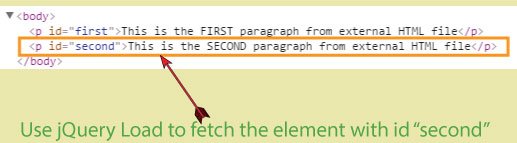
This fetching can be easily done, by providing the id of the element after the file name, in the jQuery load function.
The code for this is given below. Note that “second” is the id of the paragraph element whose html values we need to fetch.
$("#htmlData").load("file.html #second");Example 3: Using jQuery Load to Fetch Data From Database
In database-driven web applications, the jQuery Load method can be used to retrieve data from a database and display it inside an HTML element, such as a div. This process typically involves the following three steps:
- Use the jQuery .load() method to fetch a specific portion of the DOM from a server-side page (such as PHP, ASP.NET, or another backend technology).
- In the server-side page, retrieve the required data from the database.
- Place the retrieved data inside an HTML element (for example, a div). The jQuery .load() method then loads only that element and displays its contents on the current page.
To understand this let us create a small Sports Application in ASP.NET.
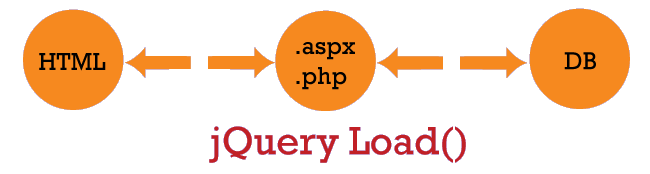
In this application there are 2 pages – a HTML and a .aspx page.
- There are 2 dropdown controls in the HTML page – one for the sports person’s name and other for the sports that he plays.
- After selecting the options from both the dropdowns and clicking the button, I call the jQuery Load method and pass the dropdown values to the .aspx page.
- The .aspx page queries the DB and gets the sports person’s information. It then updates a div with this information.
- Finally the load function fetches this div and shows the information to the user.
The below image describes this procedure.
The html page code is shown below:
<div id="message"></div>
<select id="sportSelect">
    <option value="Select">Select Sports</option>
    <option value="Tennis">Tennis</option>
    <option value="Football">Football</option>
    <option value="Cricket">Cricket</option>
</select>
<select id="playerSelect">
    <option value="Select">Select Sports Person</option>
    <option value="Maria Sharapova">Maria Sharapova</option>
    <option value="Cristiano Ronaldo">Cristiano Ronaldo</option>
    <option value="Sachin Tendulkar">Sachin Tendulkar</option>
</select>
<button id="loadDatabase">Try</button>
<div id="dbData"></div>
Now with the jQuery Load method, I make AJAX request to the result.aspx page and fetches a div with id called playerData.
I also passed the values of the 2 dropdowns using the optional data parameter.
I have also used the optional callback function to show alert in case of any error.
The div with id dbData will show the player’s information.
This jQuery code is given below:
$("#dbData").load("result.aspx #playerData", { "sport": "" + $("#sportSelect").val() + "", "player": "" + $("#playerSelect").val() + "" }, function (response, status, xhr) {
    if (status == "error")
        alert("Error: " + xhr.status + ": " + xhr.statusText);
});
Now let’s move towards the code of results.aspx page. It has only a div with id playerData where the player information will be set.
<div id="playerData" runat="server">
</div>
In the .cs page get the dropdown values using Request.Form like this:
string sport = Request.Form["sport"];
string player = Request.Form["player"];
Once I have the dropdown values, I can simply do a basic query to my DB and get the player’s information.
The .cs page code is given below:
List<MyDataBase> myDataBase;
protected void Page_Load(object sender, EventArgs e)
{
    if (!IsPostBack)
    {
        LoadData();
        SearchDatabase();
    }
}

void SearchDatabase()
{
    string sport = Request.Form["sport"];
    string player = Request.Form["player"];

    try
    {
        string information = myDataBase.FirstOrDefault(x => x.sport == sport & x.player == player).information;
        playerData.InnerHtml = information;
    }
    catch (Exception ex) {
        playerData.InnerHtml = "NO DATA";
    }
}

void LoadData()
{
    myDataBase = new List<MyDataBase>();
    myDataBase.Add(new MyDataBase() { sport = "Tennis", player = "Maria Sharapova", information = "Maria Sharapova is a Russian professional tennis player. A United States resident since 1994,[4] Sharapova has competed on the WTA tour since 2001. She has been ranked world No. 1 in singles by the WTA on five separate occasions, for a total of 21 weeks. She is one of ten women, and the only Russian, to hold the career Grand Slam. She is also an Olympic medalist, having earned silver for Russia in women's singles at the 2012 Summer Olympics in London." });
    myDataBase.Add(new MyDataBase() { sport = "Football", player = "Cristiano Ronaldo", information = "Cristiano Ronaldo is a Portuguese professional footballer who plays for Spanish club Real Madrid and the Portugal national team. He is a forward and serves as captain for Portugal. In 2008, he won his first Ballon d'Or and FIFA World Player of the Year awards. Ronaldo then won the FIFA Ballon d'Or in 2013 and 2014. He received his fourth Ballon d'Or in 2016, the most for a European player in the history of the award. One year earlier, Ronaldo had scored his 500th senior career goal for club and country." });
    myDataBase.Add(new MyDataBase() { sport = "Cricket", player = "Sachin Tendulkar", information = "Sachin Tendulkar is a former Indian cricketer and captain, widely regarded as one of the greatest batsmen of all time.[4] He took up cricket at the age of eleven, made his Test debut on 15 November 1989 against Pakistan in Karachi at the age of sixteen, and went on to represent Mumbai domestically and India internationally for close to twenty-four years. He is the only player to have scored one hundred international centuries, the first batsman to score a double century in a One Day International, the holder of the record for the number of runs in both ODI and Test cricket, and the only player to complete more than 30,000 runs in international cricket." });
}

class MyDataBase
{
    public string sport { get; set; }
    public string player { get; set; }
    public string information { get; set; }
}
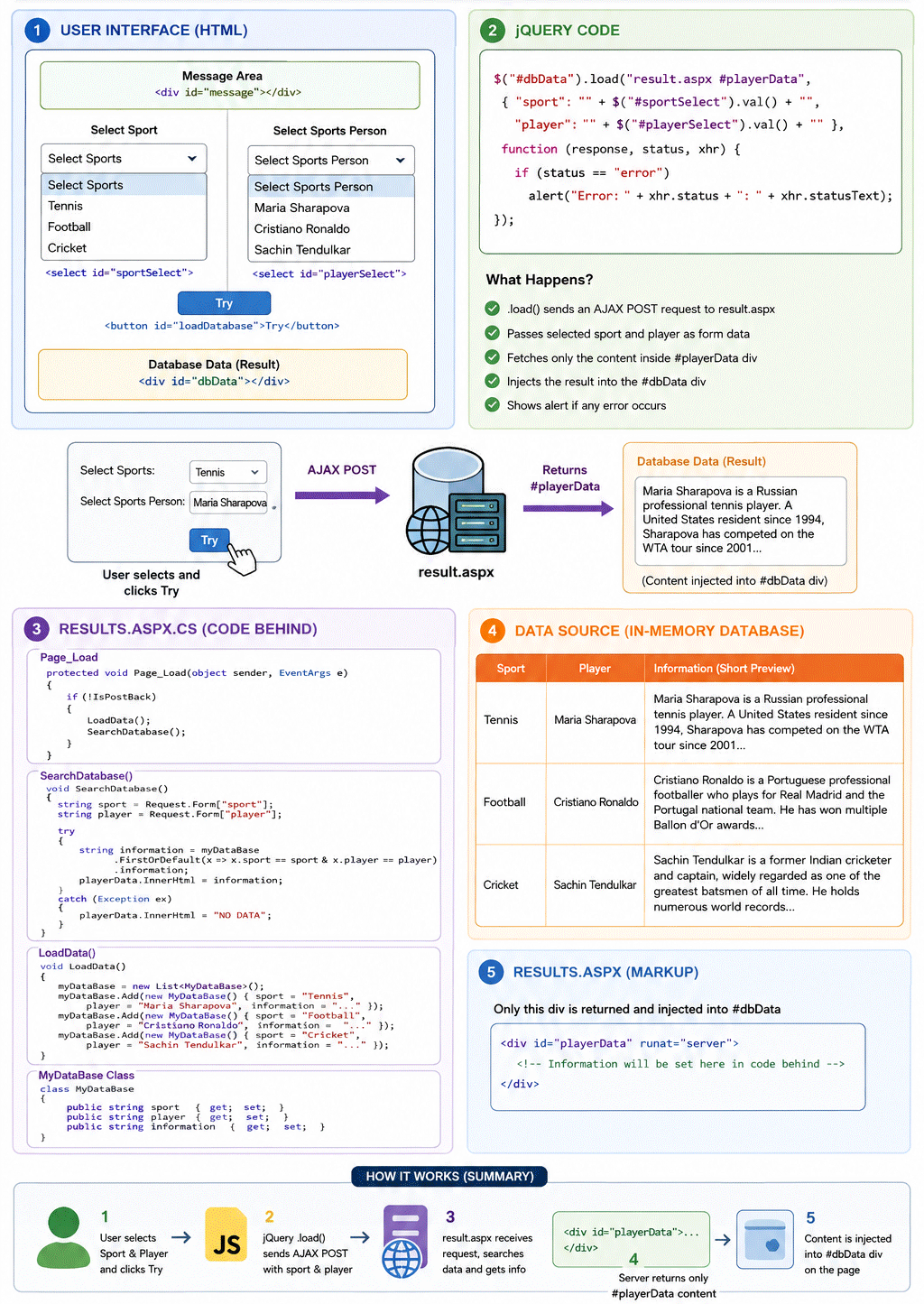
You will note that in the above code I am using a list object instead of DB. I am performing a LINQ Query to fetch the respective player’s information. At the last, putting this information inside the playerData element.
The below image explains the full code process:
Try the code of this Sports Application and download it from the links below:
Do not underestimate the power of jQuery’s .load() method which can do any sort of AJAX work in your website. I have covered 20 to 30 tutorials on AJAX usage which will satisfy all your need.
The 4 important AJAX topics of jQuery which you can’t miss are:
SHARE THIS ARTICLE


Related Tutorials:




ABOUT THE AUTHOR
I hope you enjoyed reading this tutorial. If it helped you then consider buying a cup of coffee for me. This will help me in writing more such good tutorials for the readers. Thank you.

HELLO EVERYONE
 Welcome to YogiHosting - A Programming Tutorial Website. It is used by millions of people around the world to learn and explore about ASP.NET Core, Blazor, jQuery, JavaScript, Docker, Kubernetes and other topics.
SUBSCRIBE TO NEWSLETTER
Enter your email address to subscribe to this blog and receive notifications of new posts by email.
Join 90K other subscribers